Telerik NativeScript

Resources for webinar “Build Truly Native Android & iOS Apps from Single JavaScript Codebase”

On Apr 30 2015, we conducted one more webinar titled “Build Truly Native Android & iOS Apps from Single JavaScript Codebase”. This blog post is a recap of the webinar. In this blog post you will be able to get hold of the slide deck & the video recording of the webinar.

About NativeScript:

NativeScript is a new technology that we i.e. Telerik have open sourced to the community. Using NativeScript you will be able to build truly native Android & iOS from a single code base with JavaScript as a language. You can know more about NativeScript from its home here: ww.nativescript.org.

Telerik NativeScript

Telerik NativeScript

Slide Deck:

Here is the slide deck used for the webinar:

Video Recording:

Here is the video recording of the webinar:

Additional Links:

Here are some more videos on NativeScript:

NativeScript Launch Keynote: https://www.youtube.com/watch?v=8hr4E9eodS4

How NativeScript Works: https://www.youtube.com/watch?v=I3_ZnWTj-NA

How to build Apps with NativeScript: https://www.youtube.com/watch?v=Glh927vSYKo


Till next time – Happy Coding.

Kendo UI

Resources for webinar “Adding Native Touches to your Hybrid Apps”

On Apr 23 2015 we conducted a webinar titled “Adding Native Touches to your Hybrid Apps”. This was part of our webinars we do here from Telerik India for APAC region. If you would like to know more about the webinars we do, head over to http://www.telerikhelper.net and look out for schedule announcement.

In this webinar i wanted to focus on how Hybrid Apps can make use of certain Cordova plugins which provide native functionality to your Hybrid Mobile App. The native functionality we looked at in this webinar are: Alerts, Confirm, Prompts, ActionSheet and SocialSharing.

Below you will find the slide deck & video recording of the webinar.

Slide Deck:

Video Recording:

T-Shirt Winners:

With every webinar of ours, we select 2 attendees randomly from the attendee list and they will receive our .NET Ninja T-Shirt. from this webinar, we have selected the following two people:

  • Aruna Kumara
  • Vishal Avalani

Congratulations to the winners. We will contact you to get your address and ship your t-shirts.

Till next time – Happy Coding.

Tech it Up with Telerik April Webinars

techitupWe are sad – India lost the World Cup but there is news to cheer too. Sania Nehwal is the first Indian Woman World No. 1 in Badminton.

And then there is always technology to look forward to. This month we are dialling it up with mobile app development. We are bringing the best possible experience from the mobile world for JavaScript developers.

We are teching it up with the following hot webinars:

Date Time (IST) Topic
Thursday, April 16 ’15 3:00 – 4:00 PM Architecting Real World Cloud Solutions -Lessons from the Field
Thursday,
April 23 ’15
3:00 – 4:00 PM Adding Native Touches to your Hybrid Apps
Thursday,
April 30 ’15
3:00 – 4:00 PM Build Truly Native Android/iOS Apps from Single JavaScript Codebase

Register for free by clicking on the webinar title above. The audio will be streamed via the GoToMeeting. Use of headset is recommended.

Our handy SMS reminders (for people who provide their mobile numbers during the registration) are there to remind you of the upcoming webinar. This service is currently only limited to Indian Mobile Nos.

And the Ninja T-Shirts are still coming!!

Update: April 9th Webinar has been rescheduled to April 23rd.

UI for ASP.NET AJAX

Resources for Webinar “Responsive Layouts for your ASP NET WebForms with Telerik UI for ASP NET AJAX “

On Mar 26 2015, we conducted a webinar titled “Responsive Layouts for your ASP NET Webforms with Telerik UI for ASP NET AJAX” . This blog post is a recap of that webinar. You will find the slide deck & video recording of the webinar in this post. So if you had missed attending live this resources will help you catch up on the webinar.

About Telerik UI for ASP.NET AJAX:

UI for ASP.NET AJAX is one of most popular control suites we have here in Telerik. As the name says this is a control suite for ASP.NET AJAX technology. The suite is packed with 80+ AJAX controls which meet almost every needs of your projects. With UI for ASP.NET AJAX controls you get seamless UX across browsers & devices. The controls are also responsive & support mobile devices. You can check out all the controls in UI for ASP.NET AJAX suite with our online demos  available here: http://demos.telerik.com/aspnet-ajax

UI for ASP.NET AJAX

UI for ASP.NET AJAX


Slide Deck:

Here is the slide deck i used in the webinar:


Video Recording:

Here is the video recording of the webinar:


T-Shirt Winners:

Every webinar we select 2 random attendees and they will receive our .NET Ninja T-Shirts. Following are the winners for this webinar:

  • Govind Ranjan
  • Latha S

Congratulations to the winners. We will contact you for your address and ship the t-shirts.

Till next time – Happy Coding.

Webinar Resources: Drag And Drop Application Development using Progress Rollbase

aPaaS-300x291

aPaaS is a new set of technologies emerging for enterprise use. They ensure faster Go To Market and rapid application development.

We are pleased to share the resources from the webinar conducted on Progress/Telerik aPaas Technology called – Rollbase. This webinar covered Getting Started with Drag and Drop Application Development. The viewers will be able to appreciate the aPaaS paradigm and get started quickly by building a Rollbase application.

Slides:

Video:

Integrating SignalR in HTML 5 Applications with Kendo UI – Webinar Resources

On Mar 12 2015 we conducted yet another webinar as part of our monthly webinar series. This time we were happy to invite Vidyasagar Machupalli who is a Microsoft MVP in Gaming. In fact he is the only Gaming MVP in South East Asia. The topic for this webinar was “Integrating SignalR in HTML5 Applications with Kendo UI”. Idea was to talk about real time communication in ASp.NET using SignalR and how Kendo UI makes it easy to work with SignalR.

ASP.NET SignalR:

Here is what the official description of SignalR is at http://www.asp.net:

ASP.NET SignalR is a new library for ASP.NET developers that makes developing real-time web functionality easy. SignalR allows bi-directional communication between server and client. Servers can now push content to connected clients instantly as it becomes available. SignalR supports Web Sockets, and falls back to other compatible techniques for older browsers. SignalR includes APIs for connection management (for instance, connect and disconnect events), grouping connections, and authorization.

Kendo UI:

If you have been attending our webinars, you would have known about Kendo UI by now. If not, Kendo UI is a single package you need to develop HTML5 based sites/apps. Kendo UI is a HTML5 based client side JavaScript UI framework. To know more about Kendo UI head over to the project page here: http://www.telerik.com/kendo-ui. You can find Kendo UI demos online here: http://demos.telerik.com/kendo-ui

Slides:

Video:

Questions:

Q: Hi, SignalR is an advanced topic related to Web Sockets or Server Sent Events etc. Or it rely on these architecture?
A: SignalR is a real time communication technology on ASP.NET Stack from Microsoft.

Q: In order for the server to do real-time communication with SignalR, should the server be an IIS web server ?
A: SignalR at the moment can be hosted in IIS or as a stand alone process. But this requires you to be on Windows platform.

Q: Can we use Telerik controls with SignalR?
A: Absoutely. Telerik Kendo UI has specific binding/ support for SignalR.

Q: SignalR is purely async based or can it be set to be in sync mode like the way node.js is an async by default but can be set to mode sync?
A: SignalR is a server side technology and all it does is to keep track of all the clients connected and intimate them of any updates. So typically server sends a broadcast to all connected client and clients know how to react to this update on the client side.

Q: What is the most important advantage of SignalR ?
A: Real Time Communication between Server & Client.

T-Shirt Winners:

As usual we have picked 2 attendees randomly to receive our T-Shirts. They are:

  • Sonam Bhardwaj
  • Kapil Chhabra

Congratulations to the winners. We will contact you shortly on your registered email id. Rest of you, do keep attending our future webinars.

Till next time – Happy Coding.

Kendo UI

Kendo UI Data Source Offline Storage + OData V2 – Cannot read data from offline storage

Kendo UI is our flagship product when it comes to HTML5 based UI. Kendo UI provides Web, Data Visualization and Mobile widgets for building HTML5 Apps/Sites. One of the cool features of Kendo UI is the support for storing data offline when using our Data Source. We introduced this offline support as part of our Q2 2014 SP1 release. With offline support the data bound Kendo UI widgets will continue to work even when the server connection is not available. With this support users can continue working with the available data till the network connectivity is resumed.

Kendo UI

Kendo UI

Offline Feature of Kendo UI Data Source:

The way Kendo UI Data Source supports offline functionality is through a property called “offlineStorage”. We give a unique string value to this property. This value for “offlineStorage” will be used by the data source to create a key in local storage and save the data there. We need to let the data source know if its online of offline. This helps the data source decide whether to ping the remote end point or read from local storage. Data Source exposes a method named “online()” and expects a Boolean property to indicate online or offline.

Here is a code snippet of how you would use the offline feature of data source:

allProductsData = new kendo.data.DataSource({
offlineStorage: “allProducts”,
type: "odata",
transport: {
read: {
url: "http://services.odata.org/V2/Northwind/Northwind.svc/Products",
dataType: "json",
}
},
});
allProductsData.online(“true|false”);

We are setting a type property on data source to a value “odata”. This lets the data source know that it has to communicate using the OData V2 specification. Since we have set the property offlineStorage, data source will automatically store the data it receieved from server in the local storage key “allProducts”. We then let the data source know if we are online or offline by using the online() method.
At this point it’s important to understand the shape of the data that OData service returns when asked in JSON format. Following is a glimpse of the payload we get from an OData V2 GET request on any collection:

{
"d": {
"results": [
//records
...
]
}
}
view raw ODataV2Payload hosted with ❤ by GitHub

As you can see, the data is in a results array and is part of the padded “d” object. Now, Kendo UI Data Source understands all this and will be able to parse the payload and use the results array as the data. And it will save the data array to local storage also since we have provided an offlineStorage key. Note: data source will not save the entire payload to local storage. It will only store the data array found in the results property.

The Problem:

Everything is all right so far. So what is the problem you may ask? Let me explain it below:
Let’s assume the mobile app will be used by the user when he has network connection. The GetOnline() method will detect the status and return the Boolean value accordingly. So when there is a network connection, we set the online status of data source to true and it will go ahead make a request to the remote OData end point. The service will return the data in JSON format, data source will pass the payload, use the data array in the results property, and then store the data array in the local storage.

Let’s assume that the mobile app needs to be used when there is no network connection. Theoretically it should work. Why you ask – well we had told the data source to store the data offline in local storage. So whenever there is no network connection on the device and when we let the data source know that it is offline, we think that it will read data from local storage and everything should work normally. Well I thought so too. But we get the following error:
“TypeError: Unable to get property ‘results’ of undefined or null reference”

Hmm, it doesn’t work as expected. Well what is wrong then? Remember I said that the data shape of the odata GET on any collection is actually “d.results”. Well when data source sees that its offline, it will simply go ahead read data from the local storage. But the parsing logic is looking for “d.results” property on the saved data. Whereas the saved data in local storage is just a plain data array. It does not contain the padded d object and results property on d object. Hence the parser is looking for the d.results, doesn’t find it and throws up an error.

The Solution:

Kendo UI data source has a schema property exposed. Using the schema property, we can tell the parser where to look for the data in the payload. We do that by setting the data property of schema. In our case we just need to let the parser know that if it finds “d” padded object on the payload, it can then get the data from the results data array. Else just use the payload as it is because probably it’s the local storage data that was read. Just a simple if else condition to get out of this situation. Here is the code snippet:

allProductsData = new kendo.data.DataSource({
offlineStorage: productsStorageKey,
type: "odata",
transport: {
read: {
url: "http://services.odata.org/V2/Northwind/Northwind.svc/Products",
dataType: "jsonp",
}
},
schema:{
data:function(response)
{
var dataArray = null;
if(response.d){
dataArray = response.d.results;
}
else{
dataArray = response;
}
return dataArray;
}
}
});

With the above code changes, now whenever the data source in in offline mode, it will be able to read the data correctly from the local storage.

The above code is available as a demo here: http://dojo.telerik.com/@kashyapa/itUMe/2

Hope this helps anybody who has faced a similar situation.

Till next time, Happy Coding.

Action Packed March with Telerik Webinars

take_action_iconMarch is an action packed months for all of us.

For the sports fanatics, the World Cup is keeping the sofas warm and refrigerators full. For the financial wizards, the Union Budget has provided enough to think and ponder over. For the social amongst us, Holi provides the perfect opportunity to host that wild party that you have planning.

The techies are not left behind (what a relief!). There is enough going on technical front with MWC in progress. We have been busy exploring the goodness of Progress Technologies.

This month the stage is set for some hardcore action with the following free webinars:

Date Time (IST) Topic
Thursday, March 12 ’15 3:00 – 4:00 PM Utilizing Real Time Web with SignalR in your HTML 5 Applications with Kendo UI
Thursday,
March 19 ’15
3:00 – 4:00 PM Drag and Drop Application Development using Progress Rollbase
Thursday,
March 26 ’15
3:00 – 4:00 PM Creating Responsive Layouts for your ASP.NET Webforms with Telerik UI for ASP.NET AJAX

Register for free by clicking on the webinar title above. We are starting SMS reminders from this month to all people who provide their mobile numbers during the registration. This service is currently only limited to Indian Mobile Nos.

The audio will be streamed via the GoToMeeting. Use of headset is recommended.

We maintain our giving away of 3 Telerik Ninja T-Shirts during each webinar. The most active participants during the webinar win the goodies.

Kendo UI

Resources for Webinar “Exporting Data Easily with Kendo UI”

Feb 26, 2015 we conducted a webinar titled “Exporting Data Easily with Kendo UI”.  We here at Telerik India host webinars almost every Thursday of the month from 3PM to 4PM IST. This time we wanted to talk about one of the most asked feature in Kendo UI – Data Export.

Kendo UI

As part of our Kendo UI Q3 2014 release, we introduced the capability of exporting data to Excel & PDF out of the box. In this webinar i take a look at the options available for Excel export and PDF export. You can find more about Kendo UI here: http://www.telerik.com/kendo-ui.

Slide Deck:

Here is the slide deck used in the webinar:

Video Recording:

Here is the video recording of the webinar:

Q&A:

Q: Is it required to know JQuery for Kendo UI?
A: Kendo UI is based on JQuery and depends on JQuery. If you know JQuery way of working things, it will be easier to use Kendo UI.

Q: Is Kendo UI Open Source?
A: Kendo UI Core is the open source version of Kendo UI. You can know more about it here: http://www.telerik.com/kendo-ui/open-source-core. Kendo UI Professional is our Enterprise product which will require license.  You can know more about it here: http://www.telerik.com/kendo-ui

Q: Will Kendo UI mobile support BlackBerry as well?
A: yes it will.

Q: What could be the minimal software requirements to support Kendo UI?
A: Here are the supported browsers: http://docs.telerik.com/kendo-ui/browsers-support and JavaScript Prerequisites: http://docs.telerik.com/kendo-ui/install/prerequisites

Q: which IDE is the better one for KENDO UI?
A: Since Kendo UI is all about writing JavaScript – Any IDE that you are familiar with and are comfortable can be used.

Q: I dont have excel or PDF plugin installed in my web browser or on my box. still could i able to visualize the contents?
A: Kendo UI doesnt require Microsoft Office or Adobe software to create Excel or PDF documents on client side. But you will need Microsoft Office & Adobe software to view the exported files on the machine.

Q: What is the role of JSZip library in this?
A: Is is used to zip up the file and save it to local disk.

Q: Can I initialize the formulae for any cell while exporting to excel ?
A: Formulas are not supported as of now.

Q: what version of Kendo UI is export option supported?
A: Data Export is available from Q3 2014 release onwards

Q: how can we format the columns in excel?
A: This scenario is documented in our documentation. You can take a look at it here: http://docs.telerik.com/kendo-ui/web/grid/how-to/excel/cell-format

Teleik Ninja T-Shirt Winners:

As usual we have picked the following two lucky attendees as our T-Shirt winners. They are:

  • Sinu Antony
  • Altaf Shaikh

Congratulations to winners. Those who did not win, dont worry – we still have a lot of webinars to go this year. So try your luck in our next webinar.

Till next time – Happy Coding.

ASP.NET vNext

Resources for Webinar “Getting Started with ASP.NET vNext”

On Feb 5th we conducted a webinar @ 3PM IST. This is part of our Telerik India Webinar initiative. This week the title of the webinar was “Getting Started with ASP.NET vNext”.


About ASP.NET 5:

ASP.NET vNext has been now named as ASp.NET 5 by Microsoft. ASP.NET 5 is a lean and composable framework for building web and cloud applications. ASP.NET 5 is fully open source and available on GitHub. ASP.NET 5 is currently in preview.

Slide Deck:

Here is the slide deck that i used in this webinar:

Video Recording:

As usual we have recorded this webinar and here is the video recording of the webinar:


T-Shirt giveaway:

And here are the two attendees who have been picked up in random to recieve our .NET Ninja T-Shirts. The names are:

  • Inderpal Singh Uppal
  • Venkata Rao Penta

Congratulations to the winners. Rest of you, dont worry – we still have a lot of webinars lined for the year. So keep attending our webinars and try your luck.


Till next time, Happy Coding.

Leverage Progress Technologies for Telerik Developers – Resources from the Webinar

Progress PacificTelerik Developers are Ninjas in their software development capabilities. Now, they have new tools/technologies to leverage in their quest for better solutions. These exciting enterprise grade technologies range from Business Rules Engine to Drag and Drop Application Development.
This session is an overview of the Progress tools.

The slides used at the presentation:

The video from the session is available here:

Warm Webinars for the “Cold” January

excitement.17502203_std2014 was an exciting year for us here in Telerik India. 2015 is already more of action than 2014.

Telerik joined hands with Progress Software (technically got acquired) to bring even more enterprise grade software to you. Now, we have an even broader range of software to offer you.

We have started 2015 with an announcement of Telerik’s first Developer Conference on May 3-5 2015 in Boston, USA. Called TelerikNEXT, the registrations are almost full after being open for just a week.

For Ninja’s that can’t keep their hands of technology, Telerik India is happy to announce the upcoming “warm” webinars upto the month of Feb ’15:

Title Date Time
Leveraging New Tools from Progress Technologies for Telerik Developers Jan 29th 2015 3:00 – 4:00 PM
Getting Started with ASP.NET vNext – The new way of Web Apps Feb 5th 2015 3:00 – 4:00 PM
Testing Kendo UI and Angular Applications Easily with Telerik Test Studio Feb 19th 2015 3:00 – 4:00 PM
Easily Export data from Grid using Kendo UI Feb 26th 2015 3:00 – 4:00 PM

We are keeping our developer on. The famed Ninja T-Shirts are still coming for the participative ones amongst you.

In case you would like to see a session in the future, do leave us a comment so that we can cover the same.

Microsoft Developers Express Huge Interest with Telerik Technologies at TechEd India

TechEd India 2014 is the premier annual event of Microsoft conducted in Bangalore, India. This year TechEd was hosted on Nov 5 & 6 2014. Telerik India was a proud bronze sponsor at the event. Telerik presence was marked with an exclusive booth that had technical staff available to answer any questions that the community may have. The presence was accentuated with a huge backdrop with Telerik logo & design.

TechEdBooth

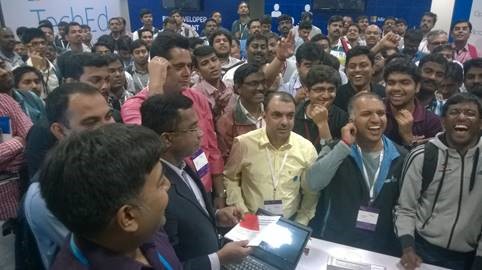
On Day 1, we were ready for the crowd. But the rush at the booth was not what we were prepared for. The showcase area was a big room the sponsors had their booths put up. Within no time we had a big crowd around our booth talking about the latest from Telerik technologies. Most of the talk was around our AJAX/Kendo UI suites. We give away our much loved Ninja T-shirts to the most enthusiastic lot. We had a lot of questions on our DevCloud offering as well.TechEdCrowd

Lohith Nagaraj, delivered a jam packed session on Day 2 from the main stage at TechEd India. Titled “ASP.NET MVC – Latest & Greatest So Far” the session saw over 300+ folks voting by their feet.

We are fortunate to have been a part of the last TechEds for the event will be reborn as Ignite from the next year. We were humbled by the confidence developers expressed in Telerik Technologies and will continue to deliver on the innovation in the years to come.

Kendo UI Grid

Simple Export to PDF from your Data Grid using Kendo UI

In my last blog post, we looked at a new feature of Kendo UI Grid released as part of our Q3 2014 – namely Export to Excel. Exporting data from Data Grid was a high ask feature and we provided that in our latest release of the product. In this blog post we will look at how to export the data grid contents to PDF. Kendo UI Data Grid support exporting to PDF out of the box. So let’s start looking at some code.

Creating a Grid:

As usual let’s build a simple grid. I will make use of our Northwind service available on our demo server as a data source to the grid. Here is the code snippet:

<div id="grid"></div>
<script>
   $("#grid").kendoGrid({
       dataSource: {
           type: "odata",
           transport: {
               read: "http://demos.telerik.com/kendo-ui/service/Northwind.svc/Products"
           },
           pageSize: 7
       },
       sortable: true,
       pageable: true,
       columns: [
           { width: 300, field: "ProductName", title: "Product Name" },
           { field: "UnitsOnOrder", title: "Units On Order" },
           { field: "UnitsInStock", title: "Units In Stock" }
       ]
   });
</script>

This will produce the following grid:

Kendo UI Grid

Kendo UI Grid


Providing Export Option on the Grid:

As seen in my previous blog post on Excel Export, for PDF also we have a command bar option available out of the box. We just have to add a toolbar command named “pdf”. This will provide an “Export to PDF” on the grid toolbar and clicking which will export the Grid to PDF. Here is the code snippet:


<script>
   $("#grid").kendoGrid({
       tooldbar:[“pdf”]      
       ….
       //code omitted for brevity
   });
</script>

And here is the snapshot of how our grid will look like now:
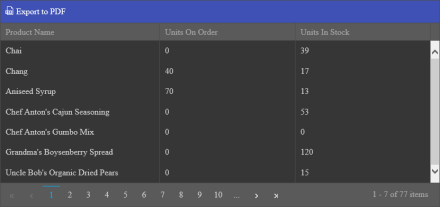
Kendo UI Grid with Export button

Kendo UI Grid with Export button

If we now click on the “Export to PDF” we will get the Grid exported to a PDF document and the PDF will be saved to your system. Here is a snapshot of the PDF file itself:
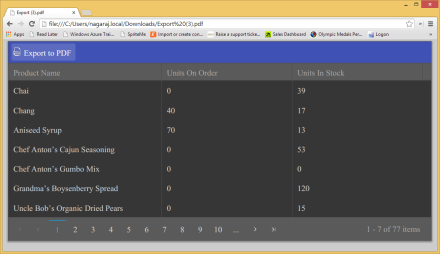
PDF Document

PDF Document

Well that’s all it takes to export your Grid data to PDF.

Customizing the Exported PDF File:

Kendo UI Grid also provides certain options which can be set on the grid itself and these options will control how the PDF exported file has to be shaped. Here are the options supported for PDF export:

Property Type Description
author String Author of PDF Document
creator String Creator of PDF Document. Defaults to “Kendo UI PDF Generator”
date Date Date when PDF Document was created. Defaults to current date
fileName String Name of the exported PDF Document
keywords String Keywords of exported PDF Document
landscape Boolean Paper dimension setting. Default is false
margin Object Specify margins of the page
paperSize String Specify paper size of PDF Document. e.g. A4, A3 etc
subject String Specify subject of the PDF Document
title String Specify title of PDF Document

Here is the code snippet on how to set the PDF options:

<script>
   $("#grid").kendoGrid({
       tooldbar:[“pdf”],
        pdf:{
              author:"Lohith G N",
              creator:"Telerik India",
              date:new Date(),
              fileName:"NorthwindProducts.pdf",
              keywords:"northwind products",
              landscape:false,
              margin:{
                      left: 10,
                      right: "10pt",
              top: "10mm",
               bottom: "1in"
              },
              paperSize:"A4",
              subject:"Northwind Products",
              title:"Northwind Products"
       },     
       ….
       //code omitted for brevity
   });
</script>

Programmatically Export to PDF:

Toolbar option to provide an export option is great. It lets you add export feature without much of you doing any coding. But what if you have a situation where you want to a button outside of the Grid i.e. no toolbar button. And you want the grid to be exported to PDF on click of that external button. Kendo UI Grid covers you in this scenario by exposing a method called “saveAsPDF()”. You just grab instance of the grid at runtime and invoke the method “saveAsPDF()” to start the export. That’s as easy and simple it is. Here is the code snippet to show this:


&nbsp;

<div id="grid"></div>
<br>
<button id="btnExport">Export to PDF</button>
<script>
$("#btnExport").kendoButton(
{
click:function(){
$("#grid").data("kendoGrid").saveAsPDF();
}
});
//code omitted for brevity
</script>

That’s all its there to exporting the data grid to a PDF document. Do give it a try and let us know if you have any suggestion/feedback on this feature.

All the code in this blog post can be accessed on our Kendo UI DoJo here: http://dojo.telerik.com/@kashyapa/ADUVi