
Webinar Resources: Develop Hybrid Mobile Application with Azure Mobile Services and Telerik Platform

azure-mobile-servicesAzure Mobile Services provide a scalable backend for creating various applications. Telerik Platform provides a singular experience for creating mobile applications that can work with various backend systems.

In this webinar, we talk about how to consume Azure Mobile Services in a Telerik Platform application. We start from scratch and build up the first screen for showing data from the backend.


Slides used during the presentation are below:

The webinar recording can be found here:

The code shown during the webinar can be download from the GitHub Code Repository

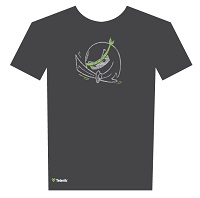
The lucky winners who have won the trendy Telerik Ninja T-Shirt are:

  1. Nitin Verma
  2. Kahdeer KI
  3. Lokesh Jain
  4. Jayaprakash N

We will be contacting you soon to dispatch your prize.

Selected questions from the webinar are produced below:

Q: Can we deploy an application built for IOS store to Windows & Google at the same time ?

A: An app built for iOS will work only on iOS . You will need to build different packages for diff platform i.e. ipa for iOS, apk for Android and xap for Windows Phone. Telerik Platform allows you to build these different packages from the same code and machine.

Audience Question:

Q: Is it possibe to view this application on browser instead of mobile?

A: yes … Kendo UI Mobile controls are HTML5 based so they will work as is in a browser. but you will need to remove the cordova initialization code as cordova wont work in a desktop browser

Q: For iOS binary,certificate and distribution profile is required for creating ipa file so in telerik how to create ipa fie?

A: AppBuilder service has provision to ingest your Apple certificate and distribution profile. It stores it in the cloud and uses the same to create the binary packaging. No extra effort is needed to sign the binary with the certificate and make it app store ready.

Q: The Azure key of the mobile apps is contained in a js file – is it not a security threat?

A: This is a Mobile App … So it gets packaged along with the app and sandboxed by the OS. Nobody other than the app code will have access to it. However, it is still susceptible to man in middle attack if proper steps during transmission are not taken.

Q: Does it makes any difference if we use standard WCF service instead of REST API?

A: A lot of difference. If you are designing for Mobile app – you need to keep in mind that the bandwidth on mobile devices is very small. so you cannot send too much data. Simple WCF is SOAP so just to send a name, you will be sending a lot of payload. It is better to create a REST based end point which sends data as JSON format. WebAPI and Azure Mobile Services are some of the options for creating REST based API.

Q: Are there any example on multiple page application using Kendo UI Mobile?

A: We have a lot of sample apps for Kendo UI Mobile – http://docs.telerik.com/platform/appbuilder/sample-apps/sample-apps – Check out the sample Airlines app.

Q: Can we host out MVC WebAPI project into Mobile services and make use of feature by Mobile services?

A: Yes, Azure Mobile Services allows for hosting of custom WebAPI projects. Mode information can be found here: http://blog.azure.com/2014/07/11/azure-mobile-services-why-should-asp-net-developers-care/

Q: I have already designed web app using CSS. How to convert code into the telerik mobile app code ?

A: A Web Page and a Mobile App are two different experiences. To create a mobile app, you will need functionality written separately using Kendo UI Mobile. To recreate the same look and feel as that of your web app, you can override specific Kendo UI Mobile classes with the CSS of the web app.

Q: Can i use backend MS SQL in a mobile app?

A: A Mobile App runs on a device. A MS SQL resides on a server. So, it is not directly possible to connect the two. Azure Mobile Services provides Hybrid Connection facility that can be used for connecting in-premise database to the cloud.


Telerik Webinars for September 2014

september_bliss__76During the 68th Independence Day, the Indian Prime Minister gave a significant recognition to the IT Professionals for contributing to the growth of Indian economy. We salute the spirit of millions of software developers and hope to continue to make their jobs easier and best of class.


In the month of September, our webinar series will cover the latest technology trends sweeping the development world. Register using the links below:

Thursday,
Sep 4 ’14
3:00 – 4:00 PM Connecting Your In-Premise Database to Mobile Applications
Thursday,
Sep 11 ’14
3:00 – 4:00 PM Best of Both Worlds – Kendo UI Integration with Angular.js
Thursday,
Sep 25 ’14
3:00 – 4:00 PM Consuming Azure Mobile Services for Cross Platform Application Development
Thursday,
Oct 16 ’14
3:00 – 4:00 PM Solving Enteprise Mobility Considerations with Telerik Mobile Platform

The audio will be streamed via the GoToMeeting. Use of headset is recommended.

On popular request, we are pleased to bring back our T-Shirt givewaway during each webinar. They now come in new cooler designs that you can wear to show your Ninja pride.

“Budget” your learnings with Telerik India Webinars

budgetThe Union Budget 2014 has been announced. Individual tax payers are getting additional money in their hands. As you open up your calculators for counting the monies, you may want to budget some time for enhancing your learning with Telerik India Webinars. We don’t want you getting drenched in the monsoon rain. These free webinars can be attended from the comfort of your home/ office.


The webinar schedule for July & August is as follows:

Date Time (IST – GMT + 5:30 hrs) Topic
Thursday, July 17 2014 3:00 – 4:00 PM Telerik Tools for Test Automation
Thursday, July 24 2014 3:00 – 4:00 PM Build a Mobile Dashboard for your team using HTML 5 and Telerik Platform
Thursday, July 31 2014 3:00 – 4:00 PM Build HTML 5 applications for free with Kendo UI Core
Thursday, August 21 2014 3:00 – 4:00 PM Solving Enteprise Mobility Considerations with Telerik Mobile Platform
Thursday, August 28 2014 3:00 – 4:00 PM Introduction to IoC and Dependency Injection in ASP.NET
Thursday, October 16 2014 3:00 – 4:00 PM Solving Enterprise Mobility Considerations with Telerik Mobile Platform

tee_front&back_previewWe are back with our T-Shirt giveaway (psst. they come in brand new style). You stand to win one for yourself by attending the webinars.

Register for the webinar today by clicking on the topic name in list above.

If you would like to hear about a particular topic from us in the future, please do leave a comment here.

Comparison of Automated Testing Tools: Throwing in Telerik Test Studio

ComparisonI was reading this excellent article by Gouri Sohoni comparing various automated testing tools. The article is an excellent introduction to automation in testing and the various tools available to do the same. She compares the following tools: Selenium, QTP (Quality Test Professional) and Coded UI Test (CUIT) with Visual Studio 2012. I am taking this opportunity to extend the article and include Telerik Test Studio in the mix.

The following is written in the same format followed by the linked article:

Ease of Use

– Recording and Playback Functionality

Test Studio supports recording on various browsers i.e. IR, Chrome & Firefox. All the scripts can be played back on different browsers too.

– IDE and tools with which the tester can write the scripts

Test Studio comes with its own IDE and also integrates with Visual Studio. You can use Test Studio as a standalone IDE for recording and writing scripts or from within Visual Studio.

– Ease of Test Case execution

Test Studio test cases can be run from within Test Studio or using the Test Studio scheduler. The scheduler can be used to run all test suites or selected test cases at pre-defined schedule. Integration with CI tools is also supported via a command line test runner.

Platform Support

-Language Support

Test Studio doesn’t require you to write code in a lot of scenarios. However, if you do need to it supports C# and VB.NET.

– Support for various application types

Test Studio comes with testing for web applications, Silverlight applications, web services, mobile devices and WPF applications.

– Support for various browsers

Test Studio supports recording and playback in almost all browsers – IE, Chrome, Firefox and Safari.

– Support for Data Driven Testing

Test Studio supports Excel, XML, CSV and Databases (MS SQL Server, Oracle, MySQL and any QLEDB or ODBC supported DB) for data driven testing.

– Exception Handling

You can configure Test Studio to ignore all errors that happen during a test execution. If unexpected situations are expected to occur in a test suite you can convert them to Coded Steps and then use try and catch blocks for exception handling.

– Validations or Assertions

Test Studio supports Verify and Wait without need for writing any code. Any assert can also be included as needed using coded steps.

– Support for Objects

Test Studio has a unique Object Finder UI called DOM explorer that helps you locate elements on the application being tested easily. You can also customize the names and the locator logic that is used to identify the object.

Integration with Application Lifecycle Management and going beyond

– ALM Integration

Test Studio integrates with Telerik TeamPulse, HPs Quality Center and Microsoft TFS. Integration with TeamPulse allows for bug submission and linking test cases to its automation script. All the features of TFS are also available if you utilize the TFS as the ALM tool.

Additionally, submission of bugs is also supported for JIRA.

– Going beyond

Test Studio can easily automate JavaScript based applications. Special constructs like “Simulate RealTimeClick” and “Simulate RealTimeTyping” makes this possible. Test Studio provides you the capability to convert your functional tests to load tests. It also has the capability to take the workload from Fiddler traces and run it in Test Studio for performance test.

The RoI for the tool is enhanced as it is also available in the pay per use model. The minimum time that you need to buy Test Studio for is 1 month.


Summarizing the Comparison

Category Selenium QTP Coded UI Test Studio
Record & Playback Completely Supported Completely Supported Completely Supported Completely Supported
Ease of IDE & Features with tool Not Par Not Par Completely Supported Completely Supported
Ease of Execution Completely Supported Completely Supported Completely Supported Completely Supported
Languages Support C#, Java, Perl, PHP, Python or Ruby VB Script C# & VB.NET C# & VB.NET
Support for Objects Not Supported Not Supported Completely Supported Completely Supported
Browser Support Allmost All IE & Firefox Some IE Versions Allmost all
Support to various applications Only Web Almost All Almost All Almost all
Integration with ALM Partially Supported Partially Supported Completely Supported Partially Supported

How to Verify Dynamic Links pointing to Live URLs in an Application – MSN

Recently I was browsing MSN India when I encountered a dead link by clicking on a story. How embarrassing!

That set me thinking that there should be a way to automate checking the URLs that are displayed on this content aggregation portal. I think the same is true for all portals that rely on external content for their functionality.

Below, I propose a mechanism to automate testing of such requirement. Some peculiarities of this web portal:

  1. The news article displayed is changed frequently (maybe every few hours)
  2. Alongwith the news article text, the URL of the article will change
  3. We need to verify that the URL is a live URL

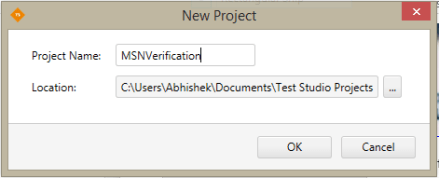
We will be using Telerik Test Studio v 2014.1 to do this test. We can start by creating a new project in Telerik Test Studio:

Click on OK.

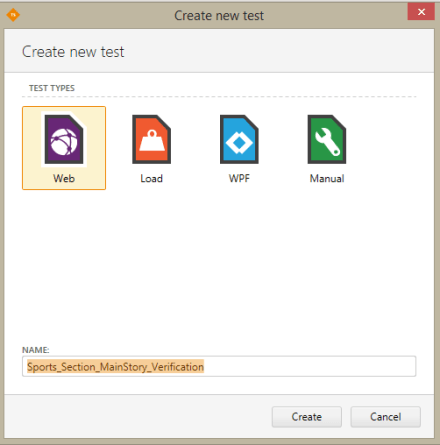
Right Click on the project name and create a new test of type Web Test. Call this Sports_Section_MainStory_Verification Test.

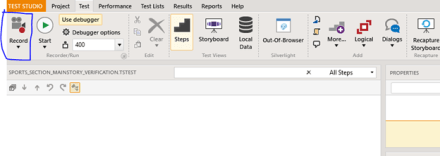
Double Click on this test to start recording this test. You should be in the “Test” section of the Ribbon. Click on Record button located at the top.


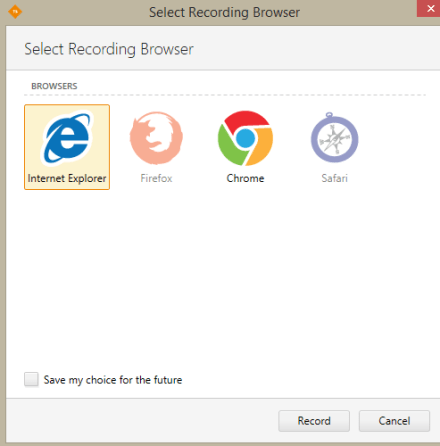
Select the browser you want to record the test in (I am using Internet Explorer):

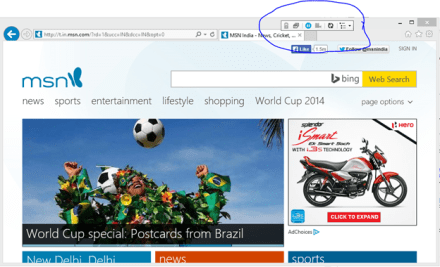
This will launch a new IE window with automation enabled (notice the small toolbar on the top of the screen). Now type in the MSN URL: http://www.msn.com and press enter.

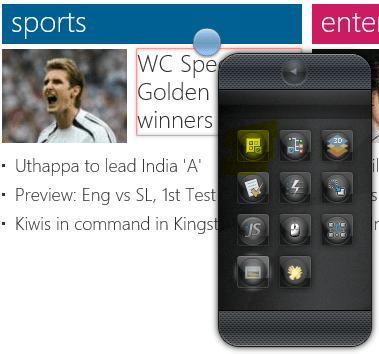
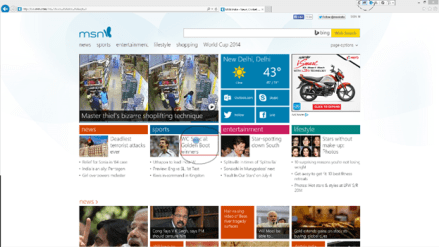
Click on “Enable/Disable Hover Highlighting” icon on the Test Studio toolbar. Hover over the Sport Section Main Story Headline (shown in the screenshot below):

Clicking on the blue bubble exposes the “Element Menu” from where you should select “Add to Project Elements”:

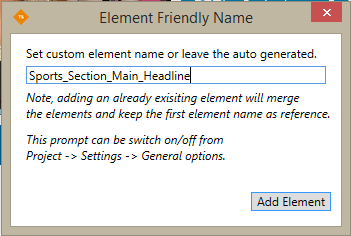
Name the element appropriately and click on Add Element:

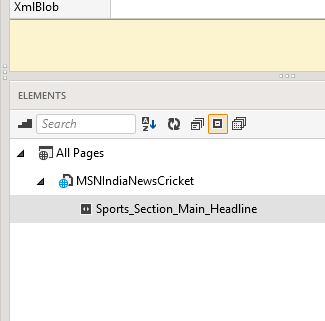
Now close the browser. We will be working with this element in coded steps. The first step is to correct the identification logic of this element. Go back to Test Studio and highlight the element in the “Element Explorer” of Test Studio:

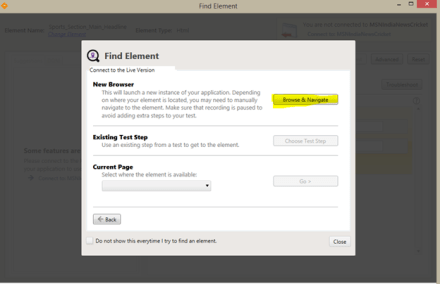
Right Click and select “Edit Element”. Click on “Find in Live Version” -> New Browser -> Browse and Navigate”:

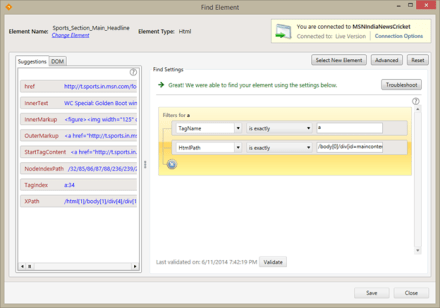
This will open a new automated window in a browser. We are interested in the “Find Element” window:

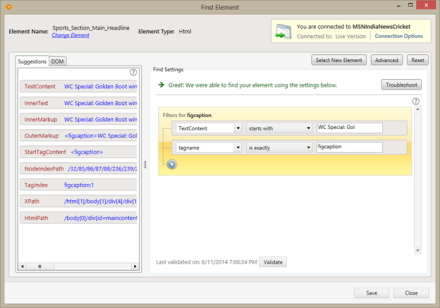
Notice the suggestions pane in the left of the screen. We are going to be using HtmlPath this time. Click on HTMLPath to add it to the right section of the screen. By clicking on the one logic present in the right section, you will be able to delete the same. The screen should now look like:

Click on Save to return to the Test Studio. Now add a coded step in Test Studio using the Add menu -> Script Step:

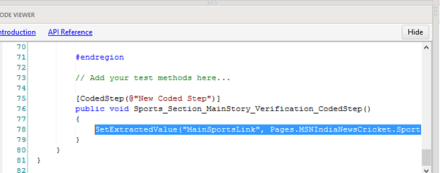
We are going to use C# to author our scripts. Please select C# in the next window. In the bottom pane of Test Studio, you will be able to write your script. A single line of code will do:

SetExtractedValue(“MainSportsLink”, Pages.MSNIndiaNewsCricket.Sports_Section_Main_Headline.HRef);


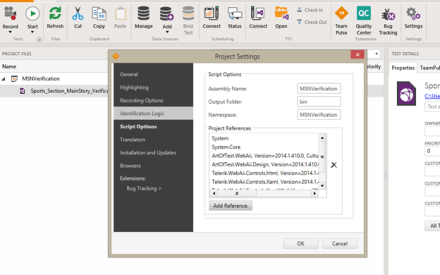
Next we will need to add Reference to System.Net namespace. To do that go to Project menu ribbon and click on settings:

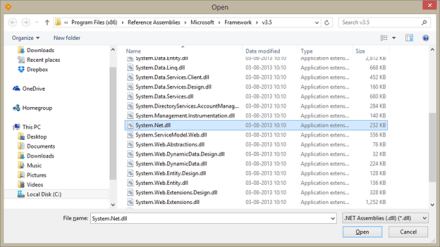
Click on Add Reference and select the System.Net.dll located here: C:\Program Files (x86)\Reference Assemblies\Microsoft\Framework\v3.5

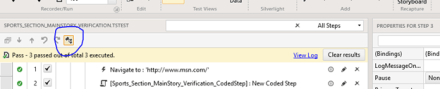
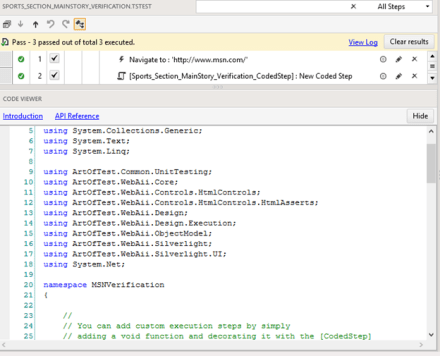
Then Click on Open, followed by OK in the Project Settings Window. Next, click on the below shown icon to view the entire code behind file in the “Code Viewer” section.

Scroll to the top of the code file, and add:

using System.Net;

Next add a new coded step and copy the following code there:

string urlloc = (string)GetExtractedValue(“MainSportsLink”);

System.Net.HttpWebRequest browurl = (System.Net.HttpWebRequest) WebRequest.Create(urlloc);

using (WebResponse response = browurl.GetResponse())

{

Assert.AreEqual<string>(“OK”, ((HttpWebResponse)response).StatusDescription);

}

Save the test and Run the test by using the Start button. The test would pass!

Congratulations, you have now automated verification of dynamic content with its associated URL using Test Studio. One can similarly author different tests for each section of the webpage and accordingly verify of the links are active.

If you want to take the next step, think about data driving the find expression of each of the elements. Interesting??

Resources for webinar “Beginning with Git Source Control for Enterprise Projects”

Git is the new source control technology that is getting wide spread adoption. In this presentation we cover the basics of Git and move on to strategies for developer workflows, source control migration to Git and Project Management with Git.

Slides:

Video:

Selected Q&A from the webinar is as follows:

Q: why should we use GIT,other than its an open source?
A: Git is extremely light weight steeply reducing your infrastructure needs. It provides for offline working and has great support for collaboration. It is also very fast.

Q: Can I Save Image File (like Logos) in Git?
A: Any known file types can be saved 🙂 remember you are just storing on a hard disk 🙂

Q: In TFS… we have only one process… called “Check-in” to make it store in server…. but in Git we have Commit and Push… why both are needed ?
A: Commit is meant to check in code to a local copy. and finally when everything is ready – you can just push to remote Git repo…

Q: Can i use in .net project;for .cs file
A: Yes … any type of files.

Q: is there a possiblity to switch my working directory file from one branch to other branch..?
A: yes you can, using checkout in Git

Q: how to update code in git.
A: Git has got nothing to do with the editing. You can use your favorite editors to work with your source code for e.g. notepad or Visual Studio or anything. Git detects the changes and allows your to commit and push

Q: may I know what is the command to switch a file from one branch to another branch in my working directory?
A: From the branch where you want to switch to, run this command: git checkout

Q: Does it have any Cloud Storage option on this Git?
A: Git is a Software to manage your source code and that is why its called source control. You can host it locally on your laptop/desktop or on your own cloud. Services like GitHub or BitBucket do the same. they have their own cloud and host Git on the cloud and you can just use their service

Q: Can i use in windows azure?
A: Yes. you will need to create a VM and then install the Git software and maintain yourself. The TFS online offering from Microsoft also offers Git repos.

Q: I am having a repo in the server and other systems that will develop the code i had lost all my data in server where i will store what should i do
A: The advantage of Git is that you have many full local copies available in computers where the code has been pulled. You can use any local copy to restore the server and let others connect to the same. Also, your server infrastructure should be in such a way that you do regular backups of your Git folders.

Q: Do we have any kind of provision for restore after delete in GIT?
A: Delete is a part of the commit. You can revert to an earlier point by checking out a specific commit.

The winners for the raffle for this webinar are:

  1. Karthi Keyan
  2. NareshKumar Kothamaddi
Indian Parliament

A New Govt. for India and New Tech for Techies in India

Congratulations to 1.2 bn Indians countrymen who participated in the elections to give ourselves a new Govt. It is exemplary that our democracy recorded over 66% voting. For perspective, USA voting percentage in Presidential elections of 2012 was 57%.

Telerik salutes all the responsible Indian citizens (esp. the youth) who voted and hope that the voting percentage would further increase in the next elections. For technologists, here are some fresh technical webinars that would get you started with the new technologies:

Date

Time (IST)

Title

May 22 2014

3:00 – 4:00 PM

Getting productive with ASP.NET MVC 5

May 29
2014

3:00 – 4:00 PM

Leveraging the Git Source Control for Enterprise Projects

June 12 2014

3:00 – 4:00 PM

Integrate Video and Photos in your ASP.NET applications with ease

June 19 2014

3:00 – 4:00 PM

Build Hybrid Mobile Applications for Nokia Lumia Devices

June 26 2014

3:00 – 4:00 PM

Mobilizing SAP with Telerik Platform

The webinars are free and can be attended from anywhere. Participate by registering for the webinars and attending them.


Resources: Getting Intelligence in your web, desktop and mobile applications

Analytics-DataBeing an application developer means that you got to know how your app is being used in the wild by your customers. If you are a mobile app developer this is even more important allowing you to focus on the features that are most widely used.

Telerik Analytics provides you with a framework for application analytics to answer such questions. Telerik Analytics is available for iOS, Android, .NET, Windows Phone, Java, Web and COM applications.

Take a look at the below resources that would help you get started with gathering intelligence from your apps:

Slide Deck:

Video:

Telerik Test Professionals Conference 2014

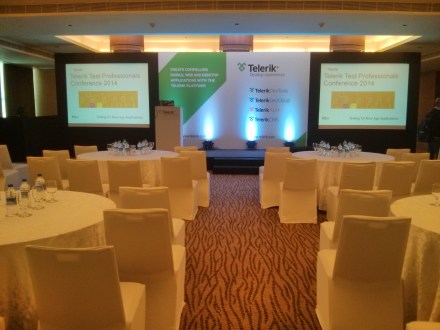
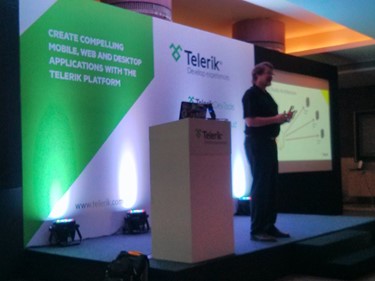
 mastheadTelerik India hosted the second Telerik Test Professionals Conference(TTPC)  for QA professionals in Chennai on 4th March 2014. A quick report on the TTPC 2013 edition can be found here. A pre-conference was also organised in Bangalore on Feb 28th. The event was aimed at sharing the best practices in automation testing with the test professionals. The attendees learnt to solve common automation testing problems during the event.

Telerik understands the value of class room teaching and in person conversation with experts to solve real life test automation problems. The presenters included Jim Holmes and Dhananjay Kumar. Jim Holmes is well known expert on Test Automation and he travelled from USA to India to conduct these workshops. Dhananjay Kumar is Developer Advocate with Telerik India.

The theme of the event was “Testing for New Age Applications”. True to the theme, strategies to enable testing for AJAX, web services and mobile applications were discussed in detail during the event.

The event saw a tremendous response from testers in Chennai with over 80 attendees from various organizations like HCL, CTS, Hexaware etc. This event covered complex testing automation problems and was conducted in the format of open discussions. Attendees discussed various automation testing issue from their projects and the presenters did a great job answering them by demonstrations.


On 28th February we conducted the pre-conference workshop in Bangalore for six hours. Workshop was hosted in Manipal centre at MG road. There were 20 seats for the workshop and it was occupied by representative from well-known organizations like ITC InfoTech, Philips, PWG etc.

Bangalore workshop was aimed at manual testers and a step by step approach was followed to bring them upto speed on automated testing. The attendees appreciated the workshop and left the day equipped with the knowledge to confidently take up automated testing.

Some topics covered during the conference included:

  • Where UI Automation fits in
  • UI Automation basics
  • Getting Started With Telerik Test Studio
  • Creating hierarchy of tests
  • Test Design
  • Working with tables
  • Working with AJAX
  • Tests and Code
  • Data driving tests
  • Load & Performance Testing
  • Performance overview
  • Load Testing
  • Mobile Testing

In both events attendees learnt to solve common automation testing problems (some of them listed above) by working on the problems in the lab.

Some feedback about the event:

Telerik Session went very well. I have learned and Knew about test suite modules.” – T Satish KumarRoy, Steria

Good followup and event went on as per the agenda mentioned. ” – Ganesh Jayaraman, DuPont

the event was well organized and informative” – Vardhini, SelfServIT

Both workshops were well received by audience and there were many practical problems discussed and solved collaboratively. Curious attendees continued to engage with the presenters even after the day was over. All attendees were presented with a certificate of participation at the conclusion of the event.

We loved the experience of being able to converse with the quality professionals in person and hope to continue meeting them in various conferences and community events.

Vote for Telerik Webinars (March – April 2014)

It is election season in the country. As we host the largest democratic exercise in the world for the 16th Lok Sabha elections, it is the duty of every eligible Indian to cast his vote.

Image

Telerik India encourages its community to exercise their vote in the Lok Sabha elections. It is just not your right but also your duty.

And we are pleased to continue discharging our duty by bringing the latest technology webinars to you. Just like the results on May 16th will usher in the new Govt., development also has elected new paradigms – mBaaS, HTML 5 visualizations, App Analytics and MVVM. Our webinars will cover these emerging trends in March – April.

DATE TIME (IST) TOPIC
Thursday,
6 March
3:00 – 4:00 PM Unpeeling the Mobile Development with Telerik Platform Register »
Thursday,
13 March
3:00 – 4:00 PM One data for different kinds of Apps using Telerik Backend Services   Register »
Thursday,
27 March
3:00 – 4:00 PM Support Financial Charts, Sparklines & Maps in your HTML 5 powered web apps Register »
Thursday,
10 April
3:00 – 4:00 PM Add intelligence to your web, desktop & mobile apps with Application Analytics Register »
Thursday,
24 April
3:00 – 4:00 PM Using Knockout.js with Kendo UI Register »

This is the last series when we would be shipping the Ninja T-Shirts. Last chance to be the cool Ninja in the town too.

You can catch the archive of older webinars here: https://telerikhelper.net/category/webinars/

The New Year e-learning goodies are rolling

Colored-GoodiesA Very Happy New Year to you! 2014 is expected to be a good year for IT industry that is still recovering from the slow down in 2013.

Forrester is forecasting good IT growth in 2014 with focus on mobile, cloud and analytics. What this means for development teams is the need for new skills to cater to the hungry business users. I called the business users “hungry” for a specific reason. The business users are now demanding consumer grade experiences on multiple devices as they have become accustomed to the great user experience they offer. This hunger will need to be satiated by the development teams of today.

Telerik is ready to help you take on these new challenges with new products and services in the new year.

In addition, we are happy to share our learnings with you so that you can deliver the experiences that your customers want.

Check out the list of webinars we have in store for you for Jan – Feb ‘14:

Date Time (Indian Time) Topic
Jan-16 3:00 – 4:00 PM Achieve Responsive Web Applications with ease using Kendo UI
Jan-23 3:00 – 4:00 PM NodeJS with Visual Studio
Jan-30 3:00 – 4:00 PM Scaffolding in One ASP.NET
Feb-13 3:00 – 4:00 PM Kendo Mobile UI – Tips and Tricks
Feb-20 3:00 – 4:00 PM Mobile & Web Services testing with Test Studio
Feb-27 3:00 – 4:00 PM Take your reports to any screen with Telerik Reporting

Register for free by clicking on the webinars, you would like to attend. We will remind you of the upcoming webinar a day prior to the event.

By popular demand, we will continue to give out Telerik Ninja T-Shirts to the top 2 engaged attendees during the webinar.

Now, aren’t the celebrations continuing after the New Year?

Delivering Telerik awesomeness in your mailbox

Telerik tools work on the cutting edge of ever changing technology. This means we work on a lot of new things that can be shared. Keeping abreast of these changes may be a challenge for anyone. Wouldn’t it be great if there was a simple way of keeping track of what’s new from Telerik?

Telerik publishes monthly newsletters that make brings the summary of the latest in your mailbox. If you have trialled any  product from Telerik or downloaded a free product, you may still not be subscribed to the newsletters. This is strictly sent on an “opt-in” basis to avoid any unintentional spamming.

Here’s how you can subscribe to the Telerik newsletters:

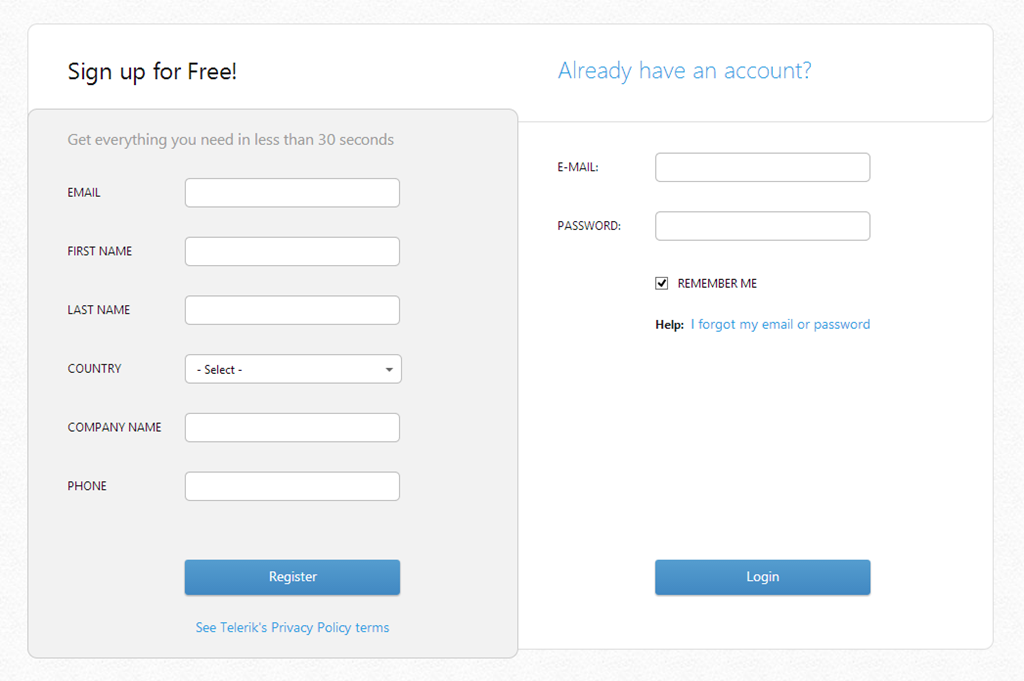
  • Login to your Telerik a/c. (create a new one for free if you don’t have one)

image

image

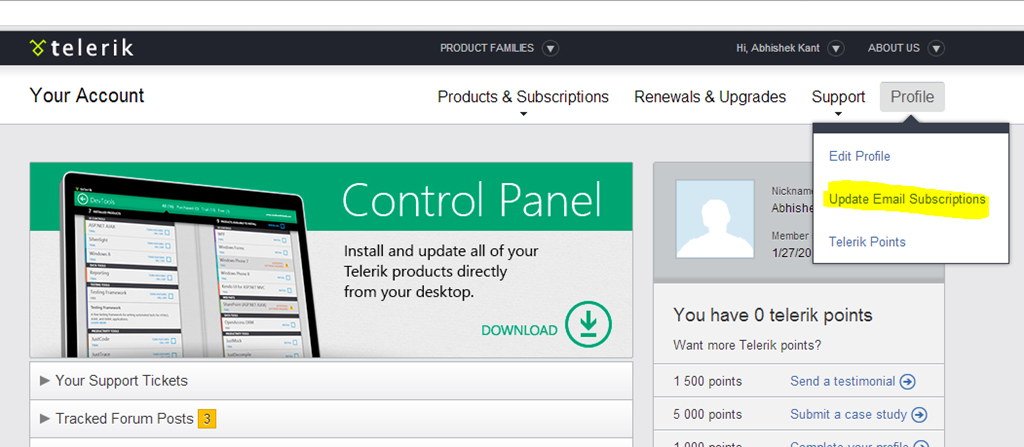
  • Browse to Profile –> Update Email Subscriptions

image

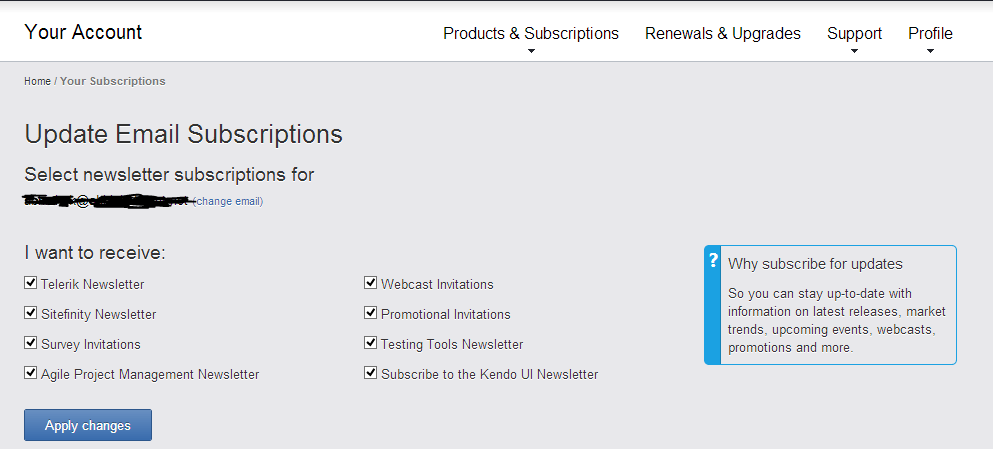
  • Choose the newsletter(s) that you want to subscribe to and click on Apply Changes

image

  • Add newsletters@telerik.com to your safe sender’s list
  • The newsletters will drop in your mailbox when they are ready

Stay awesome in 2014!

Assigning Telerik licenses to individual developers

asset-management-software-294x300If you have purchased license(s) of Telerik tools, it is highly desirable that you assign the licenses to the developers who are going to be using it. Apart from the licensing requirements, it provides two important benefits for your developers:

  1. Gives them ability to download the latest updates for the software they are using on their own
  2. Allows them to raise support tickets to Telerik on their own. This is managed support from the Telerik team. This support is different from posting your query on Telerik forums, stackoverflow or on social media. It is fully managed by our dedicated support team.

In this post, we will detail the steps that you need to take to assign the licenses to your developers. One purchase of a license, you would have provided 2 pieces of information:

1. Billing Information

2. Shipping Information

To us the billing information is license holder. He/she is one responsible for making the payment to Telerik. The invoice generated for the payment due is sent to the billing contact alias. The email alias provided in the shipping information is the address where the license activation mail is sent. If you want both billing and shipping information can be made the same.

Most people get it till here. The piece that is shrouded in ignorance starts from here. Let’s say you bought 30 licenses of DevCraft Complete to be used by 30 developers in your team. However, only 1 shipping alias would have been specified. This means that all licenses at the time of activation are provided to the shipping contact. It is the responsibility of the shipping contact and a licensing requirement that the shipping contact assign the licenses to the named developers actually using the product. To do the same, the following steps needs to be done:

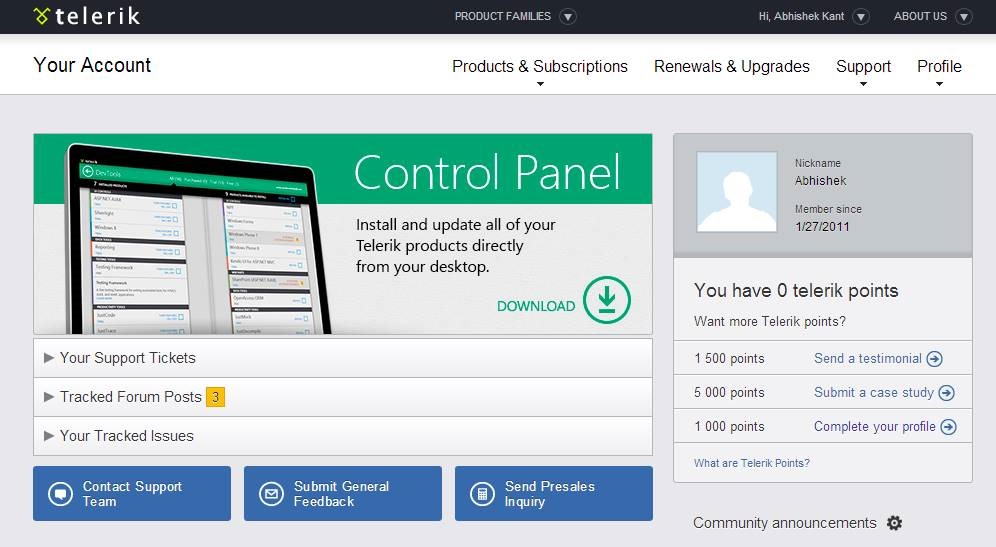
1. The shipping contact person needs to login to his account on Telerik.com:

clip_image002

2. Browse to his Account Overview (using the email alias and password):

clip_image004

3. Single Click on “Products & Subscriptions” Menu and choose the “Manage Licensed users” option:

clip_image006

(If you can’t see the “Manage Licensed Users” option, you are not authorized to assign licenses to other developers)

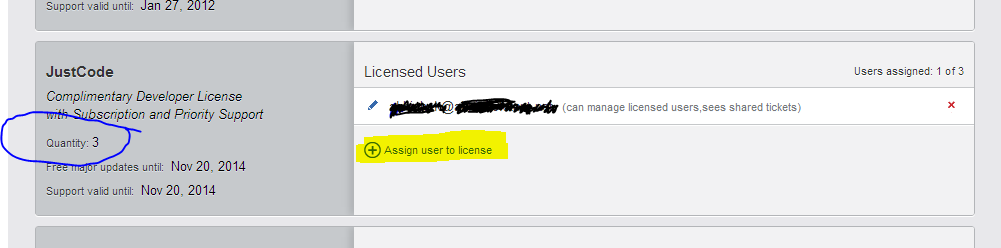
4. Select the product for which you want to assign the licenses:

image

In this view, you are able to see the users to whom the licenses have been assigned and their permissions.

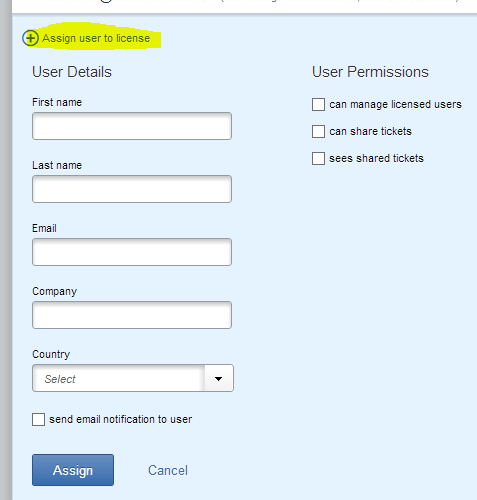
5. Click on “Assign user to license”. Please enter the details of the developer you want to add (making sure that email has been spelled correctly):

image

Please pay close attention to the “User Permissions” section. You don’t want to provide the “can manage licensed users” permission to any developer. With this permission they will acquire the right to further assign the license to another person making software asset management more difficult. Please do select the “send email notification to user” checkbox so that the developer is notified of the license assignment.

6. On clicking “Assign” button, an email is sent to the developer added with his account activation instructions. After this the developer is able to login to Telerik.com to raise support tickets and download the product updates etc.

There may be times, when you want to revoke a license from a user and reassign it someone else. The screens used are the same as above. But now, you first delete the user that is currently assigned to and then add the new user. The user that is removed will need to uninstall the specific Telerik tool from their machine to avoid mis-licensing.

image

If you need any further help on managing your licenses more efficiently, you can always reach us on our contact nos. located across the world. The one in India is located in the New Delhi area (specifically in Gurgaon).

Now that you know how to support your developers better with their queries, here is how to raise that support ticket on Telerik.

Making sense of the Enterprise Mobility

imageMobile apps have mostly meant games and a few more utility apps. While this is a large section of the mobile app ecosystem, there is a potentially lucrative market waking up now to the possibilities of mobile apps – The Enterprise.

The enterprise mobility requires a different set of considerations than the consumer oriented mobile apps. While in-app ads, mobile commerce, frame rates, access to a RadBackend (or mBaas) may be important for consumer apps, the enterprise looks for value elsewhere.

For long enterprises have controlled the hardware and the software that is allowed within its premises for reasons of security, resource optimization and IT management. These days employees are getting their own mobile devices into the enterprise leading to a more heterogeneous environment.

A story that illustrates this is about an enterprise that adopted WiFi to make it easy for employees to work on their laptops anywhere in the building. The load was calculated keeping in mind the number of laptops in the organisation (a decent assumption). The infrastructure collapsed within a week of it launching. On investigation, the IT realized that the devices logging into the WiFi system were more than double of what was planned for. The sneaky addition was the mobile devices of the employees  (outnumbering the laptops easily)!

Now, let us look at the requirements that an enterprise or small & medium business might have of the mobility application platform that they may use:

Support for heterogeneous devices

The BYOD trend can saddle an enterprise with multiple platforms – Android, iOS, Windows Phone & BlackBerry. Add to it the complexity of different form factors for each platform. The mobile apps need to accommodate and embrace this heterogeneity.

Legacy Hardware Infrastructure

A lot of infrastructure is in production in an enterprise. This may include the LAN architecture and the servers in use. The enterprises will need to add WiFi infrastructure and provision for the additional load on the IT servers by the way of mobile.

With mobility, users will also want to access data from outside the corporate network. The organisation may need to revisit its IT policies to allow data access from outside corporate network.

Security

The enterprise first needs think about securing the mobile devices though policies (e.g. password, retention). An investment needs to be made in the device management software allowing for capabilities like platform upgrades, remote wipe/lockout.

The next step is to plan user authentication via the mobile apps. Mobile apps are thick clients and need a different authentication mechanism(s) than currently used. Extending LDAP or ADFS infrastructure becomes necessary here.

Apart from authentication, one needs to consider authorization in the mobile apps. Consider the nightmarish scenario of  HR deptt accessing sales apps and employees accessing executive dashboards.

Integration with Business Apps

imageIT has become the backbone of the modern enterprise. Various business applications (e.g. SAP, Oracle, Salesforce, SharePoint) are driving the everyday business processes. Mobile devices require a different set of endpoints to be exposed (namely webservices). The enterprise needs to consider the extensibility of the apps to accommodate this requirement.

Enterprise App Stores

The mobile app ecosystems are tightly controlled by the platform vendors. The devices are only allowed to download apps from the “official” marketplaces of the devices. This leads to exposure of apps meant for the employees of the organisation to the masses. This risk can be mitigated by integrating secure login into the application.

Another option is to deploy an enterprise app store working with the platform vendors. This option may be more expensive and resource intensive (think registering devices in the app stores).

Development Choice

The enterprise needs to make a decision on the the development technology and the tool of choice. Today, the options exist between Native Development or Hybrid Development. Hybrid development offers a host of benefits including reuse of existing skills, cross platform development and lower hardware requirements for mobile app development.

I believe that today’s enterprise requirements are very well met with the Hybrid Mobile Development approach. In a recent report by reserach2guidance, they found the following:

“The majority of users say that CP (Cross Platform) Tools have saved them time compared to native app development. Almost 45% of the users estimate time-savings of 50% and more.”

Equally important things to consider would be requirements, configuration, bug and release management for the application development phase.

Mobile Testing

The mobile apps should perform as per expectations. Having a good quality team to whet the quality of the initial release is very important. Even more important is to have an automated process in place to verify each app release meets the quality bar of the organization.

App Analytics

This is an area that hasn’t been paid much attention to but would pay tremendously if included in the mobile app. Knowing the features of apps that are most widely used allows the enterprise on developing those features further. Also, knowing the detailed crash reports help to pinpoint the buggy sections of the code improving the reliability of the apps.

Synchronization/ Offline Capabilities

This is one non-functional requirement that takes special meaning in the mobile app scenarios. Since the mobile app works in the sometimes disconnected environment, it is important to have some offline way of caching data.

One needs to take care of the scenario where the server may not be available at intermediate times. Even at these times, the mobile app should provide some critical functionalities to the users.

Backend Services

While mBaaS services are in vogue today, they have limited value for the enterprises. The main challenge is that mBaaS are public cloud services. An enterprise may be reluctant to host its data in a public cloud due to security considerations. In addition to file and data storage, mBaaS services may also provide notification services, geolocation services, login services, digital wallets, audience segmentation and device management capabilities. The enterprise may consider mBaaS services if they require any of the above services.