Technology to keep you company in the Holiday Season

ravanaFor Indians worldwide, the Holiday season is about to start with the harbinger of festivals – Dusshera round the corner. As the time for revelry draws closer, Telerik India is here to keep you stay updated with the latest from the world of software development.

While our inner geek so much wants to have fun, it also craves to learn & share the latest. And we are happy to oblige the Geek Ninja in us 🙂

Here is our schedule of e-learning webinars for the months of Oct – Dec 2013:

The timing for all the below webinars is 3:00 – 4:00 PM (IST)

Title
Date
Registration Link
Walking on Water: Building Android and iOS Apps with Visual Studio Oct 24th https://www1.gotomeeting.com/register/377512208
What’s new in Visual Studio 2013 Oct 31st https://www1.gotomeeting.com/register/314109337
Patterns in JavaScript Nov 7th https://www1.gotomeeting.com/register/139546249
Using NoSQL Data Sources with Kendo UI Nov 12th https://www1.gotomeeting.com/register/207707537
Adaptive Rendering Mobile Web Apps using ASP.NET MVC Nov 28th https://www1.gotomeeting.com/register/301888536
Journey from Manual to Automated Tester in 1 hour Dec 12th https://www1.gotomeeting.com/register/333799297

Sometimes, we feel that Dusshera is just an excuse to start the party earlier than the rest of the world! The party continues with Telerik as we continue to hand out T-shirts to select few attendees from every webinar.

If you ever wanted to meet the great presenters from our webinars, you can find us in various industry events. In the coming months you can find us at:

Mobile Developer Summit 2013, Oct 10- 11, Bangalore

STC 2013, Dec 4-5, Bangalore

We would love to see you at our booth if you are attending any of the above conferences!

Raise a support ticket for that

Sometimes customers need more help that is possible over a phone call or a demo. These cases are the ones that require more investigation or may fall outside the expertise of the person conducting the demo.

Now, if you have faced the dreaded comment – “Please raise a support ticket for that” here is how you can do the same:

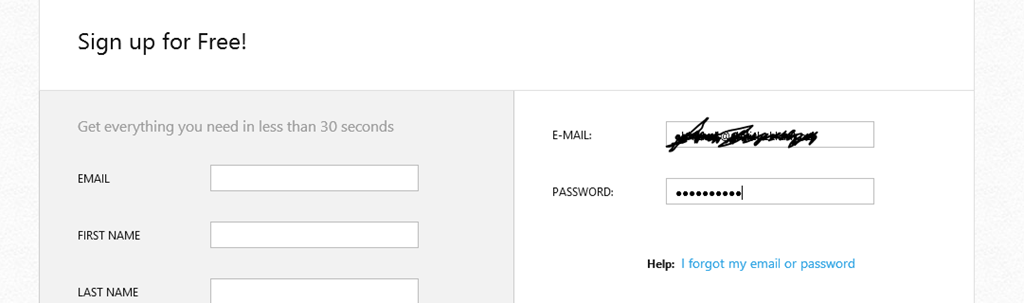
  • Login to your account (trial/ paid) on telerik.com:

image

image

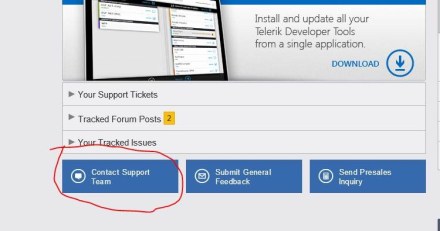
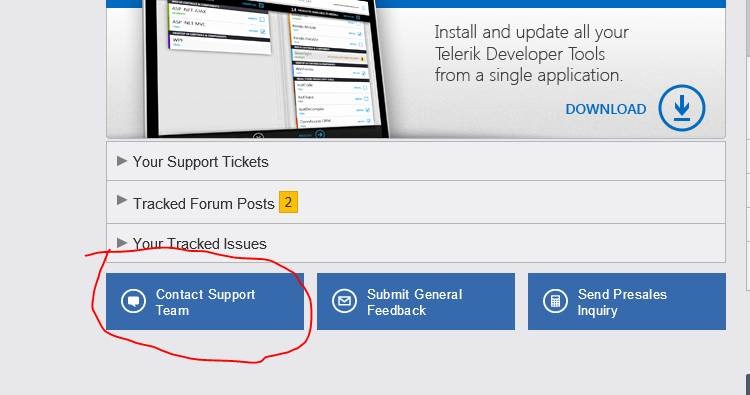
  • Click on “Contact Support Team” from your account page (after logging in):

clip_image002

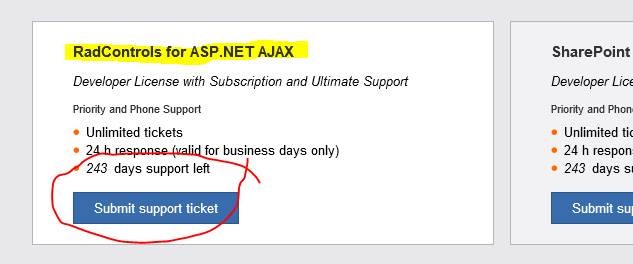
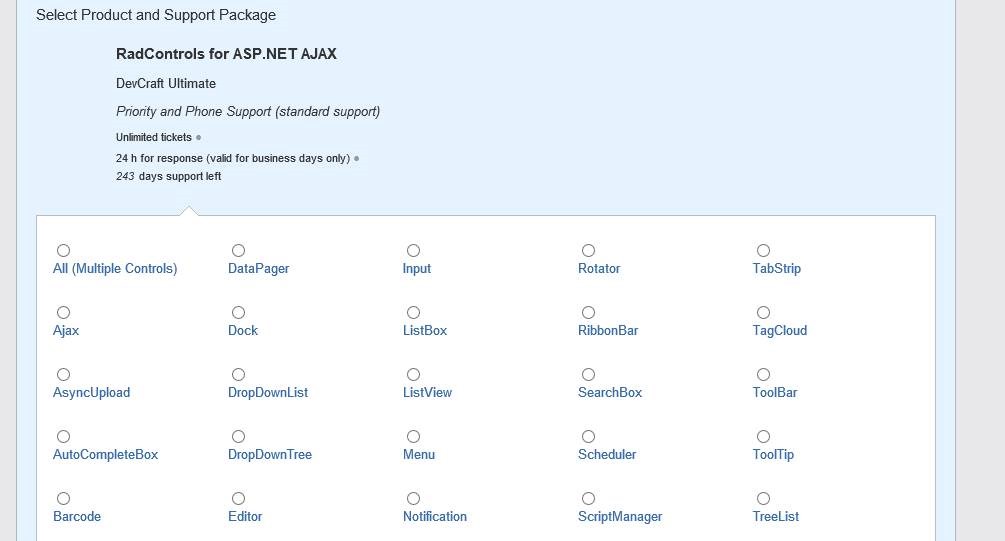
  • Choose the product you want the support for:

clip_image004

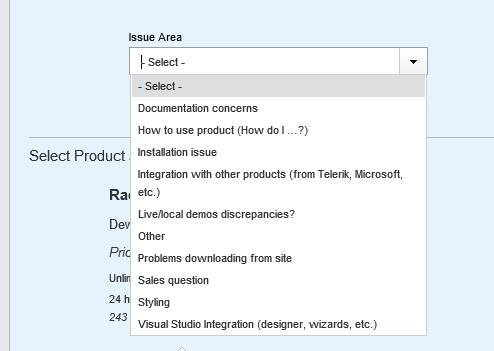
  • Identify the kind of help you need:

clip_image006

  • Choose the control you are looking help for:

clip_image008

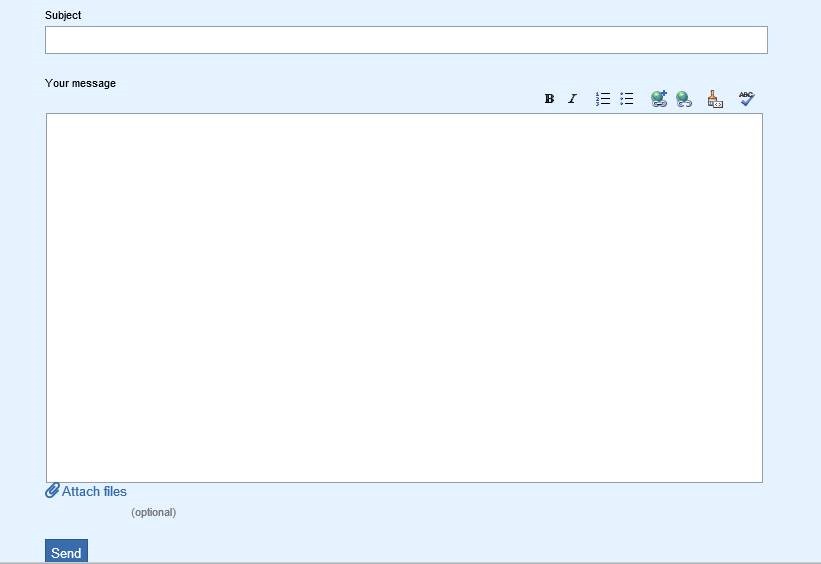
  • Provide details:

clip_image010

The message should include information on:

1. Steps to reproduce the problem

2. Attach screenshots of the error that you are encountering

Press Send button.

After you have submitted the support ticket, you expect a reply. But how soon? We have 24 working hours SLA for paid subscribers. However, we have no SLA for non-paid/trial subscribers but try and provide answers in 72 working hours. Do be aware of the “working hours”! So, if you have raised a support ticket on Friday evening, you can’t expect to get an answer on Monday morning even if you are a paid customer.

The procedure is almost the same for all Telerik products. We take pride in providing help to our customers when it is needed to improve their productivity. The above process helps us prioritize our tasks so that we can deliver most value.

If you have any feedback/ suggestions/ comments on how we can improve this further, please do share your thoughts on the comments section.

Update: We now have a video demonstrating this process:

Telerik India Webinars–Monsoon Edition

MP900410082[1]The country is drenched with monsoon. Hope you have stepped out and enjoyed getting soaked in the rains sometime.

Your monthly quota of e-learning fun is here too. We would like to thank you for your enthusiastic participation and are pleased to share the webinars for Aug-Sept ‘13. The webinars are free to attend.

Date Time (IST) Description
8th Aug 3:00 – 4:00 PM Modern UI in your Web Applications using Telerik RadTileList
22nd Aug 3:00 – 4:00 PM Integrating coded steps in functional tests of Telerik Test Studio
5th Sep 3:00 – 4:00 PM Make Windows Forms speak the Windows 8 Modern UI design
19th Sep 3:00 – 4:00 PM Agile Project Management applied across all your projects with Telerik  TeamPulse
26th Sep 3:00 – 4:00 PM Implementing Charting in WPF

We love T-Shirts and are pleased to confirm that we would be giving out 2 T-Shirts to lucky attendees at each of the webinars above. The T-shirt is sure shot way to gather some admiration in your campus.

If there are any topics that you would like to see in the future webinars, please do let us know in the comments section.

If you would like view the past webinars recordings can be found on our blog here: https://telerikhelper.net/category/webinars/

The Heat is On – Telerik India Webcasts (June – July ’13)

summerheatThe hot Indian summer sun is doing its thing! And we are pretty sure that you have found your own way of chilling out in this relentless heat.

If you are reading this, obviously you are not away at a cool hill station. As your A/Cs and coolers do their best, we at Telerik India continue to bring some amazing content that you would love to spend time with. Check out what we have in store for you this summer:

Webinar Topic Date Time (IST)
Building Uncomplicated Single Page Apps (SPAs) with Kendo June 6th 3:00 – 4:00 PM
Reporting Best Practices for ASP.NET applications with Telerik Reporting June 13th 3:00 – 4:00 PM
Cloud based Enterprise Apps using Icenium Everlive June 20th 3:00 – 4:00 PM
Hybrid Mobile Application Development with Cloud based IDE Icenium June 27th 3:00 – 4:00 PM
Developing ASP.NET MVC Applications Quicker with Kendo UI July 11th 3:00 – 4:00 PM
Data Driven Testing with Telerik Test Studio July 18th 3:00 – 4:00 PM
HTML5 Charting in ASP.NET AJAX July 25th 3:00 – 4:00 PM

The Redux webinars bring the best of international content in the Indian Time Zone. Check out the Redux Week webinars below:

Webinar Topic Date Time (IST)
Redux: What’s new in ASP.NET AJAX Technologies
Q2 2013
July 1st 3:00 – 5:00 PM
Redux: Code faster in ASP.NET MVC with updates
in Kendo UI suite
July 2nd 3:00 – 4:00 PM
Redux: Become a software craftsman with
improving productivity in Visual Studio with Just Suite in Q2 2013
July 2nd 4:00 – 5:00 PM
Redux: Advances in Windows 8 Development with
Telerik Technologies
July 3rd 3:00 – 4:30 PM
Redux: Agile Project Management gets a facelift
with Telerik TeamPulse R1 2013
July 4th 12:00 – 1:00 PM
Redux: Introducing the Free Telerik Testing
Framework
July 4th 3:00 – 4:00 PM
Redux: What’s new in Telerik Windows Development
Technologies Q2 2013
July 5th 3:00 – 4:30 PM

Click on the webinar link above to register for the event.image_thumb.png

If the list above hasn’t pleased you, we would ask you to yell at us in the comments section below with your suggestion(s).

The least we could do to ease the sweating was to continue our Ninja T-Shirt contest every webinar. This cool T-Shirt is bound to get you some developer envy in your campus!

Most of the past webinar recordings can be found on our blog here: https://telerikhelper.net/category/webinars/

Resources for webinar on “Easy Agile Project Management with TeamPulse”

On April 18th, we had a full house during our discussion on Agile methodologies and a concrete implementation with Telerik TeamPulse. We were overwhelmed with the queries put forth by the attendees. If you would like to review the presentation, we have provided the same below:

And if you are someone who wants to stay ahead of the curve in the Agile space, we have some  breaking news.  A preview of the next version of TeamPulse (TeamPulse R1 2013) is now available as public Beta. Feel free to take a look if you are interested: http://bit.ly/tp-demo

imageThe FAQs from the webinar are as follows:

Q: on which platform it should work?

A: It will work on any platform. It is web application running in browser. Some screens are not supported on mobile devices as of now.

Q: The properties – are they customizable…can we add / modify / or delete?

A: Certain properties for the requirements are customizable for example you can change what appears in the drop downs for Maturity, Certainty, etc. You cannot change the names of the labels. This is done by modifying the project template.

Q: can we track multiple projects at the same time?

A. We offer a cross project view that allows you to track multiple projects

Q: can PO be the BA ?

A.  PO is responsible for:

  1. Maintaining the backlog
  2. Representing client interests in the Scrum team and get buy ins from various stakeholders

If BA can accomplish the above two, he/ she can act as PO too. Generally, PO is someone from the client side.

Q: is it mandatory to use TFS with the Team pulse?

A: TeamPulse can be used as a stand alone too. It is not necessary to use TFS for project management. If you have already invested in TFS – you can integrate with it.

Q: so where i have to use agile?

A: Where to use Agile – its up to you and your team. Agile is developmen methodology that industry is leaning to. Short sprints i.e. ideally a 15 days to 30 day sprints, where you work on a requirement and make sure you finish it to a done state. so its upto you if you want to go the Agile way or Waterfall model.

Q: what is TFS??

A: Microsoft Team Foundation Server – a source control from Microsoft ~Lohith

Q: even for new product there is a backlog..?

A: Can you please elaborate on this ?

Q: is the sprint scope defined by Scrum master or PO?

A: The sprint scope should be decided by the team based on their capability. It is important to know your team velocity so that you can deliver what you can promise. Buy in from PO is important too. Scrum Master is there to facilitate things.

Q: is some kind of automated integration available in teampulse for other telerik products?

A: TeamPulse integrates beautifully with Telerik Test Studio for bug management. While TeamPulse is built using Telerik controls, the cross project view is built using Kendo UI.

Audience Question:

Q: why the product backlog decided in the begining of the project??

A: In Agile Methodology – you identify the requirements or user stories upfront and create a log of that. That simply put becomes product backlog and once you achieve all the backlogs – you will have built your product. so thats why you define your requirements upfront. Thats one of the core agaile principles.

Q: please listout some scrum metrics

A. We offer burn down reports, velocity reports for individual projects and across projects. We also offer timesheet views and productivity views for individual team members.

Q: Do we have any video sessions for the Team Pulse?

A: We have what we call – Telerik TV – http://tv.telerik.com/products/teampulse. Here you can find short focused videos done by evangelists. This is a free public site. no registration required.

Q: Is there any option to track the retrospective out comes? so the team and scrum master can ensure that the retrospective points are addressed.

A. We have issues and risk to track retrospective outcomes

Q: Could Scrum be implemented in production support project?

A. While Scrum can be used in production support projects, Kanban is frequently used for this. TeamPulse can be used for managing Kanban projects as well.

Q: how we manage if task cannot be completed in a given sprint?

A: If the task hasn’t been started, the task should be assigned to the next iteration.

Q: can we do a migration from TFS 2012 to teampulse?

A: Yes we can. We now support TFS. take a look at this : http://www.telerik.com/agile-project-management-tools/tour/integrations.aspx

Q: Do you have some sort of mechanism to mark the user story as broken when a bug is associated to an user story?

A. Yes, it is displayed on the board that there is a bug or blocking bug. If blocking it will identified by red colored icon.

Q: if that is a new project….even then we have the backlog?

A: Yes. normally you will start with a product backlog. Then pull items to sprint backlog.

Q: how the roles will be assigned and mapped to each project ?

A. TeamPulse offers built in groups and the ability create new custom group. Such custom groups can be assigned the desired permissions in a project.

Q: We know in an agile environment, we need to respond to changes. What kind of change management process to be implemented for cost control?

A. None currently.

Q: looks like tfs can do pretty much all of these things. What advantages does this have over TFS?

A: TFS cannot give you metrics in terms of charting/gauging. You need Reporting Services along with it. And customization of those reports are not easy. TFS was not built as a project management tool – its more of a source control and task maintenance. With TeamPulse you can do project management and get health of multiple projects in one shot – which is not possible with TFS. If you are already invested in TFS, we add value as a complement to TFS rather than as a replacement. More  features can be read here http://www.telerik.com/agile-project-management-tools/tour/overview.aspx

Q: Does it have some sort of notification to the task owner if any associated issues/Impediment is resolved by the scrum master? or the scrum master will get the update?

A. He can through our notification system but he will need to configure what types of notifications to receive. There are some limitations.

Q: agile is a framework?

A: Yes, it is a framework as it makes recommendations. Scrum and Kanban are specific implementations of this framework.

Q: How about the interface to manage the issue management – if we are using some other tool on the same?

A: At the moment we support only integration with TFS.

Q: Can we use Teampulse for teams working across geographies?

A: Yes. TeamPulse is an ideal solution for such teams. This is a web application and so anybody can log in from anywhere. However, the teams needs to understand the Scrum process well.

Q: What database the TeamPuse connects with?

A. MS SQL Server 2008 or above. SQL express is also supported

Q: In the test management, there was one topic called traceability. What is it?

A: Traceability lets you trace different things like for a bug – in which sprint was it logged, what was the check in against that bug, which backlog item was that .. etc.

Q: When you create a task i could see Given, When and Then statements in it. Does it have any support to BDD?

A. No, the only BDD like item that provide is our acceptance criteria for stories and bugs but not on the task level.

Q: What all support does it have for the process compliance? do we have any reports specific for the quality delivery group?

A. None

Q: Can we do a migration of data from JIRA/TFS 2012 to teampulse?

A: At the moment we support only TFS.

Q: How can priority be assigned to a task?

A. You set priorities by dragging and dropping the order they should be completed in. So, a task on the top of the list gets more priority than the one of the bottom. While creating your Sprint backlog, it is important to start looking from the top.

Q: Is there any metric to measure regression caused in a sprint?

A. None

Q: how do we maintain the hierarchy of user roles? Do we have any such hierarchy?

A. With Personal you can link them to specific relationships

Q: Can we configure the list of work items that need to be completed as part of a user story? This is just for tracking its completion?

A. Yes through creating Tasks in a user story.

Q: Does TeamPulse integrate with JIRA?

A: At the moment no. We have integration with TFS only.

Q: do we have a desktop plugin version of this tool ? some environments may not have access outside intranet?

A. It’s a web application that is self-hosted on your server. So, the access can be restricted to the sub-set of people you desire.

Q: Can we handle restricted story points? Visible only to specific people?

A. No. All stories are visible to all team members. One of the key tenants of Agile is transparency throughout the team.

Q: once an epic is split into sprintable units, what do you do with the original epic? Do you keep it with the stories until all are done? Do you retire them into some kind of epic archive? Do you just delete them?

A. No, we can only show the relationship

Q: Can I check resource assignments using team pulse…like resource utilization etc?

A: Yes. we give you resource utilization metrics built on time sheets.

Q: How would we arrive at the velocity of the team?

A: Tam Velocity = Story or Tasks completed in a sprint

Q: the project status looks cool. Burn down chart is a really nice addon over TFS.

A: Thank you. Glad you like it.

Q: Is project manager and team leads both can see how many release are planned for particular month?

A: Yes.

Q: Does Teampulse comes with Tereik Test studio or similar?

A: TeamPulse is a separate product from Telerik. So it has a separate license. http://www.telerik.com/agile-project-management-tools/pricing-and-licensing.aspx ! http://www.telerik.com/agile-project-management-tools/pricing-and-licensing.aspx

Q: Is Team pulse compatible with Jira/ Clearcase/ Clearquest?

A: TeamPulse currently integrates with TFS.

Q: Where does the tool store all its metadata? Does it work on client-server relationship?

A. All data is stored on the SQL Database, a local XAP file is cache locally but no meta data is passed and stored in session

Q: Will developer daily need to update the story board?

A: As a best agile practice – you should burn your days hours. 🙂

Q: Is teampulse accessible via internet?

A: You can have a trial version of TeamPulse hosted by us for 30 days. You can quickly set it up at: http://telerik.com/agile-project-management-tools/try-now.aspx

Currently there is no SaaS offering available.

Q: can we assign the tasks to individuals in Teampulse.

A: Yes.

Q: Didnt see a log where we can have the daily meeting minutes entered so that it can be reviewed and the end of the sprint?

A. All requirements have a comments area that is threaded and could be used for this purpose

Q: Can we handle multiple project? and multple team?

A: Yes. we support cross project views. meaning – as a manager you can set up your dashboards to see health of more than 1 project.

Q: I believe the key behind agile is having all the learning experience documented for future reference and better sprint planning do we have any such features here?

A. Issues can be have a resolutions added to them and associated with a time line such as iteration or simply tag for future retrieval.

Q: How to login access to tempulse?

A: Currently, TeamPulse is a self hosted solution. It can be integrated with your Active Directory environment or can have separate login credentials.

Q: Project Management Reports is export them as PDF, Excel ?

A: Yes

Q: is it multilingual? can it be used in other language like spanish ?

A. No. Although comments, user stories etc can be put in any language. You can only localize our feedback portal.

Q: what are the process template available in Teampluse?

A. Scrum for Team System v 2 and 3, MS Agile, CMMI and Scrum and our own TeamPulse template You also have the ability to change any template.

Q: Does it support Kanban dashboard?

A: yes. WIP is supported.

Q: is the api available for teampulse?

A. Only for time tracking and an Odata layer for the rest of the application

Q: As a Customer can a person log a bug or enhancement by Email in TeamPulse?

A: Not by default. However, integration points are available.

API for time tracking as well TFS sync and hook from our testing suite Test Studio to capture acceptance criteria

If you have scrolled down to read this, you are obviously looking for the winners of the cool Telerik T-Shirt. Though we had only planned for 2 giveaways, we felt humbled by the engagement during the webinar. We have decided to giveaway 5 T-Shirts for this webinar. We are pleased to announce the winners of the same as the below:

  1. Suman Chatterhee, Symphony
  2. Suresh Subramanian, CTS
  3. Harris Vincent, CSC
  4. Jayachandran P, CTS
  5. Salil Bhatnagar

The winners have been contacted directly and the prize will be shipped to them shortly.

Feel free to post your query in the comments section below.

Ninja Enough? – Telerik India Webcasts (April – May 2013)

India_elearning_webinars_April_May

 The last series of webcasts from Telerik India  in the months of Feb – March saw great response from the the community. One webcast had over 250 people registered for the webcast. Encouraged by the response to the series, we are pleased to announce the series for April – May 2013.

We hope that we will be able to deliver some Ninja techniques to you via the webinars. One technique we intend to cover is how to win more girlfriends/ boyfriends or if you are married – how to be an awesome spouse! I am not going to spill the beans now but if are interested, you may want to attend the webinars.

Some of you had a query on the cost of attending the webinars. The webinars are free to attend!

The webinar timings are all in Indian Standard Time (i.e. GMT + 5:30 hrs). So, pick your poison from below:

Date Time (IST i.e. GMT + 5:30 hrs) Topic Audience
April 11th 3:00 – 4:00 PM Easy HTML5 Data Visualization with Kendo UI DataViz HTML 5 & Mobile Developers
April 18th 3:00 – 4:00 PM Solving Agile Project Management Challenges with TeamPulse Developers & Project Managers
April 25th 3:00 – 4:00 PM Building Windows 8 Apps faster with RadControls Windows 8 Developers
May 16th 3:00 – 4:00 PM Easing Web Content Management with Sitefinity
May 23rd 3:00 – 4:00 PM Building Windows Phone 8 App using KendoUI Mobile Windows Phone Developers
May 30th 3:00 – 4:00 PM MVVM & Validation in HTML 5 apps with Kendo UI Web HTML 5 Developers

DevCraft_tee_FINALJoin our friendly evangelists @debug_mode and  @kashyapa as they guide you to being awesome in your team! The evangelists like to make everyone happy. They will be selecting two active participants from the webinar and sending them the much in demand Telerik Ninja T-Shirt. you will be coming, right?

Webinars in India

Telerik India Webcasts (Feb – March 2013)

Webinars in India

Since last year, Telerik India has been hosting monthly webinar sessions on various Telerik Technologies. The effort was hugely appreciated and we are pleased to continue the series for the Ninja Developer. Learning and training are continuous activities and with your help we hope to continue making this learning a continuous activity for you.

The webinar schedule for February – March 2013 is as follows (all times are in UTC + 5:30 hrs):

Date Time (IST i.e. UTC + 5:30 hrs) Topic Audience
21st February 3:00 – 4:00 PM Create Hybrid Mobile Application in 1 hour Developers
26th   February 11:00 AM – 12:00 PM Redux: Evolving your Mobile Strategy with Content Management System Project Managers and Developers
28th   February 3:00 – 4:00 PM ASP.NET MVC: Better User Experience with Kendo UI Developers
7th March 3:00 – 4:00 PM Developing Applications for Nokia Lumia using Telerik Controls Developers
11-Mar 11:00 AM – 11:45 AM Redux: Enhance Your WinForms LOB Applications with PDF Viewer, PivotGrid and Reporting Developers
11-Mar 3:00 – 4:00 PM Redux: Impress Your End-Users with New Visualizations in Telerik Reporting. Manage Large Data Models with OpenAccess. Developers
12-Mar 11:00 AM – 12:00 PM Redux: Get the Most Out of AJAX Web Development with PivotGrid, Grid Model Binding Support and Integration with SharePoint 2013 Developers
12-Mar 3:00 – 3:45 PM Redux: Skip the JavaScript!   Build Awesome HTML5 Apps with Kendo UI’s MVC Server Wrappers Developers
13-Mar 11:00 AM – 12:00 PM Redux: Dramatically Improve Your Next XAML Enterprise Application with PivotGrid, Spreadsheet and Telerik Reporting Developers
13-Mar 3:00 – 3:45 PM Redux: Tying Test Studio   Together With TeamPulse and Telerik Controls Testing Professionals
14-Mar 11:00 AM – 12:00 PM Redux: Amp Up Your Visual Studio Productivity with the New Features in JustCode, JustMock, JustTrace and JustDecompile Developers
14-Mar 3:00 – 4:00 PM Redux: Bring Power, Convenience and Meaningful Display of Data to Windows 8 UI using the All-New Grid, AutoCompleteBox and New Chart Developers
15-Mar 11:00 AM – 12:00 PM Redux: Develop Engaging Consumer and Enterprise Apps with the Most Recent Additions to Windows Phone 8 Controls Developers
21st March 3:00 – 4:00 PM Automated Functional Testing Can be affordable with Test Studio Testing Professionals

If you are intrigued by the mystery of the “Redux” webinars above, read on. The Redux webinars aim to bring the best content from Telerik product teams to India friendly time zones. We would be replaying the content presented earlier at these webinars and have a product team member available to answer any questions that you may have.

This time we have included the intended audience for each webinar to let you choose the most relevant topics for yourself. If you would like to see a webinar on any specific topic, please do let us know by leaving a note in the comments section below.

So, join us in this journey of continuous learning to be the venerable Ninja Developer… HeeYa!

Nokia Lumia loves Telerik

In a recent gathering of many tech enthusiasts on mobile devices, the discussion steered towards Nokia (how could it not?). People tended to like the new Lumia phones due to its colourful interface, wireless charging and deep social networking integration. The next question was on how to develop mobile apps for these devices?  Nokia has come up with new new programs that enable developers to make the most of the new devices coming out of Nokia. They are:

  1. Nokia Ad Exchange
  2. Nokia Premium Developer Program

The Nokia Ad Exchange (NAX) is a simple way of generating revenue from the in app advertising (banners, full-screen ads, text etc). From one of the my Nokia developer friends, this is the most lucrative way of generating the revenue for mobile developers. The NAX is not a single network but aggregates over 120 advertising networks worldwide with options to choose the type of ads that you want to receive in your app. You will also be able to monitor the stats (e.g. CTR, impressions) for your app. The best of it all is that the same NAX can be used on various platforms (i.e. including Series 40 and Symbian, iOS, Android and Blackberry).
I say that every Nokia Lumia developer needs to be on the Nokia Premium Developer Program. The subscription will set you back by USD 99 or approx INR 5200. As we will see, the value far outweighs the cost of this program. This program is focused on providing the Nokia developers the tools to make their app stand out in the marketplace. So, what are the tools included in the toolkit that are going to make your app pop?

  1. Yearly subscription to Microsoft Developer Center. This $99 subscription is quintessential in case you want to put up your application in the Windows Phone marketplace (duh!). This falls in the category of MUST Have.
  2. Telerik RadControls for Windows Phone. The real win for you is in the user experience of your application. RadControls gives you wonderful user experience widgets that will make your app standout in the crowded marketplace. Not only are RadControls good for user experience but also they give you the enhanced capabilities with least amount of code. Extensive learning resources are available that would get you to a flying start.
    And in case you get stuck at anything, Telerik support staff would answer it within 24 hrs. Raise a support ticket if you face any issue (via your telerik.com account).
  3. 12 months subscription to Buddy Cloud APIs. If you want to integrate functionalities like global user accounts, photo albums, messaging, friends/groups functionality, push notifications Buddy cloud quickly gets you started with it. Developers are advised to watch for the no. of API calls that they make. Over 1,000,000 calls/ month will be charged.
  4. 2 Nokia support tickets. For those difficult days when things are not going quite right

telerikLogo-web-450x180pxIf you are a Nokia Developer, you can now make truly world class application with the resources available to you. In addition, if you are in India and have an issue getting started with the Telerik RadControls for Nokia Lumia, you can call us on +91-124-4300987 and speak to Dhananjay on ext 201. He already has a video ready for you on this.

In the meantime, I am off to hunt for a Lumia 920 in India.

JumpStarting Development with Kendo UI for ASP.NET MVC

Today in the ASP.NET world, MVC is the talk of the town. Every enterprise and every developer is looking to adopt it at some time. Even the architecture guidance from Telerik recommends ASP.NET MVC liberally.

While MVC does have its benefits, it still is not as close to the ease of development that ASP.NET Web Forms provides. The default controls with ASP.NET MVC in Visual Studio are very limited. Telerik fills this productivity gap by providing the toolset that adds many powerful HTML Helpers that aid in faster development. Kendo UI Complete for ASP.NET MVC is the toolset that has the server wrappers that you can use in your ASP.NET MVC project.

In the video below, we explore quickly getting started with Kendo UI for ASP.NET MVC in your project.

We look forward to hearing your experiences using the HTML Helpers from Kendo UI for ASP.NET MVC.

Telerik tools for the Ninja Developer : The Series

If you are here – you are already an awesome developer! Probably you are looking to become what we call the “Ninja Developer”! The Ninja Developers treats coding as an art with tools that he knows would take him beyond to the metaphysical.

There are developer tools and then there are Telerik tools (ok, this was indulgent)!

If the path you have chosen is to become the ultimate developer, Telerik is proud to arm you with tools that will get you there quicker. So, we would like to present to you our array of equipment that is so lethal that is best hidden within your IDE (lest competing clans got their hands on it).

Let the Ninjutsu begin (below is the calendar for the training):

Date Time (Indian Standard Time) Topic
25th July 2012 3:00 – 4:00 PM Telerik Tools for Ninja Developer: Kendo UI
1st August 2012 3:00 – 4:00 PM Telerik Tools for Ninja Developer: JustCode
22nd August 2012 3:00 – 4:00 PM Telerik Tools for Ninja Developer: Test Studio
29th August 2012 3:00 – 4:00 PM Telerik Tools for Ninja Developer: Just Mock
5th Sep 2012 3:00 – 4:00 PM Telerik Tools for Ninja Developer: Rad Controls for Windows Phone
12th September 2012 3:00 – 4:00 PM Telerik Tools for Ninja Developer: Just* Suite
27th September 2012 3:00 – 4:00 PM Telerik Tools for Ninja Tester: Load Testing with Test Studio
10th October 2012 3:00 – 4:00 PM Telerik Tools for Ninja Developer: Just Trace
17th October 2012 3:00 – 4:00 PM Telerik Tools for Ninja Developer: Reporting
21st  Nov 2012 3:00 – 4:00 PM Telerik Tools for Ninja Developer: Windows 8 Controls
12th Dec 2012 3:00 – 4:00 PM Telerik Tools for Ninja Developer: Silverlight

After completing this webinar series (that we are hosting in the Asian Time Zone), we will award you with the Telerik Ninja Certificate (dare you on this)!

If you would like us to cover a specific tool (err topic), feel free to share that in the comments below. Come back here often for the master regularly updates this series with the attendee links and surprise sessions.

May the force be with you! (Blessings loaned from Yoda)