Resources for Webinar “Make Windows Forms speak the Windows 8 Modern UI design”

On September 5th we conducted a webinar on our RadControls for WinForms suite. The webinar was titled “Make Windows Forms speak the Windows 8 Modern UI design”. This is part of the ongoing webinar series we here at Telerik India have been doing almost every Thursday of the month. If you want to know our webinar schedule, take a look at this blog post: https://telerikhelper.net/2013/07/29/telerik-india-webinarsmonsoon-edition/

image

You can know more about our RadControls for WinForms suite here: http://www.telerik.com/products/winforms.aspx

About RadPanorama:

Telerik RadPanorama is a control that displays elements of type RadTileElement in a mosaic manner. Basically, this control allows you to represent a small amount of data in the form of tiles that the end-user is able to smoothly scroll left or right with a gesture, just like in Windows 8, and to reorder the tiles with drag and drop. With its help, in just a few minutes you can achieve Modern Style UI for your WinForms applications, similar to the Start Menu screen of Windows 8.

In the webinar I just showcased how you get started with the Panorama control. We looked at created groups, creating tiles within the group and also how to create live tiles. If you want to know more about the Panorama control, have a look at the control page here: http://www.telerik.com/products/winforms/panorama.aspx

Slide Deck:

Here is the slide deck used for the webinar:

Video Recording:
Here is the link to video recording of the webinar:

Questions & Answers:

As with every webinar, we might not have been able to answer all the questions that were asked during the webinar. We make it a practice to collate all questions asked during webinar and answer them in these recap blog posts. So here are the questions and answers from this webinar:

Q: Does this control work with windows form & even WPF i.e. xaml?
A: This webinar talks about our Panorama control for WinForms. We have a separate suite for WPF and it contains a similar control on XAML.

Q: Is there any limit for tiles in panorama?
A: No

Q: Will this work with Visual Studio2010?
A: Yes. It is supported on VS2010 environment also.

Q: Can we place tiles of one group to another group?
A: Yes. Control will automatically do that out of the box without any special coding.

Q: Can we do resizing of Tile?
A: At the moment we don’t have the capability to resize the tile similar to what Windows 8 OS provides. However during design time you can set the size of the tiles.

Q: Is it necessary to have .png format or any photo format like.jpeg or .gif will work?
A: Any image format will work. But PNG is preferred.

Q: Can we rotate the tiles ?
A: No. Moreover if you rotate you are violating the Modern UI design philosophy.

Q: If we have more tiles in a window will the scroll bar appears?
A: Yes. Panorama will automatically provide the horizontal scroll bar.

Q: The Tiles added can be independent of RadPanorama or it should be contained in it?
A: Tiles can be added directly to Panorama or can be added to the groups.

Ninja T-Shirt Giveaway:

In each of our webinars we give away 2 of our very popular .NET Ninja T-Shirts. We have picked the following 2 people from the webinar audience as the winners of our T-Shirts:

  • Farjana Parveen
  • Upendra M

Congratulations to the winners. We will get in touch with you to get your details and we will ship your T-Shirt. Rest of you folks, don’t worry – attend our future webinars to win a T-Shirt. We look forward to your presence in our future webinars.

Till next time – Happy Coding!

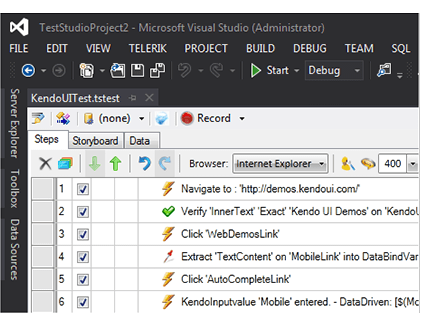
Resources for Webinar Integrating Coded Steps in Telerik Test Studio

Learn more about Test Studio here

On Aug 22 we conducted a webinar titled “Integrating Coded Steps in Telerik Test Studio”. This is part of the ongoing webinar series we here at Telerik India are doing targeting the APAC region. We call this the Telerik. .NET Ninja Developer Webinar series. You can take a look at the Aug-Sep schedule here

image

Slides deck of webinar is here,


For those of you who missed attending the webinar live, we have it covered for you. We record all our webinars and so was this one. Here is the recording of the webinar:


Telerik Ninja T-Shirt Giveaway:

We select 2 person from the webinar attendees and give away our .NET Ninja T-Shirt in each of our webinars. We have picked up 2 lucky persons in this webinar too. They are:

Farjana Parveen

swati gagare

Congratulations to the winners. We will be contacting you shortly and we will ship your t-shirts.

Excited to see you in next webinar

RadTileList

Resources for Webinar “Modern UI in ASP.NET Applications using RadTileList”

On Aug 8 we conducted a webinar “Modern UI in ASP.NET Applications using RadTileList”. This is part of the ongoing webinar series we here at Telerik India are doing targeting the APAC region. We call this the Telerik .NET Ninja Developer Webinar series. You can take a look at the Jun-Jul schedule here: https://telerikhelper.net/2013/05/24/telerik-webcasts-june-july/.

image

About RadTileList:

Build modern, Windows-8-like navigation easier and faster. With its first version the TileList control supports out of the box:

  • Single and multiple selection
  • 4 tile types: image, text, image and text, and template tiles
  • Peek templates and animations
  • Drag to reorder
  • Tile groups and more

Slide Deck:

Here is the slide deck from the webinar:


Webinar Video:

Here is the recorded video of the webinar:

Questions & Answers:

As with all the webinars, we too had a bunch of questions in this webinar too. We answered a few and we couldn’t answer many of them. So we will try to answer as much questions as possible here:

Q: Any size restriction for the Image and Text tile?
A: The tiles are of 2 types – – Wide and Square. Wide tiles have a dimension of 350x150px and Square tiles are of 150x150px dimension.

Q: we can use any type of image?
A: Yes. Any image types can be used in the Image tiles.

Q: Difference between ContentTemplate and Text Tile?
A: You can take a look at the Tiles overview here: http://www.telerik.com/help/aspnet-ajax/tilelist-tiles-overview.html

Q: Image and Text Tile, title will always be at bottom or we can arrange the position?
A: The Title is always at the bottom. You cannot customize that.

Q: Can we format text in the image and text tile control?
A: Yes. The content text of the tiles can be customized.

Q: Can the badge be mapped to any other page say a link?
A: No. The linking is on the tile itself. The Modern UI philosophy is all about using the Tiles as a navigational item. The Badge is used as a additional information display.

Q: Whether Tile can be customized to various size?
A: No. The tiles come in two dimension: Wide – 350x150px and Square – 150x150px.

Q: Can these tiles be resized?
A: No. They come in standard dimension as per the Modern UI guidelines – Wide and Square.

Q: can we use effects the way tile appears?
A: Yes. We have the concept of Peek Templates. Peek Templates have settings which control how the template should appear. You can find more info here: http://www.telerik.com/help/aspnet-ajax/tilelist-tiles-peek-template.html

Q: what all languages you support in RAD?
A: C# and VB.NET

Q: We have Telerik license for developers. Do we need to install it on production server also ?
A: No. the app build will contain all that is required for Telerik controls to work. No need to install it on production server.

Q: Can I change the positions of Title and Badge ?
A: No. This is as per the Modern UI guidelines and it dictates that the Title and Badge have to be in the lower portion of the tile.

Q: I am curious about its interoperability along with several other controls in Telerik?
A: You can work with this control programmatically too. You can wrap this control and create your sub classed controls too.

Q: Can I use RadTilelist control in sharepoint 2010/2013 applications?
A: All of our ASP.NET AJAX controls suite is SharePoint compatible. You can use our AJAX controls in custom WebParts and host them in Sharepoint.

Q: If the content exceeds the height of the content tile how we have to control the text flow?
A: As per the design principles, when using ContentTemplate Tile, the text or content you provide should be a short and informational text. You can use CSS to control the overflow – but then it will bring in the scroll bars and the whole tile concept wont look good.

Q: How it works in Desktop app UI design. We don’t deal much with Web app coding?
A: We have Windows Presentation Foundation control suite and Windows Forms controls suite for desktop applications. WPF has TileList control and Windows Forms has RadPanirama control. Both of these controls help you build a Modern UI like navigation using Tiles in your windows applications.

Q: Once Tiles are re-arranged,, whether this can be persist or re-set after page refresh?
A: Yes. The selections can be persisted. You can integrate with the RadPersistenceFramework.

Q: Is this also part of ASP.net MVC?
A: No. This is part of ASP.NET Webforms.

Q: how to resize the tile as in windows 8 using rad controls?
A; At the moment we don’t support resizing.

Q: Can we bind these values to some data source so that frequently that can be refreshed, like we have in Mail tile in Windows 8?
A: Yes absolutely. You can do that certainly.

Q: Am using Telerik controls version: 2013.1.403.40, but this doesn’t contain Rad tile List control in toolbox?
A: This was released as part of our Q2 release. So upgrade yourself to 2013 Q2 release and you will see the control.

Q: do we documentation available for RadTileList ?
A: Yes very much. You can find the documentation here: http://www.telerik.com/help/aspnet-ajax/tilelist-overview.html

Q: Can Tile be created as dynamic as similar to number of rows in Grid?
A: Yes. You can programmatically create the Tiles too. You don’t have to place them on designer like the way I did in the demo.

Q: Why is it called RADControls?
A: RAD stands for Rapid Application Development. We help you build things faster. We help you improve your productivity through our controls. Our controls contains out of the box many features that otherwise you will need to build them by yourself.

Q: can we create a link on image to redirect to another page?
A: All the tile types support NavigateUrl property which when set, clicking the tile will navigate to that page.

Telerik .NET Ninja T-Shirt Giveaway:

We select 2 persons from the audience in every webinar and give away a Telerik .NET Ninja T-Shirt. So from this webinar we have randomly selected the following 2 persons:

  • Himanshu Garg
  • Kothainayaki Krishnamoorthy

Congratulations to the winners. We will be contacting you shortly to get your postal address. We will ship you your T-Shirt soon. Rest of the folks, don’t worry we have a lot of webinars coming up. So try your luck in next webinars.

Till next time – Happy Coding.

Resources for Webinar “Data Driven Testing using Test Studio”

Learn more about Test Studio here

On Jul 18 we conducted a webinar titled “Data Driven Testing using Test Studio”. This is part of the ongoing webinar series we here at Telerik India are doing targeting the APAC region. We call this the Telerik. .NET Ninja Developer Webinar series. You can take a look at the Jun-Jul schedule here: https://telerikhelper.net/2013/05/24/telerik-webcasts-june-july/

image

Learn more about Test Studio here

Slides deck of webinar is here,

For those of you who missed attending the webinar live, we have it covered for you. We record all our webinars and so was this one. Here is the recording of the webinar:

Telerik Ninja T-Shirt Giveaway:

We select 2 person from the webinar attendees and give away our .NET Ninja T-Shirt in each of our webinars. We have picked up 2 lucky persons in this webinar too. They are:

Sharma, Avinash

Neha Tiwari

Congratulations to the winners. We will be contacting you shortly and we will ship your t-shirts.

Excited to see you in next webinar

Kendo UI Logo

Resources for Webinar “Developing ASP.NET MVC Applications Quicker with Kendo UI”

On Jul 11 we conducted a webinar titled “Developing ASP.NET MVC Application Quicker with kendo UI”. This is part of the ongoing webinar series we here at Telerik India are doing targeting the APAC region. We call this the Telerik .NET Ninja Developer Webinar series. You can take a look at the Jun-Jul schedule here: https://telerikhelper.net/2013/05/24/telerik-webcasts-june-july/

image

Kendo UI is a HTML5 based JavaScript framework for developing HTML5 based sites or apps. Its everything you need to develop the sites and apps. Its one package which will give you pretty much everything you need to develop a HTML5 based apps or sites. Although it is a client side framework and that means a lot of JavaScripting, we have you covered if you want to develop on the server side. We have what we call as ASP.NET MVC Wrappers for Kendo UI. This give you the power of JavaScript but the productivity of server side. So this webinar was all about how you can build UI quicker in ASP.NET MVC using Kendo UI.

Slide Deck:

Here is the slide deck which I used for the webinar:

Webinar Video:

For those of you who missed attending the webinar live, we have it covered for you. We record all our webinars and so was this one. Here is the recording of the webinar:

Questions & Answers:

During the webinar, my team tried hard to answer as many questions as we can. With the interest of the time we normally collect all your questions and try to answer them through this recap blog post. So here is all the questions and answers for them:

Q: What is the license cost or purchase cost for Kendo ?
A: kendo UI costing is available at this page: http://www.kendoui.com/purchase.aspx

Q: Can we use Kendo UI for asp .net apps without MVC?
A: Yes you can. But note that Kendo UI is all about client side. So no server side programming of Kendo UI controls. You will need to use JavaScript way of working with Kendo UI in technology other than ASP.NET MVC. The server side wrappers are available only for ASP.NET MVC.

Q: Is Kendo UI available as part of Telerik Controls ?
A: You can buy Kendo UI as a single product. Here is the Kendo UI pricing – http://www.kendoui.com/purchase.aspx.  Also, if you buy any of our DevCraft bundles, kendo UI is included in the bundle. Here is our DevCraft bundle pricing – http://www.telerik.com/purchase.aspx

Q: Any live application developed using kendo UI?
A: You can take a look at www.kendouimusicstore.com. This is a famous reference app for ASP.NET MVC which was developed by Microsoft. We took the same and converted it to a Kendo UI application with front end being completely done using Kendo UI controls and back end powered by Web API.

Q: Before starting development, which language knowledge required?
A: If you know JavaScript, then you know Kendo UI. Kendo UI is built on JQuery. So nothing new to learn. If you want to program Kendo UI using a server side technology – we support Server Side Wrappers for ASP.NET MVC, JSP and PHP.

Q: Can we use kendo UI with Web API?
A: Yes absolutely. Kendo UI has Data Source that easily connects with Web API.

Q: To develop app in Kendo UI little bit JS is enough?
A: Yes, you do require JS knowledge especially awareness of jquery kind of syntax. But you can directly use ASP.NET MVC, PHP or JSP server side technologies too.

Q: How do we decide between jQuery UI and Kendo UI? Do we have comparison charts between these products?
A: Take a look at this article – http://jqueryuivskendoui.com/

Q: Will Kendo UI Support SharePoint 2010?
A: Kendo UI is a client side control set. As long as you develop a webpart which supports accessing external JavaScript and Stylesheet, Kendo UI can be used anywhere.

Q: Can we use knockout.js in Kendo UI or it’s not required because it’s different JavaScript library similar to knockout.js
A: Kendo UI has all the capabilities that you require (even of KO). But you can also use KO with Kendo UI.

Q: What kindsof data sources are supported?
A: Out of the box Kendo UI Data Source can handle JSON and XML.

Q: Does it support multiple cultures?
A: Globalization is one of the features in built in Kendo UI. So you can include the appropriate culture Kendo UI JS file and set the culture you want to work with. Rest will be handled by Kendo UI.

Q: Is Kendo UI a jquery plugin?
A: Kendo UI is not a Jquery plugin or a clone. Kendo UI is written from ground up but is based on Jquery. Jquery is the only dependency Kendo UI has. All the constructs in Kendo UI are similar to Jquery so that the learning curve is less.

Q: What are the key features of Kendo UI Mobile?
A: You can take a look at our Kendo UI Mobile product page – http://www.kendoui.com/mobile.aspx

Q: Is there any Kendo Controls for Winforms?
A: No. Kendo UI is for Desktop Browser based application and Cross Platform Hybrid Mobile Application development. for WinForms we have a separate control suite which you can take a look at here – http://www.telerik.com/products/winforms.aspx

Q: Can we have Scheduler control in Kendo UI?
A: Yes. Scheduler control is available as part of Q2 2013 release of Kendo UI.

Q: Can we use Kendo UI to show data in modal and provide CRUD operations with validations in Kendo UI
A: Kendo UI Grid already supports this feature. Take a look at our Grid demos online at – http://demos.kendoui.com/web/grid/index.html

Q: Kendo UI is only a Java Script library or any server side components are also involved?
A: Kendo UI is a client side HTML5 based JavaScript framework. We have server side wrappers to speed up your Kendo UI programming. The wrappers just output the necessary JavaScript code which otherwise you would have to write.

Q: Can we bind data from SQL DB?
A: You need to create Web Service or Web API which can return the data as JSON. Kendo UI has a JavaScript data source which can work out of the box with a service returning JSON payload or xml payload.

Q: Does that mean apps developed using Kendo UI can be used on mobile browser?
A: Yes. Kendo UI Web controls are touch aware and can run on all modern browsers.

Q: How do we compile to native app after completing the app in Kendo UI mobile?
A: If you are using our Cloud Based IDE – ICENIUM, it lets you build for iOS and Android platform right from the IDE. Otherwise you will need to use PhoneGap build mechanism to generate the package.

Q: How Kendo UI is different when compared with Knockout.Js ?
A: As far as I know, Knockout.js is a library to achieve data binding where as Kendo UI is a complete framework which provide Widgets/MVVM/Validation etc.

Q: Is there any project template for VS2012 from kendo UI?
A: Yes. When you install Kendo UI using our installers, we ship in a Visual Studio project template to speed up your ASP.NET MVC development with Kendo UI.

Q: Can we integrate WPF app in this Kendo UI?
A: WPF is a different technology set. Kendo UI is meant for Web applications & not WPF.

Q: What are the mandatory script files need to be included in kendo UI on working in MVC 4?
A: You need to include Kendo UI Web JavaScript and Kendo Stylesheet files into your project.

Q: Does charts in DataViz support on IE8 ?
A: Yes, it is supported.

Q: Can the CSS be modified as per our need?
A: Yes absolutely. We even provide an online tool to facilitate this: http://demos.kendoui.com/themebuilder/index.html

Q: Can you talk about Kendo UI licensing?
A: Kendo UI is licensed on per developer basis. For more details and discounts, please write to sales@telerikindia.com

Q: Do you have any facility for group license?
A: Yes, absolutely. Please write to sales@telerikindia.com

Q: In the era where the line between PC/Laptop display and mobile display getting blurred day by day, e.g. PCs getting touchscreen, mobiles/tablets getting Full HD/Retina displays, how one should plan their investment for web application? I mean if we are targetting global reach, how you recommend Kendo UI for mobile/MVC?
A: Kendo UI Mobile is used to create Cross-Platform Apps. Using that you create apps for devices and phones . Kendo MVC Wrapper is used in MVC based web apps .

Q: Is this light weight control?
A: Yes, Kendo controls are very light weight controls with no addition to ViewState etc. Since it can use the client side processing capabilities as well, the performance is phenomenonal. It also supports virtualization etc.

Q: Can you elaborate more on “Virtualization”?
A: do take a look here: http://demos.kendoui.com/web/grid/virtualization-remote-data.html

Q: what is MVVM framework?
A: Kendo comes with its own optimized MVVM framework. Please refer to the following webcast that we had done on the same: https://telerikhelper.net/2013/05/31/resources-for-webinar-mvvm-validation-using-kendo-ui-in-web-applications/

Q: Can we use trail version control in any professional web site?
A: No, trial license explicitly forbids you from using it in live/professional web sites. Please write to sales@telerikindia.com and we can help you further with more information.

Q: Not clear how chart series changes according to data
A: Learn more about charts here http://demos.kendoui.com/dataviz/bar-charts/index.html

Q: How can we do conditional validation in KENDO UI?
A: Please do take a look at the demo here: http://demos.kendoui.com/web/validator/index.html

Q: Kendo is for web based or mobile based services?
A: Kendo UI web is meant for web apps. Kendo UI Mobile is meant for mobile. They both share a common base framework.

Q: Will there be wrapper for ASP.NET wrapper in future. We currently use ASP.NET Telerik.
A: We already have a wrapper for ASP.NET MVC. If you are using WebForms, the RadControls are the ideal controls to use. We are constantly adding & updating those controls.

Q: Can we use Kendo UI for java web application
A: Yes, we have a JSP wrapper for the same. More details here: http://www.kendoui.com/server-wrappers/jsp.aspx

Q: Can i use knockout.js with Kendo UI mvc
A: Pls take a look here: http://rniemeyer.github.io/knockout-kendo/

Q: Can we use kendo controls in VS2008
A: Sure, you can. they are simple JS libraries that can be added. It has no IDE requirements.

Q: Is there any other separate editor for Telerik development?
A: We don’t have any IDE requirement for Kendo UI. If you are doing MVC development you will want to use VS and Kendo UI wrapper for MVC

Q: Does the kendo mobile support in all the browser?
A: Yes. It only requires HTML 5 support in the browser. All modern browsers support that.

.NET Ninja T-Shirt Giveaway:

we select 2 person from the webinar attendees and give away our .NET Ninja T-Shirt in each of our webinars. we have picked up 2 lucky persons in this webinar too. They are:

  • Karthikeyan R

  • Harvinder Singh

Congratulations to the winners. We will be contacting you shortly and we will ship your t-shirts. Rest of the folks don’t worry – we still have loads of webinars lined up for this year. So do attend our future webinars without fail and try your luck to be the .NET Ninja.

Till next time – Happy Coding.

Join me for the Webinar on Data Driven Testing with Telerik Test Studio

Learn more about Test Studio here

Register here to attend webinar

clip_image001

On 18th July 2013 we are conducting webinar on Automated Data Driven Testing with Test Studio from 3 pm to 4 pm

Register here to attend webinar

When same test gets executed several times with different set of data then it is called Data Driven Testing. Data used in test is called “Test Data “. Test Data can reside in any external form like in Excel file, XML file or Databases. Before using, Test Data should be added as data source in test project. In Data Driven Testing same test get executed several times with different input data. There may be scenario in which test logics and test results both are data bound.

In this webinar we will learn to automate Data Driven Testing using Test Studio. We will learn how we can data bind test from various data sources like Excel and databases.

Learn more about Test Studio here

See you in the webinar .

Register here to attend webinar

Resources for Webinar “Hybrid Mobile Application Development with cloud based IDE – Icenium”

On Jun 25th we conducted a webinar titled “Hybrid Mobile Application Development with Cloud based IDE Icenium”. This is part of an ongoing webinar series we here at Telerik India are doing targeting APAC region. We call this the Telerik .NET Ninja Developer Webinar Series. You can take a look at the Jun-Jul schedule here: https://telerikhelper.net/2013/05/24/telerik-webcasts-june-july/

Get it started with Icenium here

image

In webinar we discussed following topics,

  • What is Hybrid Application
  • Introducing Icenium
  • Introducing Kendo UI Mobile
  • Creating Employee Details App on Northwind database
  • Working with Views , Template , Datasource
  • Consuming services

Slide Deck

Here is the slide deck which I used for the webinar

Recorded webinar

Here is the recorded webinar


NET Ninja T-Shirt Giveaway:

We select 2 person from the webinar attendees and give away our .NET Ninja T-Shirt in each of our webinars. We have picked up 2 lucky persons in this webinar too. They are:

Jalani S

Nitish Agarwal

Congratulations to the winners. We will be contacting you shortly and we will ship your t-shirts.

Resources for Webinar “Cloud Based Enterprise Apps using Everlive”

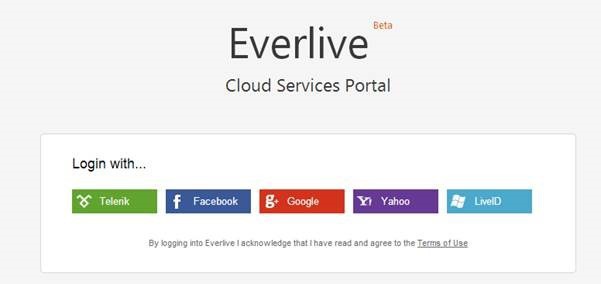
On Jun 20th we conducted a webinar titled “Cloud Based Enterprise Apps using Everlive”. This is part of an ongoing webinar series we here at Telerik India are doing targeting APAC region. We call this the Telerik .NET Ninja Developer Webinar Series. You can take a look at the Jun-Jul schedule here: https://telerikhelper.net/2013/05/24/telerik-webcasts-june-july/

To get started with Icenium Everlive visit its Everlive portal here

clip_image001

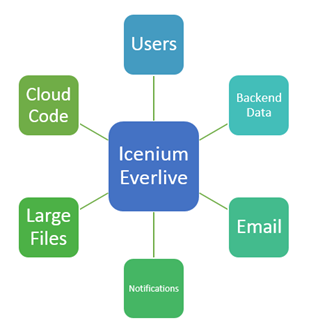
Icenium Everlive is “Backend as a Service” and it provides following as service,

  • Backend Data
  • Large Files.
  • Users
  • Email
  • Notifications
  • Cloud Code

image

All the services can be accessed via REST API, JavaScript SDK or .NET SDK.

Slide Deck:

Here is the slide deck which I used for the webinar:


NET Ninja T-Shirt Giveaway:

We select 2 person from the webinar attendees and give away our .NET Ninja T-Shirt in each of our webinars. We have picked up 2 lucky persons in this webinar too. They are:

Soumya R

HC Suraj

Congratulations to the winners. We will be contacting you shortly and we will ship your t-shirts. Rest of the folks don’t worry – we still have loads of webinars lined up for this year. So do attend our future webinars without fail and try your luck to be the .NET Ninja.

To get started with Icenium Everlive visit its Everlive portal here

Resources for Webinar “Reporting Solution for ASP.NET Application using Telerik Reporting”

On Jun 13th we conducted a webinar titled “Reporting Solution for ASP.NET Applications using Telerik Reporting”. This is part of an ongoing webinar series we here at Telerik India are doing targeting APAC region. We call this the Telerik .NET Ninja Developer Webinar Series. You can take a look at the Jun-Jul schedule here: https://telerikhelper.net/2013/05/24/telerik-webcasts-june-july/

image

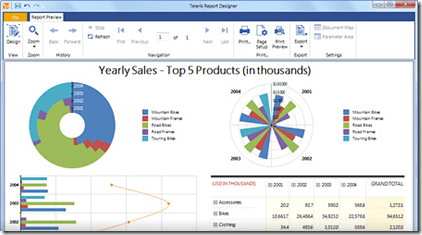
Telerik Reporting is a lightweight reporting solution for all .NET cloud, web, and desktop platforms (Azure, Silverlight, WPF, ASP.NET and Windows Forms) which targets developers and end-users alike. Rich interactive and reusable reports can be created by developers in Visual Studio, and by end users in the desktop-based Report Designer. With the help of Telerik Reporting users can examine and probe data, export reports to Microsoft Office Word and Excel for further analysis, and even present them as PowerPoint documents.

Slide Deck:

Here is the slide deck which I used for the webinar:

Webinar Video:

As usual we have this webinar recorded. So if you missed attending the webinar live, you still have a chance to catch up and that too at your own time. Here is the video recording:

Question & Answers:

During the webinar may questions were asked by the audience. We tried our best to answer as many as we can. We will try to address each and every questions from the webinar in this section.

Q: How to save report data in cache?
A: Data is provided to a Telerik Report using the DataSource property. So you can actually make use of the ASP.NET Caching mechanisms and store your report data. Then at runtime read the data from cache and provide it to the report data source.

Q: Can Telerik Reporting be used in SharePoint?
A: Yes you can. Here is the documentation – http://www.telerik.com/help/reporting/asp-net-report-viewer-deploying-web-reportviewer-in-moss.html

Q: Can I use Telerik Reporting in ASP.NET MVC?
A: Yes you can. Take a look at the following blog post: http://blogs.telerik.com/telerikreportingteam/posts/13-03-26/telerik-reporting-in-mvc-sure-it-takes-8-quick-steps-

Q: Does report have any source code?
A: Yes. The Report is a POCO class inhering from Telerik.Reporting base class. So although you design the report using the designer, it is basically a C# class file under the hood.

Q: Is it building the app while we see the preview?
A: When you preview, yes the class library project in which the report is hosted is built.

Q: Difference between Preview and Html Preview?
A: Preview uses Windows Host and it is as if you are hosting the report in a Windows Application. Html Preview uses IE as the host and it is as if you are hosting the report in a Web Application.

Q: Can i use SSAS as data source here?
A: Yes. You can. Take a look at this: http://www.telerik.com/products/reporting/managing-data.aspx#populating-data

Q: How to create report from WCF service?
A: You can always feed the report with a data coming from WCF Service. Telerik Reporting support Business Objects as a valid data source.

Q: Can we export the report using report viewer?
A: Yes, absolutely. Export to PDF, Excel and other formats.

Q: Can we style and individual cells? and copy the style from one to other?
A: Yes each individual cells can be styled. You can copy one style to another in the designer.

Q: Can’t we add this thumbnail Image in during report creation through wizard ?
A: Yes you can. The demo was to showcase our Data Explorer window feature which makes it easy for your to drag and drop data fields on to the designer.

Q: Does it can have navigation from one report to other report like drill down?
A: Yes you can do that. Here is a short video which showcases how to do that: http://tv.telerik.com/watch/reporting/creating-drilldown-reports-with-telerik-reporting

Q: will the Telerik menu come if we install Telerik Reporting in our machine
A: Yes. when you install Telerik Reporting you will see the Menu Item inside your VS.

Q: Can we give parameter at run time?
A: You normally define the report parameters at design time itself and use the report parameters in your queries to filter. You can always set value of a parameter at run time.

Q: What is the difference between Telerik Reports and RDLC reports?
A: Here is a interesting discussion on this subject on Stack Overflow – http://stackoverflow.com/questions/1444144/telerik-reporting-over-ssrs

Q: Can we create a drop down list instead of textbox to pass a parameter?
A: Yes you can. In fact you do not have to do anything except to say that the report parameter supports MultiValues. You do this by setting the MultiValue=true in the report parameter properties.

Q: Can we convert Crystal Report and SSRS Report into Telerik reports?
A: Yes. At the moment we support Crystal/Active/Xtra report conversion but not SSRS. Take a look at this: http://www.telerik.com/support/kb/reporting/general/converting-reports-from-various-versions-of-crystalreports.aspx

Q: Where we can get those trial downloads?
A: You can get the trial downloads from the following URL: http://www.telerik.com/products/reporting.aspx

Q: If any changes is done to Report Library as in this case today, will it get auto refresh?
A: You will need to redeploy the report library DLL to you Web Application Bin folder and you will have the refreshed report.

Q: Can we schedule the report subscriptions like SSRS?
A: Nope. Telerik Reporting is not a side reporting solution. So out of the box we do not have this feature. But having said that – its easy to build it. The reports are nothing but C# classes under the hood so you can build a scheduling agent which programmatically creates the report, export it to a format of your choice and send it through email.

Q: We have similar functionalities available with SSRS, Just wanted to know what additional features we have with Telerik reporting ?
A: A great comparison is found here: http://stackoverflow.com/questions/1444144/telerik-reporting-over-ssrs

Q: Should we use Dataset in place of giving the physical database connection in Telerik report ?
A: The ObjectDataSource will let you bind to any objects that you might have in BLL. Take a look here for step to step: http://blogs.telerik.com/blogs/13-06-06/reporting-or-control-suites-what-to-use-when-part-2

Q: Can we call this report from c# code without report viewer and get result in the PDF file?
A: Yes you can. The report is basically a C# class file. You can instantiate this at runtime and export to any format of your choice.

Q: Can we edit any grid row/column as in other grid?
A: No. This is reporting so no editing feature.

Q: Can we use any of web control as input parameter for report viewer?
A: You do not need to use any web control. Report Viewer itself is a control as part of our RadControls for ASP.NET AJAX suite.

Q: Do you have loading window when you click on Print Preview?
A: Yes we have. When you click on Print Preview, we will show a “Generating  Report” loading animation.

Q: Can we expand/collapse a particular group as a bunch of values?
A: Yes you can. The Expand/Collapse feature is supported.

Q: How can we display the Telerik reports using viewer in Winforms?
A: WinForms suite also contains Report Viewer control. So the same report can be displayed on WinForms too.

Q: Can we create charts – like pie, bar charts?
A; Yes you can. Check out our demos to take a look at the charting capabilities.

Q: Can we use Telerik reporting for Analytical data source? i.e. SSAS – cube n all
A: Yes. Take a look here: http://www.telerik.com/help/reporting/cubedatasource-configuring-project.html

Q: Can we have dependency of parameters, ex: first parameter is Countries, when country is selected, States should be displayed in second parameter
A: Yes you can. The cascading of parameters is possible.

Q: Can we directly print reports without print preview?
A: Yes. The report viewer has a print report button which will invoke the OS print dialog.

Q: Export functionality is inbuilt or we need to do some coding for it?
A: Export to different formats is in built in Report Viewer control. You don’t have to do anything extra to use the feature.

Q: Can I email the report directly without showing the report to user?
A: You will need to use Reporting API to achieve this functionality.

Q: Will it also be compatible with the recent version s of any report viewer like with excel 2010 or later versions?…I am asking in terms of generating output format
A: Yes the generated reports are compatible.

Q: Can we have docs/examples to implement Telerik reporting – sample projects?
A: Sample projects are installed once you install Telerik Reporting on your machine. More demos can be found at: http://demos.telerik.com/reporting/home.aspx

Q: Can we put a calendar in filters ?
A: When you create a parameter of type Date/Time, the UI for that parameter is automatically rendered as a calendar.

.NET Ninja T-Shirt Giveaway:

we select 2 person from the webinar attendees and give away our .NET Ninja T-Shirt in each of our webinars. we have picked up 2 lucky persons in this webinar too. They are:

  • Manoj Singh
  • Sulabh Sarna

Congratulations to the winners. We will be contacting you shortly and we will ship your t-shirts. Rest of the folks don’t worry – we still have loads of webinars lined up for this year. So do attend our future webinars without fail and try your luck to be the .NET Ninja.

Till next time – Happy Coding.

Resources for webinar “Building Uncomplicated Single Page Apps (SPAs) with Kendo UI”

On Jun 6th we conducted a webinar titled “Building Uncomplicated Single Page Apps (SPA) with Kendo UI”. This is part of an ongoing webinar series we here at Telerik India are doing targeting APAC region. We call this the Telerik .NET Ninja Developer Webinar Series. You can take a look at the Jun-Jul schedule here: https://telerikhelper.net/2013/05/24/telerik-webcasts-june-july/

SPA or Single Page Application is a way of building web applications which literally consists one single html page.  The application works by creating screens on the client side which is basically nothing but templates and getting the required data at different intervals as JSON payloads. So we showcased Kendo UI power and feature of building these SPA without any complication. The backbone of Kendo UI SPA is Rouer, View and Layout. So through this webinar I showcased how a SPA can be built with much hassle and very easily. Hope you go through the slide decks and the video recording of the webinar and find it useful for you.

Slide Deck:

Here is the slide deck used for the webinar:

Video Recording:

As many of you have been asking, we did record the webinar. So here is the video of the webinar:


Questions & Answers:

During the webinar there were many questions that you guys had asked. We tried our best to answer as many as we can. As a regular practice, we answer all the questions in the recap post. So here are all the questions and answers for them:

Q: where we can use SPA?
A: Anywhere User experience is critical – both enterprise and consumer apps.

Q: How does grid adapt to mobile?
A: Grids are not ideal for mobile applications. You may want to use ListView if you are primarily targeting mobiles.

Q: What is an Observable?
A: Observable is Kendo UI object that is used for supporting MVVM.

Q: How can i design Grid View UI as look like Windows 8?
A: You need to put custom CSS on Kendo Grid to achieve Windows 8 metro GridView look

Q: Do we have any IDE intelligent enough for kendo?
A; If you are using Visual Studio as IDE you will be able to get intellisense. Since its just plain JavaScript you can actually use any editors even Notepad.

Q: Can we have SPA project template for visual studio? i think development can be much quicker using that?
A: We currently don’t have it. Having said that its as easy as adding a stylesheet and a JavaScript and you have Kendo UI in your application. So you don’t need a SPA template as such. But our product team will start looking towards this.

Q: All the data binding must happen in a script tag?
A: Data binding happens in model that ultimately uses Kendo UI DataSource. It saves you a lot of writing AJAX code.

Q: What is a Router?
A: Router is the back bone of SPA feature using Kendo UI. It is responsible for tracking application state and navigating between the app states. You can read more on Router here: http://docs.kendoui.com/getting-started/framework/spa/router

Q: If our SPA is having multiple window and each window is having some sort of datagrids, charts , different lists etc, say various aspects of sales info. So, in that case where should we keep the templates, in the same page or we can put those in other files?
A: Templates can be in the same page or created as a separate script files. When you create templates as different files, you can use concept of Template Loader and load the template as you require. It all depends on your architecture.

Q: Can we create models on the fly? like dynamic?
A: Yes you can.

Q: Is kendo SPA having support for nested template?
A: Yes you can.

Q: Is there any Visual Studio plugin for Kendo UI SPA, which we can get from NuGet Package Manager? if not, does Telerik/Kendo UI has any plan to develop it? – it can be very useful for developers
A: Note that SPA is a feature available out of the box in Kendo UI solution. Kendo UI is available as NuGet package but be aware of the licensing terms. Kendo UI is not a free product. It is a licensed product.

Q: How we can change the Paging to Server side? We have to pass the page numbers and other parameters?
A: Kendo UI data source can page client side by default. If you don’t want that you can set ServerPaging to true and it will pass all the parameters required for paging to your service end point

Q: What about the performance of application when will have millions of record ? How it will be able to load in one time?
A: As a application architect you need to be wary of your data limits. Single Page Application is just a design paradigm of modern Web Applications. You will need to make sure you do paging on the server especially when you have million records. So you take control in this scenario for data loading.

Q: how to implement Kendo UI on SharePoint?
A: Kendo UI is all about 2 style sheet and 1 JavaScript file. So you can create your custom webpart and make sure to package the style sheet and javascript to the right location. The widgets will work as long as the path to the style sheet and script files are set correctly.

Q: Is Kendo UI libraries Open Source?
A: Nope. They are built, supported and sold by Telerik.

Q: Can I use WCF instead of Web API?
A: Yes. With HTTP binding that delivers JSON/ XML payload.

Q: You have edited the items only displaying in grid, if you want to edit more labels or data?
A: By default, the pop up mode of editing in Kendo UI Grid uses the column displayed to create the edit form. If you need to edit additional columns, you will need to create separate edit form and work with that.

Q: Can we use Kendo UI for offline purpose?
A: Kendo UI DataSource along with HTML 5 localStorage can be used.

Q: Data can be any custom XML. How difficult will it be to bind a custom XML with Kendo controls?
A: Yes any custom XML will do. It is as easy as just mapping what node maps to what property of the schema.

Q: IS JS wrapper. available in trial version for our Kendo UI POC that we need to show to our client?
A: Yes. Trial version is available on http://www.kendoui.com

Q: How to upgrade the Kendo UI version, once the application is already deployed
A: The Kendo UI is all about style sheet and JavaScript file. So you just swap the older version files with the new version files. That’s as easy as it can get.

Q: Does licensing allow to edit the source of kendo?
A: Yes. As a licensee you get the source code and you can modify it as per your needs. But you should know what you are doing :).

Q: Is there any service for android?
A: Yes. Please refer to Kendo UI Mobile. http://www.kendoui.com/mobile.aspx

Q: What is the licensing policy of Kendo UI?
A: The licensing is per developer and we do not charge you for deployments i.e. royalty free distribution.

Q: Will this support hybrid app development?
A: kendo UI Web is for web applications. If you are looking for Hybrid Mobile App Development you should take a look at Kendo UI Mobile. Kendo UI Mobile is a mobile control set which does adaptive rendering and is one of the best tools for Hybrid Mobile App development.

Q: What is the shortcut you are using to generate code snippet?
A: I was our Static Code Analysis product called JustCode. JustCode has a feature of Code Templates. So all my demo code were created as templates and a shortcut key associated with them. When have a key stroke which makes JustCode to autocomplete the code pertaining to the short cut key.

Q: Can we dynamically change the themes?
A: Yes you can. It is as easy as grabbing the link tag and changing the style sheet to be used.

Q: supports IE6?
A: We support IE7+ i.e IE8 and on wards.

Q: How it is differ from Upshot supported by Microsoft for SPA?
A: UpShot is not a SPA framework or solution rather it is a JavaScript library to make data retrieval in JavaScript easier. Where as Kendo UI is a complete framework which supports SPA feature out of the box and has a client side data source feature which does the data plumbing between server and client.

Q: Can we able to get the data through database connectivity?
A: The data is retrieved from DB in this demo as well. You need to build a service layer with Web API, WCF Data Service or WCF or any other non-.NET technology to retrieve data from the database

Q: Can we include 3rd party libraries in SPA application?
A: Yes, you are free to include 3rd party libraries. We can’t guarantee that there will be no conflicts.

Q: Does Telerik Test Studio support testing automation of all these?
A: Yes, Test Studio supports automation of Kendo UI controls.

Q: I see you used only JSONs as data type.. what other data-types available?
A: Kendo UI data source works very well with JSON and XML.

Q: Packaging support for android or IOS?
A: If you use our cloud based IDE called ICENIUM, it supports packaging for Android and iOS platforms with just a click.

Q: What about integration with Telerik controls?
A: Sure, this integrates with other Telerik controls too. Depending on the scenario, you can mix and match Telerik technologies.

.NET Ninja T-Shirt Giveaway:

As usual, we will be giving out 2 t-shirts in this webinar also. So following are the lucky winners of this webinar giveaway:

  • Udayakumar Mathivanan
  • Srinivas Abhishek

Congratulations to the winners. We will be contacting you soon on the email ids you have provided us during registration. The t-shirts will be shipped to you soon. Others don’t worry we still have a lot of webinars to go. So keep trying your luck by attending our webinars.

Conclusion:

In our endeavor to bring the Telerik technologies to each one of you, we are doing these series of webinars. Hope you are finding them useful. Looking forward to your presence in future webinars too. Till next time – Happy Coding!

Update:

Here is the GitHub repo to the source code of Kendo UI SPA demo: https://github.com/lohithgn/kendouispa/


Resources for Webinar “MVVM & Validation using Kendo UI in Web Applications”

On May 30 we conducted a webinar titled ”MVVM & Validation using Kendo UI in Web Applications”. We had around 600+ registrations for this webinar. We were very excited that many of you felt that the topic is an interesting one. So we are thankful to all of you who made it to the webinar. Hope you found the webinar useful and that it will be helpful in your day to day work.

image

Slide deck from the webinar:

If you missed attending the webinar, here is a chance to recap it through the slides. Here is the slide deck if you want to download:

Video Recording of webinar:

Many of you had asked if the webinar was recorded. Yes we do record all our webinars and here is the recording of this webinar. Hope this gives you a chance to catch up with the webinar:

Questions & Answers:

Many of you had a lot of questions during the webinar. We did try our best to answer many of them. So we are making sure that we address each one of them through this post. Here are the questions asked during the webinar and answers for the same:

Q: I am a .Net/Silverlight developer. What is the Usage of Kendo UI

A: Kendo can be used to develop HTML 5 apps. More details at: http://www.kendoui.com

Q: Can we use Kendo UI for Windows mobile or only for Androids?

A: Kendo UI Web can be used for Web App development. Kendo UI Mobile controls can be used for developing Hybrid Mobile Apps for multiple platforms i.e. iOS, Android, BB, WP8

Q: Can we use the Kendo UI using C# using .net ?

A: Kendo UI Web & DataViz provide server side wrappers for ASP.NET MVC. So you can program with your comfort of C# & Razor.

Q: Can we develop the Kendo Mobile Project on visual studio IDE, right?

A: Yes you can. Since its just a couple of stylesheet and  javascript, you can always use any editor of your choice. For Hybrid Mobile Application development we also have a cloud based IDE called Icenium – www.icenium.com

Q: By Kendo UI we can create widget – like calender, grid etc

A: Yes you can, though it is only one of its capabilties. Kendo UI Web already provide close to 20+ widgets out of the box. The demos for the available widgets can be found at: http://demos.kendoui.com/web/overview/index.html

Q: Is Kendo UI support all the browsers currently available?

A: We support the following – Internet Explorer 7+, Firefox ESR, Chrome, Safari 5+, and Opera 11+.

Q: Is it mandatory to use MVVM with Kendo UI?

A: No it is not. Kendo UI does support MVVM if you need it.

Q: Is Kendo UI a free version

A: No, Kendo is a paid product. You can

Q: So what is the next roadmap for Kendo?

A: Available here: http://www.kendoui.com/roadmap.aspx

Q: Does Icenium stores my code in a cloud based storage?

A: Yes. It does. The code is stored in Telerik servers. If you do not like our cloud, you can get a GitHub account and integrate Icenium with GitHub.

Q: Is Kendo UI like knockout.js, etc.,?

A: Knockout,js is a JavaScript library for supporting databinding on client side. Where as Kendo UI is a framework which supports the data binding out of the box. So you don’t need any extra library to support databinding and Kendo UI is the only thing you need.

Q: Can it run out of the browser?

A: it runs in the browser only. the browser can be on desktop or on mobile.

Q: So, If I use Kendo UI reference then we do not have to explicitly use jQuery.js reference?

A: Kendo UI depends on JQuery. So you will need to first reference JQuery and then Kendo UI scripts.

Q: In what all flavors(commercial) is Kendo available?

A: Details available here: http://www.kendoui.com/purchase.aspx. You can contact us at sales@telerikindia.com in case you want to make a purchase for yourself / organization.

Q: Does Kendo UI has specific framework for mobile ?

A: One part of Kendo UI known as Kendo UI Web is geared for mobile: http://www.kendoui.com/mobile.aspx

Q: What is this Kendo UI Framework, key points?

A: Marketing folks have done a good job and the features are provided here: http://www.kendoui.com/

Q: Can we use MVVM pattern in normal Asp.net web application?

A: Sure you can, using JavaScript.

Q: So what’s more beneficial to use KENDO UI rather than other available UI tool

A: 1. It is a fully integrated framework (data, UI, MVVM, charts, mobile) 2. Works better 3. Is continuously updated 4. Fully supported.

Q: Which all .Net framework version does Kendo UI supports?

A: Kendo UI Web is server technology obnoxious. Kendo UI is a HTML5 based client side framework. All you need is 2 stylesheet and a JavaScript. But we do provide Server Side Wrappers for ASP.NET MVC 3+.

Q: Does older versions of Visual Studio supports Kendo UI?

A: JavaScript API of Kendo can be used with any IDE (older versions of VS or Eclipse or Notepad)

Q: If i want by pass MVVM and use standard approach / does it support that , What is the licensing model with Kendo?

A: You can use Kendo UI without MVVM as well. MVVM is available in case you need it. Licensing is on a per developer basis.

Q: After getting product, is there any charge for support or maintenance from Kendo UI team?

A: The licenses are perpetual in nature. If you want product updates and support from the team, you have to maintain an active subscription by paying a renewal fee.

Q: Can we update the theme?

A: Yes. By simply changing the CSS file. And you can create your custom themes as well.

Q: Does Kendo UI has dependency on jQuery?

A: The only dependency Kendo UI has is that on JQuery and nothing else.

Q: Kendo provides any database also ?

A: No. Data has to be available over a Web Service. Kendo provides a client side data connectivity solutions.

Q: So after getting this product, is any training or demo free from kendo team?

A: A good getting started tutorial is available as Kendo Dojo: http://www.kendoui.com/dojo.aspx You can also request training from the product team as a paid activity.

Q: For email field, can we place two messages, suppose one for mandate entry and another for the format, ex: email is required and invalid email format?

A: Yes you can. you can use data-email-msg format to provide a message when email format fails.

Q: where can I view the old videos?

A: Telerik India Webinar resources: https://telerikhelper.net/category/webinars/. More Videos at: http://tv.telerik.com

Q: Definitely Kendo UI reduces the development effort. Can you quantify? How much it will reduce ?

A: We estimate this to be in the range of 20-30%.

Q: Does kendo use Knockoutjs for MVVM?

A: Nope. Kendo has its is own framework for MVVM. Doesn’t use KO.

Q: can we access server objects like sessions and application variables using Kendo?

A: No. Because Kendo UI is a client side framework.

Q: Do i need to download anything to use Kendo UI in VS2010?

A: Kendo UI can be used in 2 ways. Pure JavaScript way – for which you will  need the stylesheet and JavaScript. We provide Server Side Wrappers for ASP.NET MVC 3+. That will let you code Kendo UI from server side.

Q: More specific to Kendo UI : Does it take advantage of HTML5?

A: Kendo UI is based on HTML5 based. So we make use of HTML5 features to the core.

Q: How do we integrate web services in REST based calls in Kendo UI data binding?

A: Kendo UI has a feature known as Data Source. So this data source can be configured with CRUD endpoints and rest of the things will be done by the data source.

.NET Ninja T-Shirt Giveaway:

If you have been following our webinars you will know by now that we have been raffling out 2 .NET Ninja T-Shirts in each of our webinar. So we pick the following two people to receive our t-shirt for this webinar:

  • Mirang Parikh
  • Mohanrao Theeda

Congratulations to the winners. We will be contacting you shortly with the email you have provided. We will be shipping you your t-shirt. Rest of you folks don’t worry, we still have many more webinars to come. So make sure you attend without fail.

Till next time, Happy coding.

Recap of webinar: Building Windows Phone 8 Apps using Kendo UI

Download Source Code and Slides from here

clip_image001

On 23rd May 2013, we at Telerik India hosted a webinar on “Building Windows Phone 8 Apps using Kendo UI Mobile”. This webinar received great response from audience and we had around 150 developers attending webinar. Participants were very active during webinar and there were a flood of questions around Windows Phone 8, Coredova and Kendo UI.

We discussed following topics in webinar,

  • What is Hybrid App
  • Why we need Hybrid App
  • Setting Visual Studio2012 to develop Wp8 apps using coredova
  • Setting WP8 App project to work with Kendo UI

In demo part we covered following topics,

  • Creating Kendo Datasource
  • Consuming OData and REST Srervice in Kendo Datasource
  • Working with Kendo Template
  • Working with Layout , Views
  • Working with dynamic navigation

We learnt and experienced that how easily a developer could work with all complexities such that consuming services, navigating between views, working with layouts rendering native to WP 8, adaptive rendering etc. using Kendo UI Mobile.

If you create a Hybrid App for Windows Phone 8 using KendoUI Mobile and Coredova then with minimal or zero effort you can publish same app as iPhone app and Android App.

image

You can watch recorded webinar below,

As you can see in recorded webinar that we focused on writing codes and shown you how easily and quickly a Marketplace ready Windows Phone 8 app can be created using Kendo UI.

Download Source Code and Slides from here

You can revisit presentation of webinar below,

If you want us to do webinar on a particular topic related to Telerik products then feel free to send is mail at Dhananjay.kumar@telerik.com

Download Source Code and Slides from here

We had promised that we will be giving away 2 .NET Ninja T-Shirts as a webinar give away.

image

We normally pick 2 people randomly from the audience and raffle it out. So, as part of this webinar we are happy to say that the following 2 people are winners of our .NET Ninja T-Shirts:

  1. Ramu Naik
  2. Ardhendusekhar Kanungo

Congratulations to the winners. We will be contacting you shortly as we need your postal address to ship your t-shirts. Rest of you folks, don’t worry you still have chance to win the t-shirt. Do attend our next webinar which is on May 30 titled – MVVM and Validation with Kendo UI Web. Register for that webinar here

Download Source Code and Slides from here

clip_image001

Resources for webinar “ Web Content Management with Sitefinity”

On May 16 we conducted a webinar titled “Web Content Management with Sitefinity”. We pretty much had a full house on that day and we had a great show from Greg our Sitefinity Sales Engineer. We are thankful to one and all who attended the webinar and posted all your questions pertaining to Content Management System and Sitefinity in particular.

image

Slide deck from the webinar:

Greg did a great job in showing Sitefinity in action. So there was hardly any slides used. But if you would like to review the presentation, we have provided the same below:

Video Recording of webinar:
Also, as many of you had asked during the webinar – we do have a recording of the whole presentation. Here is the link to the video recording:

Questions & Answers:

Many of you had questions regarding the Sitefinity as a product. Here is a quick recap of some of the major questions asked during the webinar:

Q: Could you provide some website url which are running using sitefinity
A:  You can go to SiteFinity.com and look at Showcase area http://www.sitefinity.com/customers/showcases .

Q: is it customization friendly?
A: If you know ASP.NET WebForms or MVC – you can customize it to your will and wish

Q: what is the cost of license?
A: Take a look at pricing here http://www.sitefinity.com/purchase

Q: What is Connector for SharePoint?
A: If you have already an investment with SharePoint you can do a two way sync from Sitefinity to SP and vice versa using the connectors. You can know more about this here: http://www.sitefinity.com/sharepoint-integration

Q: Can we add new Contents other than in built Contents?
A: Yes you can create your custom content.

Q: Can we host the website built on Sitefinity on cloud?
A: Yes we support Azure – http://www.sitefinity.com/benefits/for-it-managers/windows-azure

Q: Does Sitefinity provide any Template Designer?
A: You can always upload a ASP.NET Master Page and make it as a template for your page. We do have a online template creator which lets you design a template with complete drag and drop feature.

Q: Can we integrate external controls like payment gateway to the pages ?
A: Yes. We have a ecommerce module built it in. So integration with payment gateways is easy

Q: Can the content be Role based contents as per authentication?
A: Yes. Granular access to content is possible with Sitefinity.

Q:  Can we host MVC3 based pages?
A: Yes. we support hybrid mode of development. Meaning you can customize and have either a Web Form based User Control as a customized widget or MVC based widget.

Q: how can we control the page access rights?
A: The page themselves have access rights defined which can be controlled from the back end.

Q: Is Sitefinity limited to e-Commerce only?
A: – No. We have news/events/forums/blog etc. modules out of the box. Take a look at our showcase area to see how this is used for a real world examples.

Q: : Can I develop and apply themes on Sitefinity?
A: Yes. Sitefinity supports ASP.NET theming.

Q: Can we create CSS layout from own template?
A: Yes you can do that.

Q: Can i apply different CSS/Page modeling for different display size?
A: Yes you can. Sitefinity comes with Responsive Design Module out of the box which will let you create different rule based on where your content can be viewed. The rule will define how your content needs to be shown when rendered on those devices/screen widths and Sitefinity will automatically take care of that.

Q: Can you explain how we can add DLL reference?
A: Sitefinity source code is a ASP.NET solution. so you develop using the VS IDE and add reference like you do with any asp.net app.

Q: Other that .NET 4.0, does Sitefinity have dependency on any other third party libraries?
A: No – we use our own controls within Sitefinity for e.g. RadControls for ASP.NET AJAX, Kendo UI, Open Access ORM.

Q: Can i create large web application using Sitefinity?
A: Yes you can. Take a look at our showcases area to see what people have built with Sitefinity: http://www.sitefinity.com/customers/showcases

Q: Can we develop application by Sitefinity for my android phone?
A: Yes. With Sitefinity 6 we have a mechanism where in you can create a custom module and with one click a Hybrid Mobile Application can be created for this custom module. The app will be able to perform full CRUD on your module and since it is hybrid, it can run on all platforms and provide you with native look and feel as we use Kendo UI Mobile controls.

Q: what are the features of Sitefinity?
A: Sitefinity features are listed here: – http://www.sitefinity.com/product/see-also/cms-features-list

Q: Is any Open Source version available of Sitefinity?
A: We do not have any Open Source version of Sitefinity. But we do have Community Edition which is completely free for personal site scenario. Here is more info on what does Community Edition contain: http://www.sitefinity.com/try-now/free-asp-net-cms

Q: Which version of ASP.Net does this belong to?
A: Currently Sitefinity supports Microsoft .NET Framework 4.0

Q: Does it support workflow functionality?
A: Absolutely. Custom and standard workflows, all based on Windows Workflow Foundation 4

Telerik .NET Ninja T-Shirt Giveaway:

We had promised that we will be giving away 2 .NET Ninja T-Shirts as a webinar give away. We normally pick 2 people randomly from the audience and raffle it out. So, as part of this webinar we are happy to say that the following 2 people are winners of our .NET Ninja T-Shirts:

  • Pramod Gupta
  • Ranjit Singh

Congratulations to the winners. We will be contacting you shortly as we need your postal address to ship your t-shirts. Rest of you folks, don’t worry you still have chance to win the t-shirt. Do attend our next webinar which is on May 30 titled – MVVM and Validation with Kendo UI Web.

Webinar Recap: Create faster Windows Store Enterprise Apps

image

On April 25th we had full house in webinar Create faster Enterprise Apps for Windows 8 . It was very overwhelming exciting discussion with attendees. In webinar we focused on DataGrid and Chart.

Download Demo Codes of Webinar

Learn more about RadControls for Windows 8

Download Trial version

In webinar we discussed

  • Different Windows 8 development paradigm
  • Setting up project to work with RadControls
  • Working with Charts in JavaScript based Apps
  • Working with DataGrid in Xamls based Apps

Here is the slide deck of webinar

During this webinar we had a lot of questions and I am trying to address them here:

Full form of WinRT?

WinRT stands for Windows RunTime

WinRT is common for both Windows 8 & Windows 8 Phone?

No WinRT is not common for both Windows 8 and Windows Phone 8. WinRT is part of Windows 8 Operating System.

Can existing .NET apps built on win xp or win 7 can we executed in win 8

Yes existing .NET apps can run on Windows 8 as desktop applications. There are two kinds of apps run on Windows 8. They are Metro/Windows Store Apps and Desktop apps. Any existing .NET apps from earlier version of Windows runs as desktop app on Windows 8

Is Silverlight supported on Windows 8 IE browsers?

No Silverlight is not supported on metro version of IE on Windows 8

Which Framework of .NET do we need for RadControls for Windows 8

RadControls for Windows 8 are supported on version 4.5

Can we use RadControls for Windows 8 in MVVM architecture?

Yes you can use them in App creating using MVVM architecture.

Can we sort the column in RadDataGrid control?

Yes sorting is implemented by default. On clicking column headers you can sort a column

In case we purchase rad controls today for $599, after august will we be eligible to get addition controls.if yes, do we need to pay more?

If you buy now you need to pay $599 and you will get all controls getting added till August. You do not need to pay anything extra then

Does grid support combobox, checkbox at cell level?

Yes you can add them. You can add any controls in TemplateColumns.

Is it possible to retrieve data from Windows Azure and result will display in Chart Rad Controls?

Yes you can retrieve data from Windows Azure. There are many options by which you can connect with Windows Azure

  • Creating a Service layer and accessing Windows Azure Services via Service
  • Using Windows Azure Mobile Services
  • Windows Azure SDK for Windows 8

Can we use ado.net or asp.net web api instead of wcf for linking to database?

Yes you can use ASP.NET Web API but you cannot use ADO.Net directly in Windows Store apps

Also, we had promised to attentive members from the audience will get our Telerik Ninja t-shirt. Well here are 2 winners we picked:

  1. Jaffar A
  2. Pramod Gupta

Congratulations to the winners and we will be getting in touch with you soon. Hope you liked this webinar and we hope to see you back in our future webinars.

Download Demo Codes of Webinar

Learn more about RadControls for Windows 8

Download Trial version

image

Resources for webinar on “Easy Agile Project Management with TeamPulse”

On April 18th, we had a full house during our discussion on Agile methodologies and a concrete implementation with Telerik TeamPulse. We were overwhelmed with the queries put forth by the attendees. If you would like to review the presentation, we have provided the same below:

And if you are someone who wants to stay ahead of the curve in the Agile space, we have some  breaking news.  A preview of the next version of TeamPulse (TeamPulse R1 2013) is now available as public Beta. Feel free to take a look if you are interested: http://bit.ly/tp-demo

imageThe FAQs from the webinar are as follows:

Q: on which platform it should work?

A: It will work on any platform. It is web application running in browser. Some screens are not supported on mobile devices as of now.

Q: The properties – are they customizable…can we add / modify / or delete?

A: Certain properties for the requirements are customizable for example you can change what appears in the drop downs for Maturity, Certainty, etc. You cannot change the names of the labels. This is done by modifying the project template.

Q: can we track multiple projects at the same time?

A. We offer a cross project view that allows you to track multiple projects

Q: can PO be the BA ?

A.  PO is responsible for:

  1. Maintaining the backlog
  2. Representing client interests in the Scrum team and get buy ins from various stakeholders

If BA can accomplish the above two, he/ she can act as PO too. Generally, PO is someone from the client side.

Q: is it mandatory to use TFS with the Team pulse?

A: TeamPulse can be used as a stand alone too. It is not necessary to use TFS for project management. If you have already invested in TFS – you can integrate with it.

Q: so where i have to use agile?

A: Where to use Agile – its up to you and your team. Agile is developmen methodology that industry is leaning to. Short sprints i.e. ideally a 15 days to 30 day sprints, where you work on a requirement and make sure you finish it to a done state. so its upto you if you want to go the Agile way or Waterfall model.

Q: what is TFS??

A: Microsoft Team Foundation Server – a source control from Microsoft ~Lohith

Q: even for new product there is a backlog..?

A: Can you please elaborate on this ?

Q: is the sprint scope defined by Scrum master or PO?

A: The sprint scope should be decided by the team based on their capability. It is important to know your team velocity so that you can deliver what you can promise. Buy in from PO is important too. Scrum Master is there to facilitate things.

Q: is some kind of automated integration available in teampulse for other telerik products?

A: TeamPulse integrates beautifully with Telerik Test Studio for bug management. While TeamPulse is built using Telerik controls, the cross project view is built using Kendo UI.

Audience Question:

Q: why the product backlog decided in the begining of the project??

A: In Agile Methodology – you identify the requirements or user stories upfront and create a log of that. That simply put becomes product backlog and once you achieve all the backlogs – you will have built your product. so thats why you define your requirements upfront. Thats one of the core agaile principles.

Q: please listout some scrum metrics

A. We offer burn down reports, velocity reports for individual projects and across projects. We also offer timesheet views and productivity views for individual team members.

Q: Do we have any video sessions for the Team Pulse?

A: We have what we call – Telerik TV – http://tv.telerik.com/products/teampulse. Here you can find short focused videos done by evangelists. This is a free public site. no registration required.

Q: Is there any option to track the retrospective out comes? so the team and scrum master can ensure that the retrospective points are addressed.

A. We have issues and risk to track retrospective outcomes

Q: Could Scrum be implemented in production support project?

A. While Scrum can be used in production support projects, Kanban is frequently used for this. TeamPulse can be used for managing Kanban projects as well.

Q: how we manage if task cannot be completed in a given sprint?

A: If the task hasn’t been started, the task should be assigned to the next iteration.

Q: can we do a migration from TFS 2012 to teampulse?

A: Yes we can. We now support TFS. take a look at this : http://www.telerik.com/agile-project-management-tools/tour/integrations.aspx

Q: Do you have some sort of mechanism to mark the user story as broken when a bug is associated to an user story?

A. Yes, it is displayed on the board that there is a bug or blocking bug. If blocking it will identified by red colored icon.

Q: if that is a new project….even then we have the backlog?

A: Yes. normally you will start with a product backlog. Then pull items to sprint backlog.

Q: how the roles will be assigned and mapped to each project ?

A. TeamPulse offers built in groups and the ability create new custom group. Such custom groups can be assigned the desired permissions in a project.

Q: We know in an agile environment, we need to respond to changes. What kind of change management process to be implemented for cost control?

A. None currently.

Q: looks like tfs can do pretty much all of these things. What advantages does this have over TFS?

A: TFS cannot give you metrics in terms of charting/gauging. You need Reporting Services along with it. And customization of those reports are not easy. TFS was not built as a project management tool – its more of a source control and task maintenance. With TeamPulse you can do project management and get health of multiple projects in one shot – which is not possible with TFS. If you are already invested in TFS, we add value as a complement to TFS rather than as a replacement. More  features can be read here http://www.telerik.com/agile-project-management-tools/tour/overview.aspx

Q: Does it have some sort of notification to the task owner if any associated issues/Impediment is resolved by the scrum master? or the scrum master will get the update?

A. He can through our notification system but he will need to configure what types of notifications to receive. There are some limitations.

Q: agile is a framework?

A: Yes, it is a framework as it makes recommendations. Scrum and Kanban are specific implementations of this framework.

Q: How about the interface to manage the issue management – if we are using some other tool on the same?

A: At the moment we support only integration with TFS.

Q: Can we use Teampulse for teams working across geographies?

A: Yes. TeamPulse is an ideal solution for such teams. This is a web application and so anybody can log in from anywhere. However, the teams needs to understand the Scrum process well.

Q: What database the TeamPuse connects with?

A. MS SQL Server 2008 or above. SQL express is also supported

Q: In the test management, there was one topic called traceability. What is it?

A: Traceability lets you trace different things like for a bug – in which sprint was it logged, what was the check in against that bug, which backlog item was that .. etc.

Q: When you create a task i could see Given, When and Then statements in it. Does it have any support to BDD?

A. No, the only BDD like item that provide is our acceptance criteria for stories and bugs but not on the task level.

Q: What all support does it have for the process compliance? do we have any reports specific for the quality delivery group?

A. None

Q: Can we do a migration of data from JIRA/TFS 2012 to teampulse?

A: At the moment we support only TFS.

Q: How can priority be assigned to a task?

A. You set priorities by dragging and dropping the order they should be completed in. So, a task on the top of the list gets more priority than the one of the bottom. While creating your Sprint backlog, it is important to start looking from the top.

Q: Is there any metric to measure regression caused in a sprint?

A. None

Q: how do we maintain the hierarchy of user roles? Do we have any such hierarchy?

A. With Personal you can link them to specific relationships

Q: Can we configure the list of work items that need to be completed as part of a user story? This is just for tracking its completion?

A. Yes through creating Tasks in a user story.

Q: Does TeamPulse integrate with JIRA?

A: At the moment no. We have integration with TFS only.

Q: do we have a desktop plugin version of this tool ? some environments may not have access outside intranet?

A. It’s a web application that is self-hosted on your server. So, the access can be restricted to the sub-set of people you desire.

Q: Can we handle restricted story points? Visible only to specific people?

A. No. All stories are visible to all team members. One of the key tenants of Agile is transparency throughout the team.

Q: once an epic is split into sprintable units, what do you do with the original epic? Do you keep it with the stories until all are done? Do you retire them into some kind of epic archive? Do you just delete them?

A. No, we can only show the relationship

Q: Can I check resource assignments using team pulse…like resource utilization etc?

A: Yes. we give you resource utilization metrics built on time sheets.

Q: How would we arrive at the velocity of the team?

A: Tam Velocity = Story or Tasks completed in a sprint

Q: the project status looks cool. Burn down chart is a really nice addon over TFS.

A: Thank you. Glad you like it.

Q: Is project manager and team leads both can see how many release are planned for particular month?

A: Yes.

Q: Does Teampulse comes with Tereik Test studio or similar?

A: TeamPulse is a separate product from Telerik. So it has a separate license. http://www.telerik.com/agile-project-management-tools/pricing-and-licensing.aspx ! http://www.telerik.com/agile-project-management-tools/pricing-and-licensing.aspx

Q: Is Team pulse compatible with Jira/ Clearcase/ Clearquest?

A: TeamPulse currently integrates with TFS.

Q: Where does the tool store all its metadata? Does it work on client-server relationship?

A. All data is stored on the SQL Database, a local XAP file is cache locally but no meta data is passed and stored in session

Q: Will developer daily need to update the story board?

A: As a best agile practice – you should burn your days hours. 🙂

Q: Is teampulse accessible via internet?

A: You can have a trial version of TeamPulse hosted by us for 30 days. You can quickly set it up at: http://telerik.com/agile-project-management-tools/try-now.aspx

Currently there is no SaaS offering available.

Q: can we assign the tasks to individuals in Teampulse.

A: Yes.

Q: Didnt see a log where we can have the daily meeting minutes entered so that it can be reviewed and the end of the sprint?

A. All requirements have a comments area that is threaded and could be used for this purpose

Q: Can we handle multiple project? and multple team?

A: Yes. we support cross project views. meaning – as a manager you can set up your dashboards to see health of more than 1 project.

Q: I believe the key behind agile is having all the learning experience documented for future reference and better sprint planning do we have any such features here?

A. Issues can be have a resolutions added to them and associated with a time line such as iteration or simply tag for future retrieval.

Q: How to login access to tempulse?

A: Currently, TeamPulse is a self hosted solution. It can be integrated with your Active Directory environment or can have separate login credentials.

Q: Project Management Reports is export them as PDF, Excel ?

A: Yes

Q: is it multilingual? can it be used in other language like spanish ?

A. No. Although comments, user stories etc can be put in any language. You can only localize our feedback portal.

Q: what are the process template available in Teampluse?

A. Scrum for Team System v 2 and 3, MS Agile, CMMI and Scrum and our own TeamPulse template You also have the ability to change any template.

Q: Does it support Kanban dashboard?

A: yes. WIP is supported.

Q: is the api available for teampulse?

A. Only for time tracking and an Odata layer for the rest of the application

Q: As a Customer can a person log a bug or enhancement by Email in TeamPulse?

A: Not by default. However, integration points are available.

API for time tracking as well TFS sync and hook from our testing suite Test Studio to capture acceptance criteria

If you have scrolled down to read this, you are obviously looking for the winners of the cool Telerik T-Shirt. Though we had only planned for 2 giveaways, we felt humbled by the engagement during the webinar. We have decided to giveaway 5 T-Shirts for this webinar. We are pleased to announce the winners of the same as the below:

  1. Suman Chatterhee, Symphony
  2. Suresh Subramanian, CTS
  3. Harris Vincent, CSC
  4. Jayachandran P, CTS
  5. Salil Bhatnagar

The winners have been contacted directly and the prize will be shipped to them shortly.

Feel free to post your query in the comments section below.