Kendo UI Grid

Simple Export to Excel from your Data Grid using Kendo UI

In Q3 2014 release of our Kendo UI, we added one of the most sought out feature in the Grid. Exporting grid data was one of the top ask feature for Kendo UI Grid. We are happy to say that with the Q3 release Kendo UI Grid now supports exporting to Excel or PDF document out of the box. In this blog post we will take a look at how to use the Excel export feature of the Kendo UI Grid.

Creating a Grid:

First we will create a simple Kendo UI Grid. I will connect to one of our demo service which is based on Northwind database. I will use the Products table and display Product Name, Units on Order and Units in Stock and will have a page size of 7. Here is the code snippet for the grid:

<div id="grid"></div>
<script>
    $("#grid").kendoGrid({
        dataSource: {
            type: "odata",
            transport: {
                read: "http://demos.telerik.com/kendo-ui/service/Northwind.svc/Products"
            },
            pageSize: 7
        },
        sortable: true,
        pageable: true,
        columns: [
            { width: 300, field: "ProductName", title: "Product Name" },
            { field: "UnitsOnOrder", title: "Units On Order" },
            { field: "UnitsInStock", title: "Units In Stock" }
        ]
    });
</script>

And here is the output of the above code snippet:

Kendo UI Grid

Providing Export Option on the Grid:

Before we proceed with enabling the export to excel option of the grid, there is one prerequisite that needs to be taken care of. Excel Export relies on a JavaScript library called “jszip”. This library needs to be referenced before Kendo UI JavaScript reference. JSZip is part of the Kendo UI distribution and is also available via the Kendo UI CDN:

<script src=”http://cdn.kendostatic.com/2014.3.1029/js/jszip.min.js”></script&gt;

Kendo UI Grid provides one of the easiest way to configure the export button options. If you have used Kendo UI Grid before, you will be familiar with the concept of Toolbars on Grid. We have provided a simple command which can be used in toolbar and provide export to excel or export to pdf option. Yes with just one setting you can now provide export capability on your grid. Let’s see the code to believe it:

<script>
    $("#grid").kendoGrid({
        toolbar:[“excel”]
        ….
        //code omitted for brevity
    });
</script>

And here is the output of the above code:

Kendo UI Grid with Toolbar
Let’s go ahead and click on the Excel export button. You should see a file named “Export.xslx” being download to your machine. Here is the screenshot of the excel file on my machine:

Excel Export File

Customizing the Exported Excel File:

So far we saw how simple it was to provide an export to excel capability on the Grid. But the exported file was named “Export.xslx”. Well that name is not intuitive. Better would be to provide a meaning full name to the excel file that’s gets exported. Fortunately, the Kendo UI team has thought about it and the Grid API has exposed certain options for Excel export feature. Let’s take a look at the options we have on hand:

Property Type Description
excel Object Configure the Kendo UI Grid Excel export settings
excel.fileName String Configure the file name of the exported excel file
excel.filterable Boolean Configure whether exported excel file will have column filtering or not
Excel.allPages Boolean Configure if all pages data need to be exported. Default is false

Let’s see the above excel options in action. Here is a code snippet which sets the excel options on the Grid:

<script>
    $("#grid").kendoGrid({
        toolbar:[“excel”],
        excel:{
	filename:”Northwind Products Stick List.xslx”,
	filterable:true,
	allPages:false
        },
        ….
        //code omitted for brevity
    });
</script>

Now, when we click on the Export to Excel button – the exported file will be named as “Northwind Products Stock List” and will have data filters on in the worksheet. Here is a screenshot of the exported excel file on my machine:

Excel Export File with Filters
Well that how easy it is to configure your excel export options.

Programmatically Export to Excel:

So far we have seen how the inbuilt feature of toolbar helps you to provide the excel export capability with juts a single setting. What if you have a scenario where you don’t need a toolbar button the grid rather you need a button outside the grid and on click of this external button excel file should be exported. Well even this scenario is covered by the export feature of Kendo UI Grid. Grid API exposes a single method called “saveAsExcel()” which can be invoked on the Grid at runtime and the excel file will be exported. Let’s see this in action. Here is the code snippet to do this:

<div id="grid"></div>
<button id="btnExport">Export to Excel</button>
<script>
  $("#btnExport").kendoButton({
    click: function()
    {
      $("#grid").data("kendoGrid").saveAsExcel()
    }
  })

    $("#grid").kendoGrid({
        excel: {
          fileName: "Northwind Products Stock List.xlsx",
          filterable:true,
          allPages:false
        },
        …
        //code omitted for brevity
    });

Lets take a closer look at what we have done here. I have placed a button outside the grid. I have gone ahead and set excel export options on the grid. When the button is clicked, I obtain a reference to kendo grid and call “saveAsExcel()” method on the grid instance. And the behavior is the same i.e. an excel file is exported according to the options set on the grid.

I hope this blog post excites you with the new feature of Kendo UI Grid namely Excel Export. If you have followed along the blog post, you would have realized that providing excel export option on a grid is as simple as setting couple of properties on the Grid itself. It cannot get any easier than this. Do give it a try and let us know your feedback or suggestion on Excel Export feature of Kendo UI Grid.

Note: The complete code of this blog post is made available as a Kendo UI DOJO here: http://dojo.telerik.com/@kashyapa/umuWI

Till next time, Happy Coding!

Top 5 Blog Posts of 2014

We wanted to take this opportunity to thank you for a wonderful 2014. We have learnt and grown with you. In all cases, we have tried to bring to you the latest and greatest from Telerik. The technology field is a quest that is never ending – And that’s what we love about it.

We wish all the readers of our humble little effort, a Very Happy New Year:

Card_India_2014

Before we let the year go by, here are the top 5 most visited blog posts from 2014:

Kendo DropDownList Wrapper for ASP.NET MVC
How to iterate all the data in Kendo UI Data Source
Kendo Editor Wrapper for ASP.NET MVC
Conditional statement in Kendo UI Template
Kendo AutoComplete Wrapper for ASP.NET MVC

In the coming days, we are even more excited about the emerging technologies on the horizon. This year we also added a slew of technologies from Progress Technologies that we will share in the coming days.

We are always looking for feedback and opportunities for improvement. Please do share your thoughts and comments about our blog and technologies in the comments below. We want to be better in 2015 for you.

Telerik Reporting

Video: Telerik Reporting with Visual Studio 2013 in WPF Applications

Recently, i was talking to a customer who was evaluating Telerik Reporting. They were on Visual Studio 2013 and wanted to use Telerik Reports in WPF application. But they were having difficulty getting started with our Reporting. In order to make things easier, i have recorded a getting started video for Telerik Reporting using Visual Studio 2013 and consuming the report in WPF application.

Here is the video:

Hope this helps anybody who is working on our Reporting software & WPF platform.

Till next time, Happy Coding.

Telerik Mobile Testing

Resources for Webinar – Mobile Testing with Telerik Tools

Proliferation of Mobile Devices have lead to many mobile applications. Testing of these mobile applications require a new approach and new tools. In this webinar, we have covered the same.

About Telerik Mobile Testing:

Telerik Mobile Testing is an automated testing solution for native, hybrid, and web apps. Write one coded test on the desktop and execute it against any supported devices and clients, including an iOS native app, Android native app, hybrid app(Android/iOS/WP), mobile browser, and desktop browser. These coded tests are written in JavaScript. To know more about Telerik Mobile Testing, check this link.

Telerik Mobile Testing

Telerik Mobile Testing

Slide Deck:

Here is the slide deck used for the webinar:

Video Recording:

The recorded video of the webinar is available below:

Q & A:

Q: Do we to write separate code for android and ios?
A: The operation will be different for different platform. but you write one test or spec.

Q: Can we create multiple agents and run on multiple agents?
A: Yes. supported. You can take a look at this video: https://www.youtube.com/watch?v=JxxAkK1h26o

Q: Do we need to know android coding before?
A: Nope. You just need to know how to access a particular element from the screen . we have a query syntax

Q: what would be the cost of Telerik framework?
A: Pricing is available here: http://www.telerik.com/purchase/platform

Q: Web application load-performance testiing can it be possible using Telerik Test Studio?
A: Yes. Teleik Test Studio can perform automated testing of any web pps which includes functional/load/performace – all with one software

Q: If I write code for ios and andriod under one spec can i run it seperatley for each of the platform?
A: When you write a test – you can have platform specific instruction written under the same test. The test runner will execute the appropriate instruction depending on the platform.

Q: How are elements located?
A: by tagname, by clasname, by id, by XPATH also

Q: How to lacate elements in app?
A: With our framework – it doesnt do auto detection. we assume you know the id or tagname or classname or xpath to locate a element

Q: Can parameterization is possible using Telerik Test Studio? Want to check login scenario with multiple users
A: Yes. Absolutely – data driven testing is supported.

T-Shirt Winners:

As with any of our webinars, we have selected the following 2 attendees randomly who will receive our .NET Ninja T-Shirt.

  • Rajitha K
  • Kapil Chabra

Congratulations to the winners. You will be contacted on your registered email and t-shirt will be shipped.

We hope to see you in our future webinars also.

Till next time – Happy Coding.

Sitefinity

Resources for Webinar – “Jumpstart your ASP.NET Project Development with Sitefinity Platform”

On Dec 11 2014, we conducted a webinar titled “Jumpstart your ASP.NET Project Development with Sitefinity Platform”.  This time the emphasis was on our Content Management Solution or CMS software that we have called “Sitefinity”. One of our Sales Engineer from Sofia delivered this webinar. This blog post is a recap of the webinar. if you missed attending the webinar, you will be able to catch up on the slide deck, video recording and questions from the webinar as part of this blog post

About Sitefinity:

Sitefinity is a content management system (CMS) that you use to create, store, manage, and present content on your website. Content and pages in Sitefinity are multilingual and you can use one Sitefinity instance to manage multiple sites that can share content. To know more about Sitefinity, head over to this URL: http://www.sitefinity.com/

Slide Deck:

Here is the slide deck that was used in the webinar:


Video Recording:

Here is the video recording of the webinar:


Q&A:

Here are the questions that were asked as part of the webinar:

Q: Can we add custom SEO tags and page categories or type like news or blogs?
A: Yes. We have News/Blogs supported out of the box.

Q: Besides news and blog, can we have our custom page type?
A: Yes. You can create your own custom content type

Q: Is there a software available for use with our servers ? or we should use the site being used by Greg?
A: Sitefinity is a software you download. and deploy to your server. you can then design you site

Q: Is trial version available?
A: Yes. just head over to http://www.sitefinity.com

Q: My client wants the CMS to also have workflows?
A: Workflows are supported in Sitefinity. You can create your custom workflow with Windows Workflow Foundation.

Q: RadControls are also available along with same Sitefinity licence ?
A: Yes. But its usage has to be within the Sitefinity project. You cannot use it to create a standalone ASP.NET project. The licensing terms will not allow it

Q: Is there any connector available in Sitefinity to integrate with media maintained outside, e.g. in a DAM?
A: We have connectors for SharePoint, Marketo and SalesForce. Sitefinity is all web services under the hood. you can create your own by hooking in to sitefinity events

Q: Which .net framework is required to deploy the project
A: Here is the system requirements for Sitefinity – http://www.sitefinity.com/documentation/documentationarticles/installation-and-administration-guide/install-sitefinity/system-requirements-

Q: How sitefinity can help in scenarios where load balancers are used?
A: Documented here – http://www.sitefinity.com/documentation/documentationarticles/installation-and-administration-guide/load-balancing

T-Shirt Winners:

We have selected the following 2 attendees from the webinar (randomly) who will recieve our t-shirts. They are:

  • Anurag Agarwal
  • Sathish Potta

Congratulations to the winners. We will contact you on your email and ship the t-shirts.

Till next time, Happy Coding.

Register for the Last Learning Webinars of 2014

2013_2014We are the end of 2014 and we can almost hear the celebration bells ringing. Just like always, we have the learning webinars to keep you company in those celebrations.

We are giving out lots more T-Shirts this holiday season. Read to the end of this post to know how to make the most of this.

We are happy to bring to you sessions that have been most frequently requested by the community. Register for these last webinars of 2014 using the links below:

Date Time (IST) Topic
Thursday,
Dec 11 ’14
3:00 – 4:00 PM Jumpstart your ASP.NET Project Development with Sitefinity Platform
Thursday,
Dec 18 ’14
3:00 – 4:00 PM Testing Mobile Applications with Telerik Platform

Telerik Ninja T-Shirts (3 nos.) are still up for winning during each webinar. The most active participants during the sessions win the goodies.

This is a season of giving and and there is now a shortcut for winning our awesome T-Shirts. You need to download the “unofficial” Telerik app (in Beta) – NinjaVerse and take the Telerik Progress Quiz (located in Engagements -> Contests). We will be announcing 5 winners every week.

I wouldn’t wait to download and take quiz! Here is the download link for NinjaVerse app: Android Devices |iOS Devices

Resources for Webinar “Mobilizing Your SharePoint Data”

On Nov 13 2014, we conducted a webinar titled “Mobilizing Your SharePoint Data”. This is part of our regular webinars we do here at Telerik India. These webinars are scheduled on Thursdays of every month from 3PM to 4PM. You can look out for schedules that we announce in announcement category of this blog site.

Mobilizing your SharePoint data is a very common scenarios that most of the enterprises come across. We wanted to showcase how you can use Kendo UI Mobile to create cross platform adaptive rendering Hybrid Mobile Apps and connect to SharePoint using OData services that SP exposes. You can know more about Kendo UI here: www.telerik.com/kendo-ui

Slide Deck:

This was one of those webinar where i did not have a slide deck at all. That means there was no presentation and was all practicals in the webinar.

Video Recording:

Below is the video recording of this webinar. For those of you who missed attending live, you can go through the video at your leisure time and relive the webinar.

T-Shirt Giveaway:

As usual we have randomly picked 2 attendees from the webinar who will recieve our .NET Ninja T-Shirt. They are:

  • Ganesh Malireddy
  • Srinivas Panuganti

Congratulations to the winners. Rest of the folks dont worry. We still have a lot of t-shirts to give away. So keep watching our blog for webinar schedule, sign up and attend our future webinars.

Till next time – Happy Coding !

Resources for webinar “Front End Applications Using One Stop JavaScript Library from Telerik”

On Oct 30 2014, we conducted one more webinar as part of our webinar series. This time we looked at the Kendo UI framework and how you can develop front end applications using one stop JavaScript library from Telerik. In this blog post you will find the webinar resources i.e. slide deck that was used in the webinar and the video recording of the webinar.

About Kendo UI:

Kendo UI is a client side JavaScript UI framework. This is one package you need to build HTML5 sites or apps. To know more about Kendo UI check out the product page here: http://www.telerik.com/kendo-ui.

KendoUI

Slide Deck:

Here is the slide deck that was used in the webinar:

Video Recording:

As with any of our webinars, this webinar was also recorded and here is the video recording:


T-Shirt Giveaway:

Following folks have been randomly selected to recieve our Telerik .Net Ninja T-Shirts. Congratulations and we will contact you on your email to ship the t-shirts:

  • Ankit Chauhan 
  • Bijeesh Kunjukunju

We still have a lot of webinards lined up for the rest of the year. Hope to see you in our future webinars too.

Till next time – Happy Coding !

Autumn Technology Webinars with Telerik India

After all the festivities of Diwali, the colours have spilled over to the trees. As monsoon gives way to the autumn, Telerik India is hosting technology webinars on web and mobile technologies.

Register for these great online learning sessions in the month of Oct & Nov for free by clicking on the links below:

Thursday,
Oct 30 ’14
3:00 – 4:00 PM Front End Applications Using One Stop JavaScript Library from Telerik
Thursday,
Nov 13 ’14
3:00 – 4:00 PM Mobilizing your Sharepoint Data
Thursday,
Dec 18 ’14
3:00 – 4:00 PM Testing Mobile Applications with Telerik Platform (Rescheduled)

The Ninja T-Shirts are still coming. Top participants at the webinars will receive these must have T-Shirts (after all who doesn’t want to be a Ninja).

Wonderful people of Telerik, we would be participating in the following events and would like to welcome you to say hello if you are there:

1. Microsoft TechEd India, Bangalore

2. Hyderabad Software Testing Conference (HSTC), Hyderabad

Kendo UI Grid with External Search Box

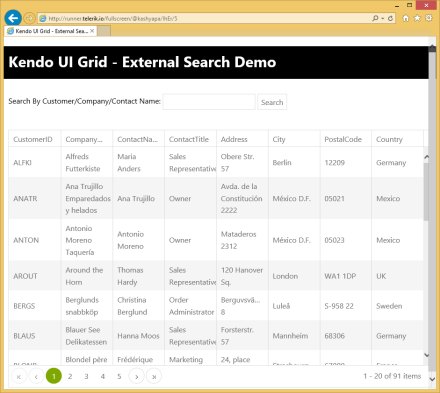
How To: External Search Box For Kendo UI Grid

Couple of weeks ago, i had an email from a customer of ours who wanted to know how to provide a external search box to our Kendo UI grid. What they wanted to do was to have a text box and a button to initiate the search. This seems to be a common scenario that you will have in your proejcts. So i thought this makes a good case for a blog post. If you have a similar situation in your projects then you better read through this blog post till the end.

The Plot:

What i want to achieve is:

  • Have a text box to enter a search string
  • Have a button which will trigger the search
  • Have a Kendo UI Grid to show the data

I will be using our Northwind OData service available here: http://demos.telerik.com/kendo-ui/service/Northwind.svc/. I will be using the Customers data to show in the grid and search

Kendo UI Grid with External Search Box

Kendo UI Grid with External Search Box


Setting up the UI:

<div>
<div>
Search By Customer/Company/Contact Name:
<input class=k-textbox type=text id="txtSearchString" placeholder="enter search text..." />
<button id="btnSearch">Search</button>
</div>
<br><br>
<div id="kGrid"></div>
</div>


Binding the Grid with Data:

On document ready, i will instantiate the Kendo UI Grid and bind it to the Odata service. Here is the code snippet:

$(document).ready(onReady);
function onReady()
{
$("#btnSearch").kendoButton({
click:onSearch
})
$("#kGrid").kendoGrid({
dataSource:{
type:"odata",
transport:{
read:"http://demos.telerik.com/kendo-ui/service/Northwind.svc/Customers&quot;
},
schema:{
data:function(data){
return data.d.results
},
total:function(data){
return data.d.__count
},
},
serverPaging:true,
serverFiltering:true,
pageSize:20
},
height:550,
pageable:true,
columns:[
'CustomerID',
'CompanyName',
'ContactName',
'ContactTitle',
'Address',
'City',
'PostalCode',
'Country'
]
})
}
view raw documentgetreay hosted with ❤ by GitHub

Lets walkthrough as to what has been done. I provide a datasource to the grid . I set the page size to 20 and turn on server paging & server filtering so that the data source does not do client side paging & filtering. I also provide the grid with the columns that needs to be shown.


Handling Search Button Click:

As stated earlier, the external search will be triggered by the search button we have above the grid. If you thought that the Grid is what will be doing the search – well its not. Its actually the data source will do the heavy lifting. The Grid just gets the data to display from the data source. Now, the Grid’s data source is of type kendo.Data.DataSource. One of the API methods that the data source provides is query(). What query method does is – it will execute any specified query and will make a HTTP request when bound to a remote service. So the query we need to perform in our case is filtering. Our search text needs to be converted in to a bunch of filters. In my use case i would like to search the fields Company Name, Customer Name and Contact Name whether they contain the text entered in the search box. So this will be specified as 3 filter conditions with an “OR” logic. So here is the code snippet to do this:

function onSearch()
{
var q = $("#txtSearchString").val();
var grid = $("#kGrid").data("kendoGrid");
grid.dataSource.query({
page:1,
pageSize:20,
filter:{
logic:"or",
filters:[
{field:"CustomerID", operator:"contains",value:q},
{field:"CompanyName", operator:"contains",value:q},
{field:"ContactName", operator:"contains",value:q}
]
}
});
}
view raw searchfilters hosted with ❤ by GitHub

Well that’s all the code it takes you to provide a external search capability for your grid.


Result:

You can see a working demo here: http://runner.telerik.io/fullscreen/@kashyapa/IhEr/5

You can get the source code of this demo is available here: http://dojo.telerik.com/@kashyapa/IhEr/5


I think this post gives you an idea on the power of kendo.data.DataSource. You can do a lot of things with data source. Hope this example helps you in your project if you have a similar requirement.

Till next time, Happy Coding!

Telerik Mobile Platform

Resources for Webinar “Solving Enteprise Mobility Considerations with Telerik Mobile Platform”

On Oct 16 2014, we conducted a webinar titled “Solving Enterprise Mobility Considerations with Telerik Mobile Platform”. This is a recap blog post of the webinar. In this blog post you will find the slide deck, video recording and questions & answers from the webinar.

About Telerik Mobile Platform:

Telerik Platform is a modular platform for web, hybrid, and native development that integrates a rich set of UI tools with powerful cloud services. This end-to-end development and project management solution provides tools and services for every stage of your application lifecycle – from idea to deployment and on-device performance. Telerik Platform integrates AppPrototyper, AppBuilder, Backend Services, Analytics, Mobile Testing, AppManager, and AppFeedback to help you solve the challenges of designing, building, connecting, testing, deploying, managing, publishing, and measuring your applications.

Telerik Mobile Platform

Telerik Mobile Platform

You can know more about Telerik Mobile Platform here.


Slide Deck:

Here is the slide deck that was used in the webinar:


Video Recording:

As usual, we record all our webinars and here is the video recording of this webinar:


T-Shirt Winners:

Here are the 2 lucky persons from the webinar who have been selected to receive our .NET Ninja T-Shirt.

  • Kugan Karthikeyan
  • Siva Ayinampudi

Congratulations to the winners. We will contact you shortly and ship the t-shirt. Rest of you dont worry, we still have a lot of webinars coming up. So make sure you attend our future webinars too.


Till next time, Happy Coding

Webinar Resources: Develop Hybrid Mobile Application with Azure Mobile Services and Telerik Platform

azure-mobile-servicesAzure Mobile Services provide a scalable backend for creating various applications. Telerik Platform provides a singular experience for creating mobile applications that can work with various backend systems.

In this webinar, we talk about how to consume Azure Mobile Services in a Telerik Platform application. We start from scratch and build up the first screen for showing data from the backend.


Slides used during the presentation are below:

The webinar recording can be found here:

The code shown during the webinar can be download from the GitHub Code Repository

The lucky winners who have won the trendy Telerik Ninja T-Shirt are:

  1. Nitin Verma
  2. Kahdeer KI
  3. Lokesh Jain
  4. Jayaprakash N

We will be contacting you soon to dispatch your prize.

Selected questions from the webinar are produced below:

Q: Can we deploy an application built for IOS store to Windows & Google at the same time ?

A: An app built for iOS will work only on iOS . You will need to build different packages for diff platform i.e. ipa for iOS, apk for Android and xap for Windows Phone. Telerik Platform allows you to build these different packages from the same code and machine.

Audience Question:

Q: Is it possibe to view this application on browser instead of mobile?

A: yes … Kendo UI Mobile controls are HTML5 based so they will work as is in a browser. but you will need to remove the cordova initialization code as cordova wont work in a desktop browser

Q: For iOS binary,certificate and distribution profile is required for creating ipa file so in telerik how to create ipa fie?

A: AppBuilder service has provision to ingest your Apple certificate and distribution profile. It stores it in the cloud and uses the same to create the binary packaging. No extra effort is needed to sign the binary with the certificate and make it app store ready.

Q: The Azure key of the mobile apps is contained in a js file – is it not a security threat?

A: This is a Mobile App … So it gets packaged along with the app and sandboxed by the OS. Nobody other than the app code will have access to it. However, it is still susceptible to man in middle attack if proper steps during transmission are not taken.

Q: Does it makes any difference if we use standard WCF service instead of REST API?

A: A lot of difference. If you are designing for Mobile app – you need to keep in mind that the bandwidth on mobile devices is very small. so you cannot send too much data. Simple WCF is SOAP so just to send a name, you will be sending a lot of payload. It is better to create a REST based end point which sends data as JSON format. WebAPI and Azure Mobile Services are some of the options for creating REST based API.

Q: Are there any example on multiple page application using Kendo UI Mobile?

A: We have a lot of sample apps for Kendo UI Mobile – http://docs.telerik.com/platform/appbuilder/sample-apps/sample-apps – Check out the sample Airlines app.

Q: Can we host out MVC WebAPI project into Mobile services and make use of feature by Mobile services?

A: Yes, Azure Mobile Services allows for hosting of custom WebAPI projects. Mode information can be found here: http://blog.azure.com/2014/07/11/azure-mobile-services-why-should-asp-net-developers-care/

Q: I have already designed web app using CSS. How to convert code into the telerik mobile app code ?

A: A Web Page and a Mobile App are two different experiences. To create a mobile app, you will need functionality written separately using Kendo UI Mobile. To recreate the same look and feel as that of your web app, you can override specific Kendo UI Mobile classes with the CSS of the web app.

Q: Can i use backend MS SQL in a mobile app?

A: A Mobile App runs on a device. A MS SQL resides on a server. So, it is not directly possible to connect the two. Azure Mobile Services provides Hybrid Connection facility that can be used for connecting in-premise database to the cloud.

Kendo UI + Angular JS Integration

Kendo UI Integration with AngularJS – Webinar Resources

On Sep 11 2014, we conducted a webinar titled “Best of Both Worlds – Kendo UI Integration with Angular JS”. This webinar is part of the series of webinar we do here in Telerik India for India time zone.

About Kendo UI:

Kendo UI is a flag ship product from Telerik. It is a HTMl5 based JavaScript client side UI framework. Kendo UI provide Web Widgest, Data Vizualization Widgets and Mobile Widgets. Kendo UI also has certain framework elements namely Kendo UI DataSource, MVVM, Templating, Gloabalization, Validation, Drag & Drop support, Effects and SPA. You can know more about Kendo UI here.

About Angular JS:

Angular JS is a popular JavaScript framework and is developed by folks at google. Angular pretty much is the community choice as of now when it comes to using a client side framework. It is very popular among the front end developers today.

Kendo UI + Angular JS Integration:

As part of Kendo UI framework we now fully support Angular JS. What this means is when using Angular in your project you can make use of Kendo Directives to create Kendo UI widgets. We have out of the box support for Kendo Angular Directives and the directives are available for Web, DataViz & Mobile widgets. You can continue using Angular as the back bone of your app while you can make use of Kendo UI as the front end control choice. Thats why we called this webinar “best of both the worlds”.

Kendo UI + Angular JS Integration


Slide Deck:

Here is the slide deck that was used in the webinar:


Video:

Here is the video recording of the webinar:


Q & A:

Q: Is Kendo UI With Angular is free?
A: Kendo UI comes in two flavours – Kendo UI Core which is a OSS & free and Kendo UI Professional (paid). Kendo UI Angular support is available in both – the Core & Professional editions.

Q: Is Angular JS different than Backbone JS and Knockout JS?
A: Yes. Knockout deals with only data binding. Angular provides data binding plus many more things as a framework.

Q: What do you mean by Hybrid Applications in JavaScript?
A: Mobile Apps developed using HTML/CSS/JS are known as Hybrid Applications.

Q: why did you use visual studio? is it so specific?
A: No. Speaker is familiar with Visual Studio and hence using the same. VS is not a prerequisite for this. You can use notepad, sublime text or any other editor.

Q: Is Telerik Test Studio Supports Angular Components, I am sure it supports Kendo UI?
A: Test Studio has native support for Kendo UI components. Any web page developed using Angular can also be tested using Test Studio. However, native support for Angular doesn’t exist right now.

Q: Whats your view on Open Source Ionic Framework?
A: Our team has written about it. http://developer.telerik.com/featured/supercharge-app-development-ionic-appbuilder/

Q: do we need Kendo libraries or only Kendo scripts in order to work with Kendo?
A: Kendo UI is all about 2 style sheets and 1 JavaScript file 🙂

Q: Will it helps in SharePoint ?
A: Sure. These are both client side frameworks (no server side requirements). So, it is supported by SharePoint.

Q: Is Kendo UI fully client side ?
A: Yes it is fully client side.

Q: Kendo UI is based on ?
A: It takes a dependency on jQuery. It is written from scratch for performance and functionality.

Q: DataSource is like database?
A: No. Kendo UI DataSource is a client side framework object that can connect to any web service and be leveraged by binding it to any Kendo widget & charts.

Q: If I install Kendo UI Library using Nuget in Visual Studio then do I need need to pay for that?
A: Kendo UI Core is the OSS from Telerik. It is available on NuGet as KendoUICore. Kendo UI Core is free for personal as well as commercial projects.

Q: In Core all these are available?
A: Core doesn’t have some widgets like Grid and the whole charting library. More details here: http://www.telerik.com/kendo-ui/comparison

Q: Whether Kendo UI supports all Browser?
A: List of supported browsers: http://docs.telerik.com/kendo-ui/browsers-support

Q: Can i get the document related to Kendo UI and their usage?
A: Kendo UI Documentation can be found at – http://docs.telerik.com/kendo-ui.

Q: If we need only 1 or 2 element (i.e. Calender or slider) so we have to add whole Kendo UI CSS and JS file?
A: No. You can simply use the specific js file for those specific widgets. There is a custom script builder also available at: http://www.telerik.com/download/custom-download

Q: Does Kendo-Core provide support for responsive layout like Bootstrap?
A: Kendo UI as a framework does not reinvent the wheel for providing a responsive layout. Instead all Kendo UI widgets are responsive in nature out of the box.

Q: I was under impression that Kendo UI is for Mobile apps. if true why we are using regular browser and not a emulator ?
A: Kendo UI comes in 3 flavors namely – Kendo UI Web for Web Apps/Sites, Kendo UI DataVix for visualization and Kendo UI Mobile for hybrid mobile applications. In the demo we are taking Kendo UI Web and hence the browser check.

Q: Is Angular-Kendo version released?
A: Yes. This is officially supported. http://docs.telerik.com/kendo-ui/AngularJS/introduction

Q: Hey Kendo UI Core can be used on production as it is free or any licensing issue?
A: Completely free with Apache v2 license. Good for commercial and open source projects.

Q: From where we can download free version of Kendo UI + Angular.JS ?
A: You can get the pre built package of Kendo UI Core here. Angular JS support is out of the box.

Q: what is difference between kendo.web.min.js and kendo.all.min.js?
A: Kendo Web is a part of Kendo framework. Kendo.all contains the full framework components – DataViz, Mobile and Web

Q: what are the performance issues in building hybrid apps using Kendo UI?
A: We have worked very hard to get the performance up for Kendo. You will experience a very smooth performance with Kendo in Hybrid Apps.

Q: can u please show the example of Kendo UI DropDown list?
A: Demos can be found here: http://demos.telerik.com/kendo-ui/dropdownlist/index

Q: Does same code written for Kendo UI widget (desktop web)run on mobiles also?
A: Yes, it will. Kendo UI widgets are responsive by default.

Q: Are you using Knockout JS for MVVM in Kendo?
A: No. Kendo has a native MVVM framework.

Q: Is data-role option avaliable in core ui? or only in proferssional?
A: data-role is used to convert a simple HTML element into specific widgets (e.g. Grid, ListView). It is available for all widgets that are available in Kendo UI Core. Kendo UI Professional contains additional widgets and charts.

Q: what about the row template?
A: Kendo Grid supports row templates written as Kendo Template (very simple javascript syntax).

Q: I was not able to use two panel bar controls in same page as its being tracked by ID..Ex- <Ul id=”panelbar” ?
A: You need to make sure that each widget has an unique ID

Q: Whats the role of row template here?
A: If you want to display data in a specific way from the incoming data, you can use the row template e.g. an image from simply the image URL

Q: Is Server Paging possible?
A: you can enable Kendo UI DataSource to request this from server. However, it will also need to be supported by the underlying service.

Q: Is it possible to create Angular or Kendo based website in Visual Studio 2010 ?
A: Yes absolutely. You can use any other IDE/ Editor as well.

Q: Can we use it with asp.net MVC 5?
A: Yes you can. Kendo UI comes with bindings for ASP.NET MVC 5. http://www.telerik.com/aspnet-mvc

Q: Any Kendo map file for WebStorm for code completion?
A: Sorry not available at this time. Please submit this at the feedback portal: http://kendoui-feedback.telerik.com/forums/127393-telerik-kendo-ui-feedback

Q: how can we provide locale support for multiple culture to kendo date picker with angular?
A: Locale Support is availabl for all Kendo widgets. More details: http://docs.telerik.com/kendo-ui/framework/globalization/overview

Q: my company wants to create an application on asp.net MVC. some Views should be able to work on phone also. Do u recommend me to use Kendo UI?
A: I think yes. Kendo UI specializes in making apps cross platform.

Q: Do we have widgets for pop-up dialogs?
A: Yes window widget. Demo here: http://demos.telerik.com/kendo-ui/window/index

Q: Do we have themeb uilder for kendo UI?
A: Yes, we do. http://demos.telerik.com/kendo-ui/themebuilder/

Q: Can I show google map from Kendo UI?
A: http://demos.telerik.com/kendo-ui/map/index

Q: How does kendo support these many browsers? Does it not make the framework heavy? Can we download a tailored copy that would only work for modern browsers so that the framework weight is light?
A: I am not sure if we allow only support for modern browsers. You can however use our custom script builder for only the components you require. http://www.telerik.com/download/custom-download

Q: Is kendo-UI supports rendering images/graphics/text on canvas?
A: http://demos.telerik.com/kendo-ui/drawing/index

Q: can we do animation with Kendo UI?
A: Supported via FX. Sample: http://demos.telerik.com/kendo-ui/fx/expand

On our website you can see a high level description of the integration between Kendo UI and AngularJS.

T-Shirt Giveaway:

Since we had an overwhelming response to this webinar, we decided to pick 3 winners for the T-Short giveaway instead of regular 2 winners. So here are the 3 names:

  1. Prolay Sarkar
  2. Vishal Sanchihar
  3. Kapil Chhabra

Congratulations to the winners. We will contact you over email and will ship the t-shirts to your address. Rest of the folks dont worry, we still have a lot of webinars lined up. So keep joining us for every webinar.

Till next time – Happy Coding !!!


Resources for webinar “Connecting your In-Premise Database to Mobile Apps”

On Sep 4 2014 we conducted a webinar titled “Connecting your In-Premise Database to Mobile Apps”. This was part of regular webinars we conduct almost every Thursday of every month for India time zone. This post is a recap of the webinar.

One of the pressing issues enterprises often face when it comes to mobility is how to connect to an in-premise database from a mobile application. Scenario is that the enterprise does not want to move the data outside of the organization i.e. move to a cloud infrastructure. Rather they want to keep the data inside the organization but still be able to access it from a mobile application. In this webinar we look at 2 solutions/techniques to solve this problem. They are:

  1. Use ASP.NET WebAPI to create a service and host it inside the organization, expose it as a public IP behind fire wall and consume from a mobile app
  2. Use Telerik BackEnd and in particular DataLink & DataConnector to expose data as a RESTful service without writing any code

Below you will find the slide deck used for the webinar, video recording of the webinar, Q&A and T-Shirt winners.

Slide Deck:


Video Recording:


Q & A:

Q: HOw Does webAPI serve when more request  (traffic)?
A: The web server can be used to manage the web traffic. You can also create web farms if you expect more traffic.

Q: How rLinq is different from edmx?
A: It is almost the same. EF (edmx) can be used here as well. rlinq also has L2 caching support that helps speed up the application.

Q: What is the benefit of JustCode
A: More details here: http://www.telerik.com/products/justcode.aspx

Q: What is POSTMAN?
A: Chrome extension to work with RESTful URIs. An alternative is Fiddler. More details here: http://www.telerik.com/fiddler

Q: How to secure Web API?
A: Options include OAuth, Cookie based Authentication, ADFS and a few more

Q: can you provide me the name of cross platform development tools..?
A: Lovingly called AppBuilder (a part of Telerik Mobile Platform). More details: http://www.telerik.com/platform#overview

Q: Can we use this telerik platform service with our existing telerik id?
A: Yes. you can get started for free with Telerik Platform.

Q: How to do top ten records?
A: Kendo DataSource has support for querying as well. More details here: http://docs.telerik.com/kendo-ui/api/framework/datasource

Q: Which one is faster, techinque1 or technique2?
A: You have more control in Technique 1 but deploy bug free system faster with Technique 2

Q: Does the data gets cached anywhere or it hits the on-premise database everytime?
A: Data Link capability is a pass through service. So, we don’t cache any data. It hits the DB each time.


T-Shirt Giveaway:

As usual with any of our webinars, this time too we select 2 random attendees from the attendee list and they will receive our .NET Ninja T-shirt. So the winners for this webinar are:

  1. Pooja Cheema
  2. Gopesh Sharma

Congratulations to the winners. We will contact you over your registered email and will ship the t-shirts. Others dont worry – there are many more webinars to come. So try your luck next time.

Till next time – Happy Coding.

Resources for “Introduction to IoC and Dependency Injection for ASP.NET” Webinar

On Aug 28 2014, we conducted a webinar titled “Introduction to IoC and Dependent Injection in ASP.NET”. This is part of the regular webinars that we i.e. Telerik India do every month. You can see the September/October webinar schedule here.

Slide Deck:

Following is the slide deck that we used as part of the webinar. You can view it online below or you can download to view it at your leisure time:


Video:

We record all our webinars so that people who missed attending live can view the recording on demand. Following is the video recording for this webinar:

Demo Source Code:

We had shown two demos as part of this webinar.  It was divided as Part1 & Part 2. Part 1 talked about DI & IoC as a generic concept. Where as Part 2 we took a look at Di & IoC in ASP.NET MVC with Ninject as the container. Find the source code links below:

Part 1:
https://bitbucket.org/abhishekkant/survey-app-di-ioc-demo

Part 2:
http://1drv.ms/1rKBOm2

Q & A:

Q: what is ado.net?
A: You can read about ADO.NET here: http://msdn.microsoft.com/en-us/library/h43ks021(v=vs.110).aspx

Q: is there a ORM by Telerik to access data?
A: Yes we have. It is called Teleik DataAccess – http://www.telerik.com/data-access

Q: what is loosely coupling?
A: two classes are not directly coupled in dependency

Q: There are so many DI you mentioned , what are the most famous and used wide along?
A: NInject , Unity, StructureMap are some of the widely used ones

Q: Does ORM by telerik supports all database technologies?
A: Yes

Q: Is Telerik DataAcess open source ?
A: It is free to use commercially as well.

Q: Which is most useful, parameter injection or constructor injection?
A: Depends on your scenario. My personal pref is Constructor injection.

Q: what is high cohesion?
A: http://en.wikipedia.org/wiki/Cohesion_(computer_science)

Q: Which is best AutoFac or Ninject? As i have implmented the same with AutoFac
A: Doesnt matter. All the IoC containers are pretty much alike. Its just the ease of use for somebody. Ninject is a simple one too.

Q: from the Performance point of view , what you recommend?
A: All IoC containers out there in the market are more or less pretty good wuth respect to the perfrormance. so its just the ease of use that you need to pinpoint and use one

Q: Should we always think of getting on the interface way even when we are not sure if there could be multiple types of dependent class ?
A: Its always better to program to contract than a class.

Q: Can we achieve dependeny injection without an IoC?
A: Yes … its known as Poor Mans DI – where you hand craft everything that you need

Q: what is DI?
A: Dependency Injection. Making dependencies loosely coupled. A more formal definition can be found: http://en.wikipedia.org/wiki/Dependency_injection

Q: what is Ninject?
A: A DI Container. More details here: http://www.ninject.org/

Q: Hi, DI is always a combination of Poor Mans and IOC Container?
A: Not always. you can do DI with either approaches.

Q: How lifetime is managed in Ninject?
A: By specifying whether the object is created as Singelton or new object. fluent syntax .InSingletonScope()

Q: which container you would prefer Unity or Ninject or any other?
A: It is a matter of personal choice. All of them provide almost similar functionality.

Q: so who is taking the load of instanciating the object here- ninject or test app or both?
A: Ninject is responsible for creating the objects. It works with MVC pipeline to make it seamless.

Q: If we have difrent implementation of an interface, Can we decide on runtime which implementation to inject. Like getting from a web config file.
A: Yes possible. Ninject is meant for that :). You can use configuration settings in web.config for the same.


T-Shirt Giveaway:

If you are a regular to our webinars, then you know that we select 2 random attendees to receive our .NET Ninja T-Shirt. But we had a huge turnout for this particular webinar and we decided to pick 3 instead of 2 attendees from the webinar. Here are the lucky winners of our t-shirt:

  • Inderpal Singh Uppal
  • Vinay Bansal
  • AjithKumar Rai

Congratulations to the winners. For the rest of you don’t worry. We still have a lots of webinars lined up. So be there and try your luck.

Till next time – Happy Coding.