Resources for Webinar “MVVM & Validation using Kendo UI in Web Applications”

On May 30 we conducted a webinar titled ”MVVM & Validation using Kendo UI in Web Applications”. We had around 600+ registrations for this webinar. We were very excited that many of you felt that the topic is an interesting one. So we are thankful to all of you who made it to the webinar. Hope you found the webinar useful and that it will be helpful in your day to day work.

image

Slide deck from the webinar:

If you missed attending the webinar, here is a chance to recap it through the slides. Here is the slide deck if you want to download:

Video Recording of webinar:

Many of you had asked if the webinar was recorded. Yes we do record all our webinars and here is the recording of this webinar. Hope this gives you a chance to catch up with the webinar:

Questions & Answers:

Many of you had a lot of questions during the webinar. We did try our best to answer many of them. So we are making sure that we address each one of them through this post. Here are the questions asked during the webinar and answers for the same:

Q: I am a .Net/Silverlight developer. What is the Usage of Kendo UI

A: Kendo can be used to develop HTML 5 apps. More details at: http://www.kendoui.com

Q: Can we use Kendo UI for Windows mobile or only for Androids?

A: Kendo UI Web can be used for Web App development. Kendo UI Mobile controls can be used for developing Hybrid Mobile Apps for multiple platforms i.e. iOS, Android, BB, WP8

Q: Can we use the Kendo UI using C# using .net ?

A: Kendo UI Web & DataViz provide server side wrappers for ASP.NET MVC. So you can program with your comfort of C# & Razor.

Q: Can we develop the Kendo Mobile Project on visual studio IDE, right?

A: Yes you can. Since its just a couple of stylesheet and  javascript, you can always use any editor of your choice. For Hybrid Mobile Application development we also have a cloud based IDE called Icenium – www.icenium.com

Q: By Kendo UI we can create widget – like calender, grid etc

A: Yes you can, though it is only one of its capabilties. Kendo UI Web already provide close to 20+ widgets out of the box. The demos for the available widgets can be found at: http://demos.kendoui.com/web/overview/index.html

Q: Is Kendo UI support all the browsers currently available?

A: We support the following – Internet Explorer 7+, Firefox ESR, Chrome, Safari 5+, and Opera 11+.

Q: Is it mandatory to use MVVM with Kendo UI?

A: No it is not. Kendo UI does support MVVM if you need it.

Q: Is Kendo UI a free version

A: No, Kendo is a paid product. You can

Q: So what is the next roadmap for Kendo?

A: Available here: http://www.kendoui.com/roadmap.aspx

Q: Does Icenium stores my code in a cloud based storage?

A: Yes. It does. The code is stored in Telerik servers. If you do not like our cloud, you can get a GitHub account and integrate Icenium with GitHub.

Q: Is Kendo UI like knockout.js, etc.,?

A: Knockout,js is a JavaScript library for supporting databinding on client side. Where as Kendo UI is a framework which supports the data binding out of the box. So you don’t need any extra library to support databinding and Kendo UI is the only thing you need.

Q: Can it run out of the browser?

A: it runs in the browser only. the browser can be on desktop or on mobile.

Q: So, If I use Kendo UI reference then we do not have to explicitly use jQuery.js reference?

A: Kendo UI depends on JQuery. So you will need to first reference JQuery and then Kendo UI scripts.

Q: In what all flavors(commercial) is Kendo available?

A: Details available here: http://www.kendoui.com/purchase.aspx. You can contact us at sales@telerikindia.com in case you want to make a purchase for yourself / organization.

Q: Does Kendo UI has specific framework for mobile ?

A: One part of Kendo UI known as Kendo UI Web is geared for mobile: http://www.kendoui.com/mobile.aspx

Q: What is this Kendo UI Framework, key points?

A: Marketing folks have done a good job and the features are provided here: http://www.kendoui.com/

Q: Can we use MVVM pattern in normal Asp.net web application?

A: Sure you can, using JavaScript.

Q: So what’s more beneficial to use KENDO UI rather than other available UI tool

A: 1. It is a fully integrated framework (data, UI, MVVM, charts, mobile) 2. Works better 3. Is continuously updated 4. Fully supported.

Q: Which all .Net framework version does Kendo UI supports?

A: Kendo UI Web is server technology obnoxious. Kendo UI is a HTML5 based client side framework. All you need is 2 stylesheet and a JavaScript. But we do provide Server Side Wrappers for ASP.NET MVC 3+.

Q: Does older versions of Visual Studio supports Kendo UI?

A: JavaScript API of Kendo can be used with any IDE (older versions of VS or Eclipse or Notepad)

Q: If i want by pass MVVM and use standard approach / does it support that , What is the licensing model with Kendo?

A: You can use Kendo UI without MVVM as well. MVVM is available in case you need it. Licensing is on a per developer basis.

Q: After getting product, is there any charge for support or maintenance from Kendo UI team?

A: The licenses are perpetual in nature. If you want product updates and support from the team, you have to maintain an active subscription by paying a renewal fee.

Q: Can we update the theme?

A: Yes. By simply changing the CSS file. And you can create your custom themes as well.

Q: Does Kendo UI has dependency on jQuery?

A: The only dependency Kendo UI has is that on JQuery and nothing else.

Q: Kendo provides any database also ?

A: No. Data has to be available over a Web Service. Kendo provides a client side data connectivity solutions.

Q: So after getting this product, is any training or demo free from kendo team?

A: A good getting started tutorial is available as Kendo Dojo: http://www.kendoui.com/dojo.aspx You can also request training from the product team as a paid activity.

Q: For email field, can we place two messages, suppose one for mandate entry and another for the format, ex: email is required and invalid email format?

A: Yes you can. you can use data-email-msg format to provide a message when email format fails.

Q: where can I view the old videos?

A: Telerik India Webinar resources: https://telerikhelper.net/category/webinars/. More Videos at: http://tv.telerik.com

Q: Definitely Kendo UI reduces the development effort. Can you quantify? How much it will reduce ?

A: We estimate this to be in the range of 20-30%.

Q: Does kendo use Knockoutjs for MVVM?

A: Nope. Kendo has its is own framework for MVVM. Doesn’t use KO.

Q: can we access server objects like sessions and application variables using Kendo?

A: No. Because Kendo UI is a client side framework.

Q: Do i need to download anything to use Kendo UI in VS2010?

A: Kendo UI can be used in 2 ways. Pure JavaScript way – for which you will  need the stylesheet and JavaScript. We provide Server Side Wrappers for ASP.NET MVC 3+. That will let you code Kendo UI from server side.

Q: More specific to Kendo UI : Does it take advantage of HTML5?

A: Kendo UI is based on HTML5 based. So we make use of HTML5 features to the core.

Q: How do we integrate web services in REST based calls in Kendo UI data binding?

A: Kendo UI has a feature known as Data Source. So this data source can be configured with CRUD endpoints and rest of the things will be done by the data source.

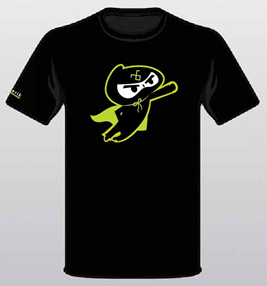
.NET Ninja T-Shirt Giveaway:

If you have been following our webinars you will know by now that we have been raffling out 2 .NET Ninja T-Shirts in each of our webinar. So we pick the following two people to receive our t-shirt for this webinar:

  • Mirang Parikh
  • Mohanrao Theeda

Congratulations to the winners. We will be contacting you shortly with the email you have provided. We will be shipping you your t-shirt. Rest of you folks don’t worry, we still have many more webinars to come. So make sure you attend without fail.

Till next time, Happy coding.
Revamping Web Applications: Upgrading to RadListView

We have finished the ORM deployment with our previous post. Now we are ready to start migrating the default controls to Telerik controls. In this post we will take a look at converting asp:ListView to telerik:RadListView and we would learn about telerik:RadDataPager which will replace the asp:DataPager.

Add RadListView

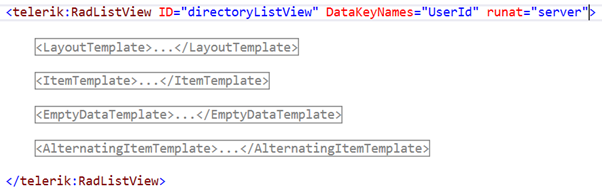
For this exercise we will take Directory page from our Event Networking application. Remove the existing ListView control and add a RadListView control from the Telerik AJAX Components.image

Note: After adding the control rename the ID property same as your asp:ListView ID property. We might see an error because the underlying type has changed. The error occurs because initially the same id was linked to asp:ListView. The error will eventually disappear. Again, we need to first remove the already existing methods defined for the ListView from the aspx.cs i.e. codebehind page. Now copy the rest of the properties from ListView. We need to add the property DataKeyNames to our RadListView. Now we copy all the templates from asp:ListView.

image

If you run the application RadListView should have been populated by the data, as the data binding has already been handled at the Page_Load event (explained in our previous blog <Hyperlink>).

Your data is now populated but currently there is no paging option. To provide paging add the property AllowPaging=”true” to RadListView.

Add Event Handler to RadListView

To add an event, type the name of the event and click <Create New Event>. So add an event handler for OnItemCreated. We are using this event to populate the pictures of each attendee.

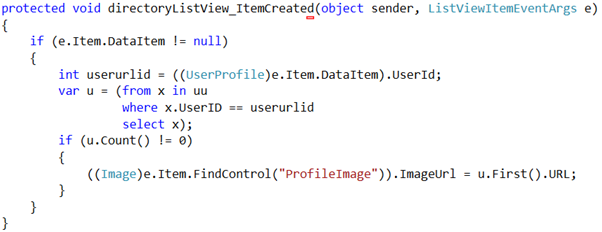
We had the following code under asp:ListView event:

image

Lets tweak the existing code for the RadListView:

NOTE: Do not forget to add “using Telerik.Web.UI;” in your aspx.cs

protected void directoryListView_ItemCreated(object sender, RadListViewItemEventArgs e)
 {
var item = e.Item as RadListViewDataItem;
if (item != null)
{
var userId = item.GetDataKeyValue("UserId").ToString();
var u = (from x in uu
where x.UserID == int.Parse(userId)
select x);
if (u.Count() != 0)
{
((Image)e.Item.FindControl("ProfileImage")).ImageUrl = u.First().URL;
}
 }
 }

Add RadDataPager

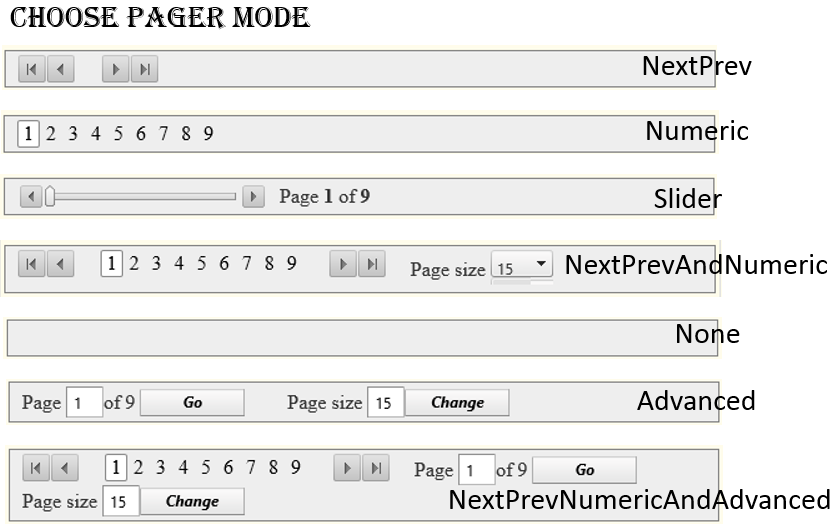
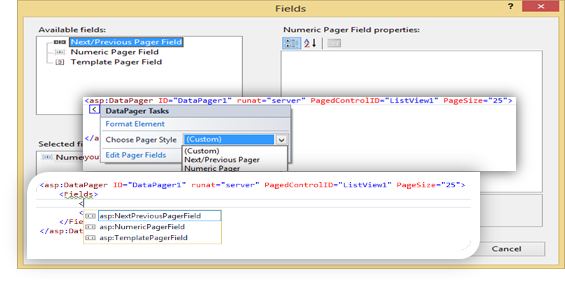
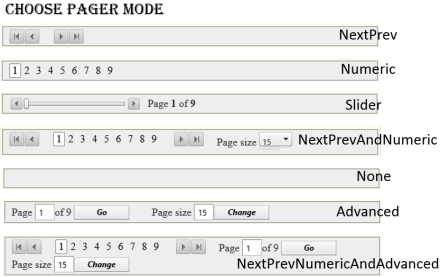
If you use ASP pager, you only have the numeric option. But using RadDataPager gives you lot more option.
imageimage

The main aim is to get a better UX and hence we replace asp:DataPager with telerik:RadDataPager. We changed the following properties PagedControlID=”directoryListView” and PageSize=”15″. Next we add a field and within it we insert the <telerik:RadDataPagerSliderField /> . This provides us a natural gesture to slide through various pages.

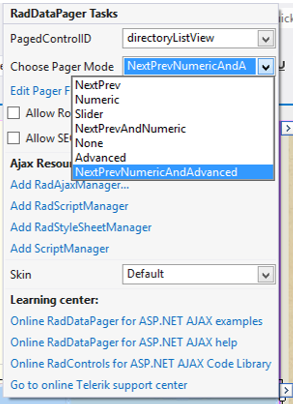
To do it declaratively switch to Design view and select the RadDataPager. Then expand the smart-tag and change the PagedControlID and the Pager Mode to NextPrevNumericAndAdvanced. This would allow users to do more than just select the page numbers.

Error Explanation

But if we had copied the same code to our RadListView item created event it throws following error:

‘Telerik.Web.UI.RadListViewItem’ does not contain a definition for ‘DataItem’ and no extension method ‘DataItem’ accepting a first argument of type ‘Telerik.Web.UI.RadListViewItem’ could be found (are you missing a using directive or an assembly reference?)

This occurs because the “e” defines the event argument which at runtime has type RadListViewDataItem but has RadListViewItem at compile time. Hence we need to explicitly need to typecast it into RadListViewDataItem and then we can use it in a similar way.

Why Change it after all:

In case of customisation RadListView gives us far better UX and functionality.

The dataPager is static for ASP control whereas we have many more features and modes in which we can operate while using RadDataPager varying from just numeric pagers to smooth sliders gesture.

The following image gives us an overview of how the ASP control looked. And in the following image we can the great UX and the additional features available with us.

image

image

Read- Revamping Web Applications Part-9: Working with RadWindows & Converting GridView to RadGrid

Revamping Web Applications: Adding DAL (Data Access Layer) Part 2

Following the previous post – Revamping Web Applications part 5: Adding DAL (Data Access Layer)

After the Data Access Layer (DAL) has been implemented by moving the ORM into a new project, there would be further errors experienced in our web application. This happens because of two reasons:

  1. Initially, LINQ data source was used which is now no longer used.
  2. The ORM which we have implemented here is Open Access, and syntax to implement CRUD operations are different from that of LINQ.

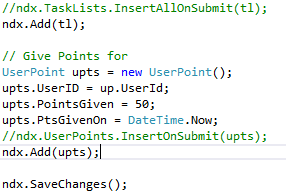
Hence, we need to change all the LINQ CRUD operations, and the following snippets explains the same. The commented line was the LINQ operation and the non-commented part is the new Open Access syntax. For further knowledge on implementing Open Access CRUD operation click here. \

imageimage

After replacing the LINQ commands we still might see few more errors such as:

Error 1image

Then it has occurred because we have converted the Linq to SQL to Open Access ORM. Hence, the control LinqDataSource will not help us map it to the new ORM.image

Since we have removed the Linq Data Source so we have to also remove the existing LinqDataSource and create a new DataSource.

Solution #1

We can use an OpenAccess DataSource control replacing the LINQ DataSource and keep the same ID. Hence, no more effort is needed.

Solution #2

More preferred practice in the industry is to remove the DataSource control and do the following:

We added the following code under the Page_Load event. We created a DataTable and then linked the DataSource property of the DropDownList with the newly created DataTables.
This helps in insulating the data. We also need to remove the DataSource property from the controls where we had linked to the Linq DataSource.

if (User.Identity.IsAuthenticated)
{
if (!IsPostBack)
{
int userid = (from uid in ndx.UserProfiles
where uid.Username == User.Identity.Name
select uid.UserId).First();
// Storing the value of the userid in a hidden variable
loggedUserId.Value = userid.ToString();
}

MasterData.getMasterData();
ds = Context.Cache["masterdata"] as DataSet;
if (ds != null)
{
DataTable dtcity = ds.Tables["CityMaster"];
DataTable dtcountry = ds.Tables["CountryMaster"];

if (!IsPostBack)
{
citySearchDropDown.DataSource = dtcity;
citySearchDropDown.DataTextField = dtcity.Columns["CityName"].ColumnName;
citySearchDropDown.DataValueField = dtcity.Columns["CityID"].ColumnName;
citySearchDropDown.DataBind();

countryDropDown.DataSource = dtcountry;
countryDropDown.DataTextField = dtcountry.Columns["CountryName"].ColumnName;
countryDropDown.DataValueField = dtcountry.Columns["CountryID"].ColumnName;
countryDropDown.DataBind();
}
}

How to Add telerik:OpenAccessDataSource

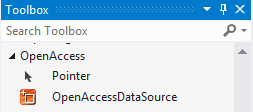
    1. Drag the OpenAccessDataSource tool under the OpenAcces group.image
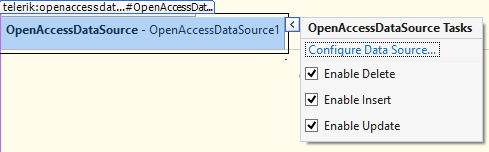
    2. You will have something like this in the design view.image
    3. Click on “Configure Data Source…”
      Here we are asked to save changes to our items. Click Yes.
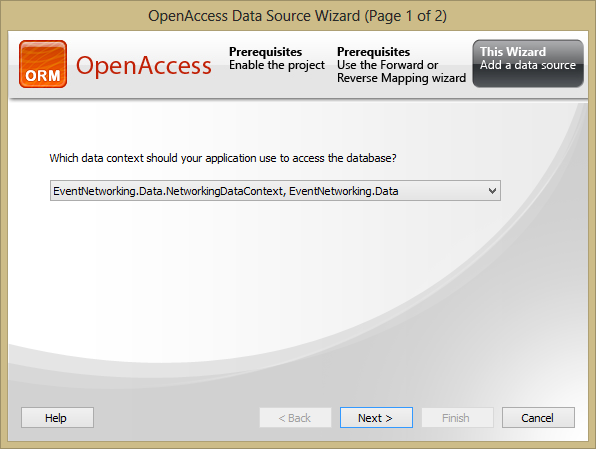
    4. Choose the data context for your application and click next.image
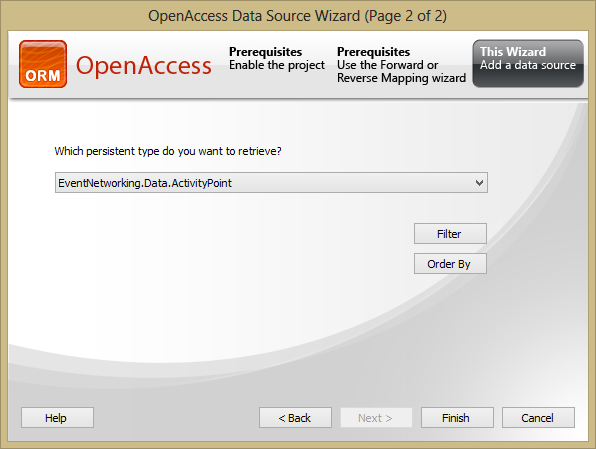
    5. Choose the table you want to retrieve from the database and click finish.image
    6. We also rename the ID as same as the asp:LinqDataSource so that there is no name-conflict anywhere else in our application. Now your code will look like this.
<telerik:OpenAccessDataSource ID="badgeLDS" runat="server"
ObjectContextProvider="EventNetworking.Data.NetworkingDataContext, EventNetworking.Data"
TypeName="EventNetworking.Data.Badge">
</telerik:OpenAccessDataSource>

Where “Badge” is our table-name.

Note: We have not used OpenAccessDataSource anywhere because it takes direct dependency from the OpenAccess.

Error 2

Another Runtime error you may encounter is over the DataBind property.

This occurs because LINQ sends the data as a list but now since we are using OpenAccess the data returned is in the form of iEnumerable and hence we need to convert it to a List explicitly.

Solution

It can be solved by simply adding the ToList() property to the DataSource.

directoryListView.DataSource = users.ToList();

Read-Revamping Web Applications Part-8 : Upgrading to RadListView

Revamping Web Applications: Adding DAL (Data Access Layer)

Read – Revamping Web Applications part 5: Proposed Enhancements

As a part of following best practice we need to separate the data access from our existing project. Here, we talk about how we create an ORM (Object-Relational Mapping) and create a separate DAL.

Prerequisites

  1. Remove any Projects which might be unavailable.
  2. We must reconfigure our Connection String to the localhost within Web.Config file.
  3. Any connections to the TFS server shall be currently closed, because our development will be focused initially on local server.
  4. Build the Solution and execute it to check for any errors exist prior to the changes.

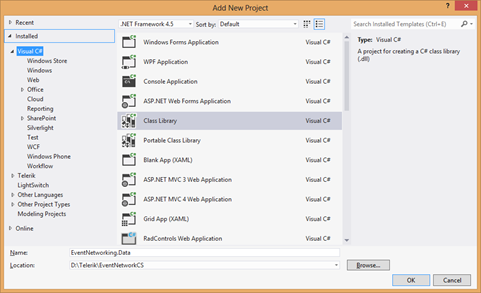
To begin with the process we add a class library to the existing EventNetworking (EN) web application.

  1. In the Solution Explorer tab, right click on ‘Solution’ and Add -> New Project
  2. Create a new ‘Class Library’ and name it “EventNetworking.Data”imageMake sure to change the target framework similar to the same version as the existing project. This is a very common mistake that a developer encounters.
  3. Right click on EventNetworking.Data->Properties. In our case we need to change the Target framework to 4.5Next we need to add an App.Config file and set the “ConnectionStrings”.
    We might get the following Output when adding the App.Config
    “Could not parse the configuration file. The error message is: ‘Could not find file ‘D:\Telerik\ZipFiles\EventNetworkCS\EventAdmin\Web.config’.’. Try editing the file manually and then saving it.”
    We should copy the connection string from Web.Config file of the existing project.
    Once we have done that, we again need to go to the Properties of new project and check the “Settings” tab to see if the connection string has been validated.
  4. Now we will transfer the existing data layer file to our new project. Transfer the “Networking.dbml” from “EventNetworking” project to EventNetworking.Data. DBML stands for DataBase Markup Language. The DBML file represents the data model for a LINQ to SQL project – it’s used to generate the C# code for the various entities. And build the “EventNetworking” project to get a list of errors. These errors have occurred because we have moved the DBML file to another project.
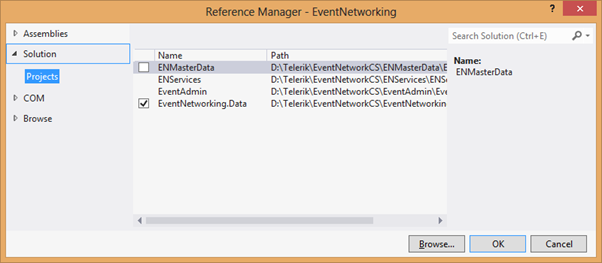
  5. To resolve the above errors, first we need to add a reference to the EN project.
    Right click the “EventNetworking” and Add Reference -> Projects -> Select “EventNetworking.Data”. image
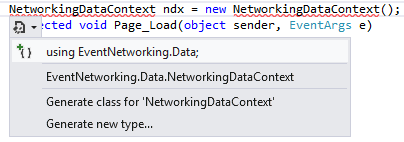
    Next, we will have to refactor the code as all the data links have been shifted from its current location to a new project. clip_image001
    Select “using EventNetworking.Data;” for all such errors.
    Rebuild the project to remove errors depending on the above dependency.
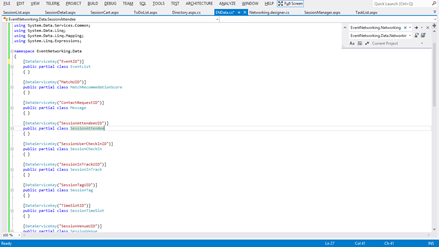
  6. We create a new class within “EventNetworking.Data” named “ENData.cs” and copied all the dependent files from “Utilities.cs” within “EventNetworking”.
    We also have to add references in the project for the following assemblies:

    using System.Data.Services.Client;
    using System.Data.Entity;

    image

  7. Remove Utilities from the EN project. Don’t forget to build the project and check for silly errors. Shortcut to build the “current project” is Ctrl+Shift+B. We would still see some error. These errors are produced because there is a discrepancy between the TaskList as a class and a file. So wherever we get an error saying such an element does not exist. Append the using statements with:using EventNetworking.Data;
    using DataEntities = EventNetworking.Data;What these two lines would do is help differentiate between the TypeCollision caused by TaskList as file from the current project and TaskList as class from EventNetworking.Data. How to do that:
    Instead of

    TaskList[] tl = new TaskList[2];

    we alias

    DataEntities.TaskList[] tl = new DataEntities.TaskList[2];

    and make the above changes at all places where TaskList is being referred as class. Now we are left with around 20 errors and all of them having the same construct.
    We will have to make these changes in more than one aspx file.

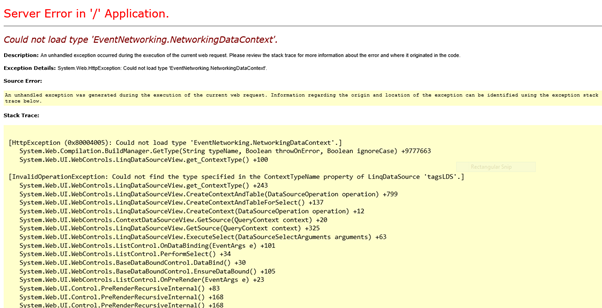
  8. Finally, we have resolved all the build time errors. The build is a success but there is a runtime error which still lingers.image

This occurs because, we have moved the data access layer to a new project and modified the direct references. But we are still left with the most important reference which is mapping Linq to SQL.
To do so, change the property “ContextTypeName” from the “asp:LinqDataSource” control which is defined as:

ContextTypeName="EventNetworking.NetworkingDataContext"

to

ContextTypeName="EventNetworking.Data.NetworkingDataContext"

Make changes to all the LinqDataSource control in all the aspx files. Build the project and we should be left with neither compile time nor runtime errors.

Conclusion

We have managed to create a separate DAL (Data Access Layer) and reproduce it into a new project named “EventNetworking.Data”. This blog post explains the various errors we faced while we moved the data layer from one project to another and how to resolve these issues.

Read-Revamping Web Applications Part-7 : Adding DAL (Data Access Layer) Part 2

The Heat is On – Telerik India Webcasts (June – July ’13)

summerheatThe hot Indian summer sun is doing its thing! And we are pretty sure that you have found your own way of chilling out in this relentless heat.

If you are reading this, obviously you are not away at a cool hill station. As your A/Cs and coolers do their best, we at Telerik India continue to bring some amazing content that you would love to spend time with. Check out what we have in store for you this summer:

Webinar Topic Date Time (IST)
Building Uncomplicated Single Page Apps (SPAs) with Kendo June 6th 3:00 – 4:00 PM
Reporting Best Practices for ASP.NET applications with Telerik Reporting June 13th 3:00 – 4:00 PM
Cloud based Enterprise Apps using Icenium Everlive June 20th 3:00 – 4:00 PM
Hybrid Mobile Application Development with Cloud based IDE Icenium June 27th 3:00 – 4:00 PM
Developing ASP.NET MVC Applications Quicker with Kendo UI July 11th 3:00 – 4:00 PM
Data Driven Testing with Telerik Test Studio July 18th 3:00 – 4:00 PM
HTML5 Charting in ASP.NET AJAX July 25th 3:00 – 4:00 PM

The Redux webinars bring the best of international content in the Indian Time Zone. Check out the Redux Week webinars below:

Webinar Topic Date Time (IST)
Redux: What’s new in ASP.NET AJAX Technologies
Q2 2013
July 1st 3:00 – 5:00 PM
Redux: Code faster in ASP.NET MVC with updates
in Kendo UI suite
July 2nd 3:00 – 4:00 PM
Redux: Become a software craftsman with
improving productivity in Visual Studio with Just Suite in Q2 2013
July 2nd 4:00 – 5:00 PM
Redux: Advances in Windows 8 Development with
Telerik Technologies
July 3rd 3:00 – 4:30 PM
Redux: Agile Project Management gets a facelift
with Telerik TeamPulse R1 2013
July 4th 12:00 – 1:00 PM
Redux: Introducing the Free Telerik Testing
Framework
July 4th 3:00 – 4:00 PM
Redux: What’s new in Telerik Windows Development
Technologies Q2 2013
July 5th 3:00 – 4:30 PM

Click on the webinar link above to register for the event.image_thumb.png

If the list above hasn’t pleased you, we would ask you to yell at us in the comments section below with your suggestion(s).

The least we could do to ease the sweating was to continue our Ninja T-Shirt contest every webinar. This cool T-Shirt is bound to get you some developer envy in your campus!

Most of the past webinar recordings can be found on our blog here: https://telerikhelper.net/category/webinars/

Recap of webinar: Building Windows Phone 8 Apps using Kendo UI

Download Source Code and Slides from here

clip_image001

On 23rd May 2013, we at Telerik India hosted a webinar on “Building Windows Phone 8 Apps using Kendo UI Mobile”. This webinar received great response from audience and we had around 150 developers attending webinar. Participants were very active during webinar and there were a flood of questions around Windows Phone 8, Coredova and Kendo UI.

We discussed following topics in webinar,

  • What is Hybrid App
  • Why we need Hybrid App
  • Setting Visual Studio2012 to develop Wp8 apps using coredova
  • Setting WP8 App project to work with Kendo UI

In demo part we covered following topics,

  • Creating Kendo Datasource
  • Consuming OData and REST Srervice in Kendo Datasource
  • Working with Kendo Template
  • Working with Layout , Views
  • Working with dynamic navigation

We learnt and experienced that how easily a developer could work with all complexities such that consuming services, navigating between views, working with layouts rendering native to WP 8, adaptive rendering etc. using Kendo UI Mobile.

If you create a Hybrid App for Windows Phone 8 using KendoUI Mobile and Coredova then with minimal or zero effort you can publish same app as iPhone app and Android App.

image

You can watch recorded webinar below,

As you can see in recorded webinar that we focused on writing codes and shown you how easily and quickly a Marketplace ready Windows Phone 8 app can be created using Kendo UI.

Download Source Code and Slides from here

You can revisit presentation of webinar below,

If you want us to do webinar on a particular topic related to Telerik products then feel free to send is mail at Dhananjay.kumar@telerik.com

Download Source Code and Slides from here

We had promised that we will be giving away 2 .NET Ninja T-Shirts as a webinar give away.

image

We normally pick 2 people randomly from the audience and raffle it out. So, as part of this webinar we are happy to say that the following 2 people are winners of our .NET Ninja T-Shirts:

  1. Ramu Naik
  2. Ardhendusekhar Kanungo

Congratulations to the winners. We will be contacting you shortly as we need your postal address to ship your t-shirts. Rest of you folks, don’t worry you still have chance to win the t-shirt. Do attend our next webinar which is on May 30 titled – MVVM and Validation with Kendo UI Web. Register for that webinar here

Download Source Code and Slides from here

clip_image001

Resources for webinar “ Web Content Management with Sitefinity”

On May 16 we conducted a webinar titled “Web Content Management with Sitefinity”. We pretty much had a full house on that day and we had a great show from Greg our Sitefinity Sales Engineer. We are thankful to one and all who attended the webinar and posted all your questions pertaining to Content Management System and Sitefinity in particular.

image

Slide deck from the webinar:

Greg did a great job in showing Sitefinity in action. So there was hardly any slides used. But if you would like to review the presentation, we have provided the same below:

Video Recording of webinar:
Also, as many of you had asked during the webinar – we do have a recording of the whole presentation. Here is the link to the video recording:

Questions & Answers:

Many of you had questions regarding the Sitefinity as a product. Here is a quick recap of some of the major questions asked during the webinar:

Q: Could you provide some website url which are running using sitefinity
A:  You can go to SiteFinity.com and look at Showcase area http://www.sitefinity.com/customers/showcases .

Q: is it customization friendly?
A: If you know ASP.NET WebForms or MVC – you can customize it to your will and wish

Q: what is the cost of license?
A: Take a look at pricing here http://www.sitefinity.com/purchase

Q: What is Connector for SharePoint?
A: If you have already an investment with SharePoint you can do a two way sync from Sitefinity to SP and vice versa using the connectors. You can know more about this here: http://www.sitefinity.com/sharepoint-integration

Q: Can we add new Contents other than in built Contents?
A: Yes you can create your custom content.

Q: Can we host the website built on Sitefinity on cloud?
A: Yes we support Azure – http://www.sitefinity.com/benefits/for-it-managers/windows-azure

Q: Does Sitefinity provide any Template Designer?
A: You can always upload a ASP.NET Master Page and make it as a template for your page. We do have a online template creator which lets you design a template with complete drag and drop feature.

Q: Can we integrate external controls like payment gateway to the pages ?
A: Yes. We have a ecommerce module built it in. So integration with payment gateways is easy

Q: Can the content be Role based contents as per authentication?
A: Yes. Granular access to content is possible with Sitefinity.

Q:  Can we host MVC3 based pages?
A: Yes. we support hybrid mode of development. Meaning you can customize and have either a Web Form based User Control as a customized widget or MVC based widget.

Q: how can we control the page access rights?
A: The page themselves have access rights defined which can be controlled from the back end.

Q: Is Sitefinity limited to e-Commerce only?
A: – No. We have news/events/forums/blog etc. modules out of the box. Take a look at our showcase area to see how this is used for a real world examples.

Q: : Can I develop and apply themes on Sitefinity?
A: Yes. Sitefinity supports ASP.NET theming.

Q: Can we create CSS layout from own template?
A: Yes you can do that.

Q: Can i apply different CSS/Page modeling for different display size?
A: Yes you can. Sitefinity comes with Responsive Design Module out of the box which will let you create different rule based on where your content can be viewed. The rule will define how your content needs to be shown when rendered on those devices/screen widths and Sitefinity will automatically take care of that.

Q: Can you explain how we can add DLL reference?
A: Sitefinity source code is a ASP.NET solution. so you develop using the VS IDE and add reference like you do with any asp.net app.

Q: Other that .NET 4.0, does Sitefinity have dependency on any other third party libraries?
A: No – we use our own controls within Sitefinity for e.g. RadControls for ASP.NET AJAX, Kendo UI, Open Access ORM.

Q: Can i create large web application using Sitefinity?
A: Yes you can. Take a look at our showcases area to see what people have built with Sitefinity: http://www.sitefinity.com/customers/showcases

Q: Can we develop application by Sitefinity for my android phone?
A: Yes. With Sitefinity 6 we have a mechanism where in you can create a custom module and with one click a Hybrid Mobile Application can be created for this custom module. The app will be able to perform full CRUD on your module and since it is hybrid, it can run on all platforms and provide you with native look and feel as we use Kendo UI Mobile controls.

Q: what are the features of Sitefinity?
A: Sitefinity features are listed here: – http://www.sitefinity.com/product/see-also/cms-features-list

Q: Is any Open Source version available of Sitefinity?
A: We do not have any Open Source version of Sitefinity. But we do have Community Edition which is completely free for personal site scenario. Here is more info on what does Community Edition contain: http://www.sitefinity.com/try-now/free-asp-net-cms

Q: Which version of ASP.Net does this belong to?
A: Currently Sitefinity supports Microsoft .NET Framework 4.0

Q: Does it support workflow functionality?
A: Absolutely. Custom and standard workflows, all based on Windows Workflow Foundation 4

Telerik .NET Ninja T-Shirt Giveaway:

We had promised that we will be giving away 2 .NET Ninja T-Shirts as a webinar give away. We normally pick 2 people randomly from the audience and raffle it out. So, as part of this webinar we are happy to say that the following 2 people are winners of our .NET Ninja T-Shirts:

  • Pramod Gupta
  • Ranjit Singh

Congratulations to the winners. We will be contacting you shortly as we need your postal address to ship your t-shirts. Rest of you folks, don’t worry you still have chance to win the t-shirt. Do attend our next webinar which is on May 30 titled – MVVM and Validation with Kendo UI Web.

How to add .NET Assembly or Reference in Test Studio standalone version

Recently I was demonstrating Test Studio to a group of Test Studio professionals. While working with Coded Step I had to add a .NET Assembly Reference. Adding reference in Visual Studio plugin is quite simple. However adding that in Test Studio standalone version requires certain steps.

In this post we will have a look on adding assembly reference in Test Studio standalone version. Follow following steps,

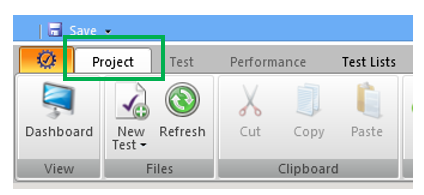
Select Project option in top menu

image

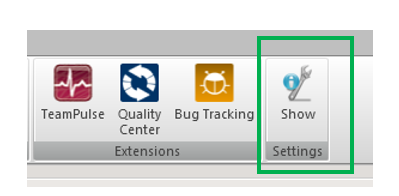
Click on Show Settings in project tab

image

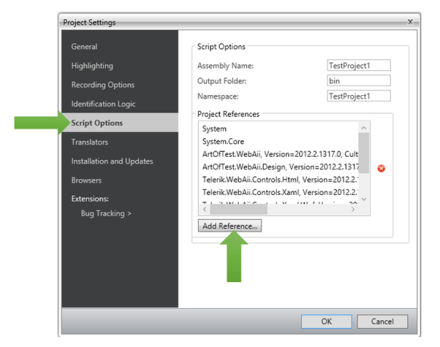
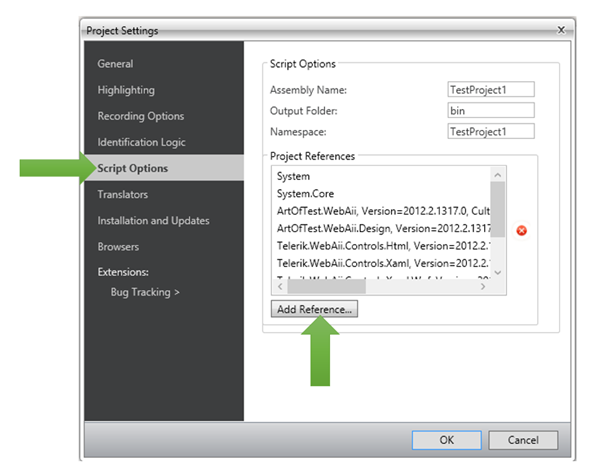
On clicking on Show Settings you will get Project Settings dialog box. In dialog box click on Script Options. To add assembly reference click on Add Reference.

image

When you clock on Add Reference Test Studio will open File Chooser dialog box. In that browse .NET Assembly Reference location in file system and select that to add as reference in current Test project. I hope you find this post useful. Thanks for reading.
image

Webinar Recap: Create faster Windows Store Enterprise Apps

image

On April 25th we had full house in webinar Create faster Enterprise Apps for Windows 8 . It was very overwhelming exciting discussion with attendees. In webinar we focused on DataGrid and Chart.

Download Demo Codes of Webinar

Learn more about RadControls for Windows 8

Download Trial version

In webinar we discussed

  • Different Windows 8 development paradigm
  • Setting up project to work with RadControls
  • Working with Charts in JavaScript based Apps
  • Working with DataGrid in Xamls based Apps

Here is the slide deck of webinar

During this webinar we had a lot of questions and I am trying to address them here:

Full form of WinRT?

WinRT stands for Windows RunTime

WinRT is common for both Windows 8 & Windows 8 Phone?

No WinRT is not common for both Windows 8 and Windows Phone 8. WinRT is part of Windows 8 Operating System.

Can existing .NET apps built on win xp or win 7 can we executed in win 8

Yes existing .NET apps can run on Windows 8 as desktop applications. There are two kinds of apps run on Windows 8. They are Metro/Windows Store Apps and Desktop apps. Any existing .NET apps from earlier version of Windows runs as desktop app on Windows 8

Is Silverlight supported on Windows 8 IE browsers?

No Silverlight is not supported on metro version of IE on Windows 8

Which Framework of .NET do we need for RadControls for Windows 8

RadControls for Windows 8 are supported on version 4.5

Can we use RadControls for Windows 8 in MVVM architecture?

Yes you can use them in App creating using MVVM architecture.

Can we sort the column in RadDataGrid control?

Yes sorting is implemented by default. On clicking column headers you can sort a column

In case we purchase rad controls today for $599, after august will we be eligible to get addition controls.if yes, do we need to pay more?

If you buy now you need to pay $599 and you will get all controls getting added till August. You do not need to pay anything extra then

Does grid support combobox, checkbox at cell level?

Yes you can add them. You can add any controls in TemplateColumns.

Is it possible to retrieve data from Windows Azure and result will display in Chart Rad Controls?

Yes you can retrieve data from Windows Azure. There are many options by which you can connect with Windows Azure

  • Creating a Service layer and accessing Windows Azure Services via Service
  • Using Windows Azure Mobile Services
  • Windows Azure SDK for Windows 8

Can we use ado.net or asp.net web api instead of wcf for linking to database?

Yes you can use ASP.NET Web API but you cannot use ADO.Net directly in Windows Store apps

Also, we had promised to attentive members from the audience will get our Telerik Ninja t-shirt. Well here are 2 winners we picked:

  1. Jaffar A
  2. Pramod Gupta

Congratulations to the winners and we will be getting in touch with you soon. Hope you liked this webinar and we hope to see you back in our future webinars.

Download Demo Codes of Webinar

Learn more about RadControls for Windows 8

Download Trial version

image

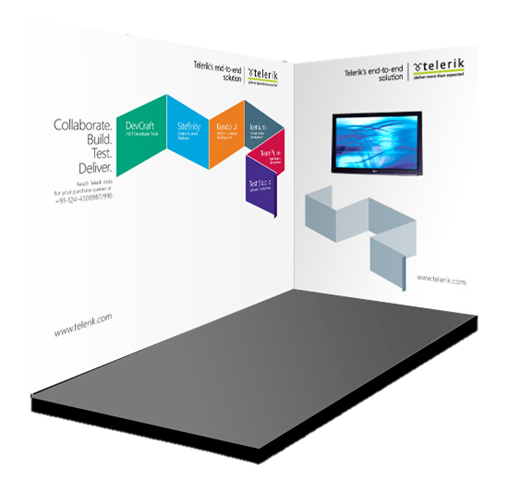
Visit Telerik booth at GIDS 2013 and win tablets

image

We are excited to share that Telerik India will be present at Great Indian Developer Conference. We will be around for all three days. We request you to visit our booth.

image

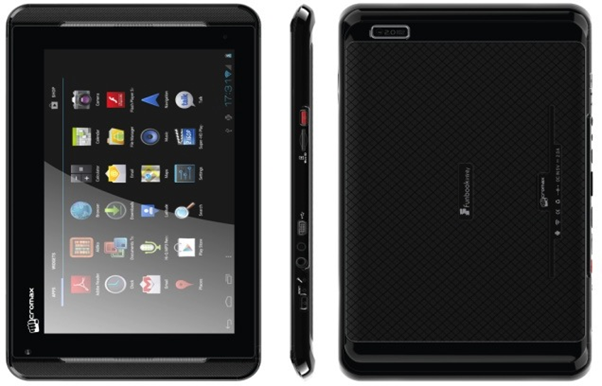
Along with technical presentations and discussions, we will give away 1 Micromax tablet in raffle daily.

image

Do not forget to visit our booth,

  • To gain knowledge on various technology trends
  • To know and learn more about various Telerik products
  • To get cool Ninja T-Shirts
  • To get a chance to win one Micromax tablet

We are helping GIDS by creating apps for the event as well. We have created apps for iPhone and Android devices.

Download apps for iPhone from here

Download apps for Android devices from here

We are excited to see you at GIDS.

Resources for webinar on “Easy Agile Project Management with TeamPulse”

On April 18th, we had a full house during our discussion on Agile methodologies and a concrete implementation with Telerik TeamPulse. We were overwhelmed with the queries put forth by the attendees. If you would like to review the presentation, we have provided the same below:

And if you are someone who wants to stay ahead of the curve in the Agile space, we have some  breaking news.  A preview of the next version of TeamPulse (TeamPulse R1 2013) is now available as public Beta. Feel free to take a look if you are interested: http://bit.ly/tp-demo

imageThe FAQs from the webinar are as follows:

Q: on which platform it should work?

A: It will work on any platform. It is web application running in browser. Some screens are not supported on mobile devices as of now.

Q: The properties – are they customizable…can we add / modify / or delete?

A: Certain properties for the requirements are customizable for example you can change what appears in the drop downs for Maturity, Certainty, etc. You cannot change the names of the labels. This is done by modifying the project template.

Q: can we track multiple projects at the same time?

A. We offer a cross project view that allows you to track multiple projects

Q: can PO be the BA ?

A.  PO is responsible for:

  1. Maintaining the backlog
  2. Representing client interests in the Scrum team and get buy ins from various stakeholders

If BA can accomplish the above two, he/ she can act as PO too. Generally, PO is someone from the client side.

Q: is it mandatory to use TFS with the Team pulse?

A: TeamPulse can be used as a stand alone too. It is not necessary to use TFS for project management. If you have already invested in TFS – you can integrate with it.

Q: so where i have to use agile?

A: Where to use Agile – its up to you and your team. Agile is developmen methodology that industry is leaning to. Short sprints i.e. ideally a 15 days to 30 day sprints, where you work on a requirement and make sure you finish it to a done state. so its upto you if you want to go the Agile way or Waterfall model.

Q: what is TFS??

A: Microsoft Team Foundation Server – a source control from Microsoft ~Lohith

Q: even for new product there is a backlog..?

A: Can you please elaborate on this ?

Q: is the sprint scope defined by Scrum master or PO?

A: The sprint scope should be decided by the team based on their capability. It is important to know your team velocity so that you can deliver what you can promise. Buy in from PO is important too. Scrum Master is there to facilitate things.

Q: is some kind of automated integration available in teampulse for other telerik products?

A: TeamPulse integrates beautifully with Telerik Test Studio for bug management. While TeamPulse is built using Telerik controls, the cross project view is built using Kendo UI.

Audience Question:

Q: why the product backlog decided in the begining of the project??

A: In Agile Methodology – you identify the requirements or user stories upfront and create a log of that. That simply put becomes product backlog and once you achieve all the backlogs – you will have built your product. so thats why you define your requirements upfront. Thats one of the core agaile principles.

Q: please listout some scrum metrics

A. We offer burn down reports, velocity reports for individual projects and across projects. We also offer timesheet views and productivity views for individual team members.

Q: Do we have any video sessions for the Team Pulse?

A: We have what we call – Telerik TV – http://tv.telerik.com/products/teampulse. Here you can find short focused videos done by evangelists. This is a free public site. no registration required.

Q: Is there any option to track the retrospective out comes? so the team and scrum master can ensure that the retrospective points are addressed.

A. We have issues and risk to track retrospective outcomes

Q: Could Scrum be implemented in production support project?

A. While Scrum can be used in production support projects, Kanban is frequently used for this. TeamPulse can be used for managing Kanban projects as well.

Q: how we manage if task cannot be completed in a given sprint?

A: If the task hasn’t been started, the task should be assigned to the next iteration.

Q: can we do a migration from TFS 2012 to teampulse?

A: Yes we can. We now support TFS. take a look at this : http://www.telerik.com/agile-project-management-tools/tour/integrations.aspx

Q: Do you have some sort of mechanism to mark the user story as broken when a bug is associated to an user story?

A. Yes, it is displayed on the board that there is a bug or blocking bug. If blocking it will identified by red colored icon.

Q: if that is a new project….even then we have the backlog?

A: Yes. normally you will start with a product backlog. Then pull items to sprint backlog.

Q: how the roles will be assigned and mapped to each project ?

A. TeamPulse offers built in groups and the ability create new custom group. Such custom groups can be assigned the desired permissions in a project.

Q: We know in an agile environment, we need to respond to changes. What kind of change management process to be implemented for cost control?

A. None currently.

Q: looks like tfs can do pretty much all of these things. What advantages does this have over TFS?

A: TFS cannot give you metrics in terms of charting/gauging. You need Reporting Services along with it. And customization of those reports are not easy. TFS was not built as a project management tool – its more of a source control and task maintenance. With TeamPulse you can do project management and get health of multiple projects in one shot – which is not possible with TFS. If you are already invested in TFS, we add value as a complement to TFS rather than as a replacement. More  features can be read here http://www.telerik.com/agile-project-management-tools/tour/overview.aspx
Q: Does it have some sort of notification to the task owner if any associated issues/Impediment is resolved by the scrum master? or the scrum master will get the update?

A. He can through our notification system but he will need to configure what types of notifications to receive. There are some limitations.

Q: agile is a framework?

A: Yes, it is a framework as it makes recommendations. Scrum and Kanban are specific implementations of this framework.

Q: How about the interface to manage the issue management – if we are using some other tool on the same?

A: At the moment we support only integration with TFS.

Q: Can we use Teampulse for teams working across geographies?

A: Yes. TeamPulse is an ideal solution for such teams. This is a web application and so anybody can log in from anywhere. However, the teams needs to understand the Scrum process well.

Q: What database the TeamPuse connects with?

A. MS SQL Server 2008 or above. SQL express is also supported

Q: In the test management, there was one topic called traceability. What is it?

A: Traceability lets you trace different things like for a bug – in which sprint was it logged, what was the check in against that bug, which backlog item was that .. etc.

Q: When you create a task i could see Given, When and Then statements in it. Does it have any support to BDD?

A. No, the only BDD like item that provide is our acceptance criteria for stories and bugs but not on the task level.

Q: What all support does it have for the process compliance? do we have any reports specific for the quality delivery group?

A. None

Q: Can we do a migration of data from JIRA/TFS 2012 to teampulse?

A: At the moment we support only TFS.

Q: How can priority be assigned to a task?

A. You set priorities by dragging and dropping the order they should be completed in. So, a task on the top of the list gets more priority than the one of the bottom. While creating your Sprint backlog, it is important to start looking from the top.

Q: Is there any metric to measure regression caused in a sprint?

A. None

Q: how do we maintain the hierarchy of user roles? Do we have any such hierarchy?

A. With Personal you can link them to specific relationships

Q: Can we configure the list of work items that need to be completed as part of a user story? This is just for tracking its completion?

A. Yes through creating Tasks in a user story.

Q: Does TeamPulse integrate with JIRA?

A: At the moment no. We have integration with TFS only.

Q: do we have a desktop plugin version of this tool ? some environments may not have access outside intranet?

A. It’s a web application that is self-hosted on your server. So, the access can be restricted to the sub-set of people you desire.

Q: Can we handle restricted story points? Visible only to specific people?

A. No. All stories are visible to all team members. One of the key tenants of Agile is transparency throughout the team.

Q: once an epic is split into sprintable units, what do you do with the original epic? Do you keep it with the stories until all are done? Do you retire them into some kind of epic archive? Do you just delete them?

A. No, we can only show the relationship

Q: Can I check resource assignments using team pulse…like resource utilization etc?

A: Yes. we give you resource utilization metrics built on time sheets.

Q: How would we arrive at the velocity of the team?

A: Tam Velocity = Story or Tasks completed in a sprint

Q: the project status looks cool. Burn down chart is a really nice addon over TFS.

A: Thank you. Glad you like it.

Q: Is project manager and team leads both can see how many release are planned for particular month?

A: Yes.

Q: Does Teampulse comes with Tereik Test studio or similar?

A: TeamPulse is a separate product from Telerik. So it has a separate license. http://www.telerik.com/agile-project-management-tools/pricing-and-licensing.aspx ! http://www.telerik.com/agile-project-management-tools/pricing-and-licensing.aspx

Q: Is Team pulse compatible with Jira/ Clearcase/ Clearquest?

A: TeamPulse currently integrates with TFS.

Q: Where does the tool store all its metadata? Does it work on client-server relationship?

A. All data is stored on the SQL Database, a local XAP file is cache locally but no meta data is passed and stored in session

Q: Will developer daily need to update the story board?

A: As a best agile practice – you should burn your days hours. 🙂

Q: Is teampulse accessible via internet?

A: You can have a trial version of TeamPulse hosted by us for 30 days. You can quickly set it up at: http://telerik.com/agile-project-management-tools/try-now.aspx

Currently there is no SaaS offering available.

Q: can we assign the tasks to individuals in Teampulse.

A: Yes.

Q: Didnt see a log where we can have the daily meeting minutes entered so that it can be reviewed and the end of the sprint?

A. All requirements have a comments area that is threaded and could be used for this purpose

Q: Can we handle multiple project? and multple team?

A: Yes. we support cross project views. meaning – as a manager you can set up your dashboards to see health of more than 1 project.

Q: I believe the key behind agile is having all the learning experience documented for future reference and better sprint planning do we have any such features here?

A. Issues can be have a resolutions added to them and associated with a time line such as iteration or simply tag for future retrieval.

Q: How to login access to tempulse?

A: Currently, TeamPulse is a self hosted solution. It can be integrated with your Active Directory environment or can have separate login credentials.

Q: Project Management Reports is export them as PDF, Excel ?

A: Yes

Q: is it multilingual? can it be used in other language like spanish ?

A. No. Although comments, user stories etc can be put in any language. You can only localize our feedback portal.

Q: what are the process template available in Teampluse?

A. Scrum for Team System v 2 and 3, MS Agile, CMMI and Scrum and our own TeamPulse template You also have the ability to change any template.

Q: Does it support Kanban dashboard?

A: yes. WIP is supported.

Q: is the api available for teampulse?

A. Only for time tracking and an Odata layer for the rest of the application

Q: As a Customer can a person log a bug or enhancement by Email in TeamPulse?

A: Not by default. However, integration points are available.

API for time tracking as well TFS sync and hook from our testing suite Test Studio to capture acceptance criteria

If you have scrolled down to read this, you are obviously looking for the winners of the cool Telerik T-Shirt. Though we had only planned for 2 giveaways, we felt humbled by the engagement during the webinar. We have decided to giveaway 5 T-Shirts for this webinar. We are pleased to announce the winners of the same as the below:

  1. Suman Chatterhee, Symphony
  2. Suresh Subramanian, CTS
  3. Harris Vincent, CSC
  4. Jayachandran P, CTS
  5. Salil Bhatnagar

The winners have been contacted directly and the prize will be shipped to them shortly.

Feel free to post your query in the comments section below.

Windows Azure Mobile Services Data and Telerik RadDataGrid: Two good things together

Learn more about Rad Controls for Windows 8 here

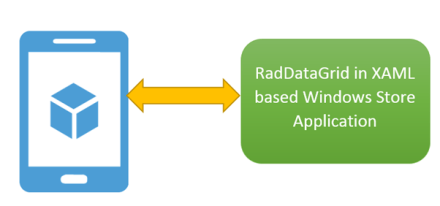
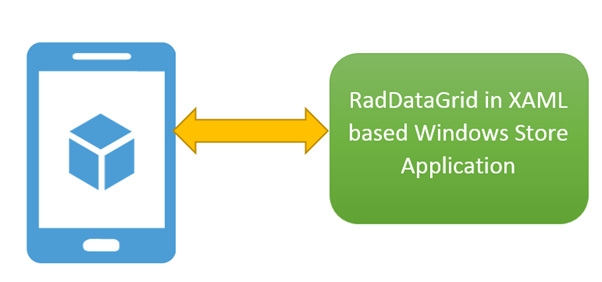
Recently I was in a Windows Azure event for local user group. Attendees were very excited about Windows Azure Mobile Services. When I discussed with them how more immersive and user friendly it could be working with data from Windows Azure Mobile Service Table in Telerik RadDataGrid, they got more excited. In this post we will go very basic and learn basic required steps to fetch data from Mobile Service Data Table in RadDataGrid.

image

If you are new to Mobile Services and Windows Store App development then before you proceed in this post, I recommend you to read these two posts

Step by Step working with Windows Azure Mobile Service Data in XAML based Windows Store Apps

Three Steps to work with RadDataGrid in XAML based Windows Store Application

Video: Getting started with RadDataGrid in XAML based Windows Store Application

Mobile Service Data Table

You can view all Windows Azure Mobile Services and tables by login to Windows Azure Management Portal.

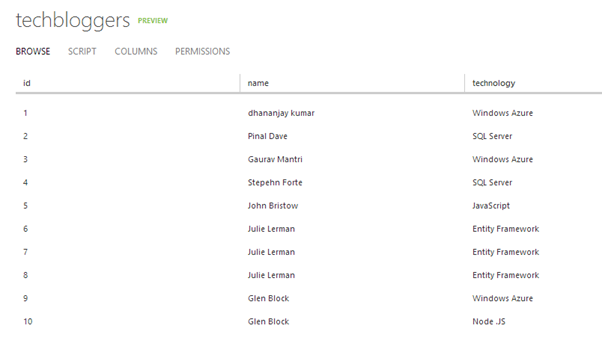
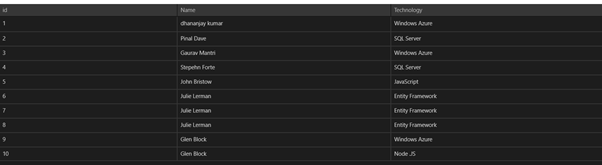
We are going to display data from techbloggers table. I have created this table in Windows Azure Mobile Service as shown below. There are three columns in table. We will display content from techbloggers Mobile Service table in RadDataGrid.

image

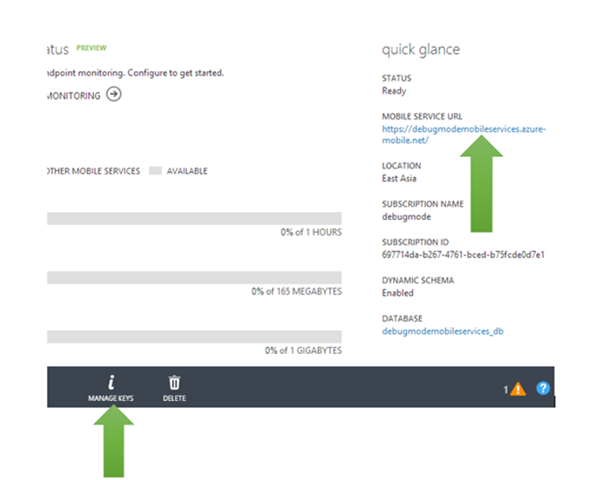
We need App URL and key. You need key and application URL to work with Mobile Services from Windows Store application. You will find key and application URL at the portal.

image

Creating Windows Store App

Very first you need to install Windows Azure SDK for Windows 8. You can download that from here . After installing make sure that you have installed RadControls for Windows 8. You can download trial from here

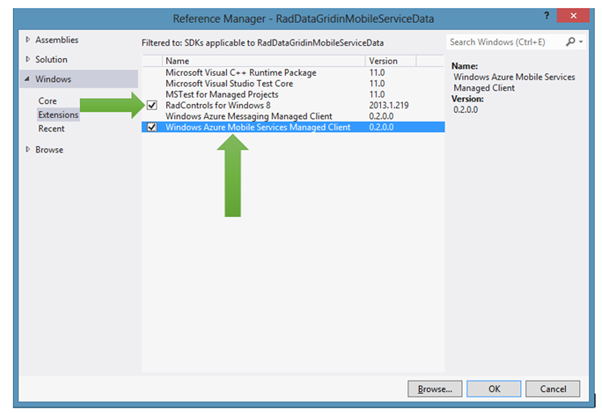
Now go ahead and create a Windows Store App by choosing Blank App project template from Windows Store project tab. After project being created add Rad Controls for Windows 8 reference and Windows Azure Mobile Services Managed Client reference in the project. To add reference right click on Reference in project and select Add Reference.

image

After adding reference on XAML add namespace on MainPage.xaml to work with RadDataGrid


xmlns:telerik="using:Telerik.UI.Xaml.Controls.Grid"

Next add following namespaces on MainPage.xaml.cs to work with Mobile Services client.


using Microsoft.WindowsAzure.MobileServices;
using System.Runtime.Serialization;

Next you need to create entity class representing table from the Windows Azure Mobile Service. Let us create entity class as following. We are creating entity class TechBloggers.

public class TechBloggers
 {
 public int id { get; set; }
 [DataMember(Name = "name")]
 public string Name { get; set; }
 [DataMember(Name = "technology")]
 public string Technology { get; set; }

}

After creating entity class go ahead and add following global variables.


MobileServiceClient client;
IMobileServiceTable<TechBloggers> bloggerstable;

Once global variable is defined in the constructor of page you need to create instance of MobileServiceClient and MobileServiceTable. Let us go ahead and create that in constructor of the page.


public MainPage()
 {

 this.InitializeComponent();
 MobileServiceClient client = new MobileServiceClient("https://youappurl", "appkey");
 bloggerstable = client.GetTable<TechBloggers>();
 }

Next you need to put RadDataGrid on XAML and bind it to data source. RadDataGrid can be created as following


<telerik:RadDataGrid x:Name="BloggerGrid" />

Next you need to bind RadDataGrid to List of Bloggers. List of Bloggers will be fetched from Mobile Service data table. You can do this as following.


protected async override void OnNavigatedTo(NavigationEventArgs e)
 {
 var items = await bloggerstable.ToListAsync();
 this.BloggerGrid.ItemsSource = items;
 }

Next go ahead and run application. You will get records from Mobile Service table bind to RadDataGrid.

image

These are basic steps to fetch data from Windows Azure Mobile Services Table Data and display in RadDataGrid. In further posts we will get into further details of working with these two together. I hope you find this post useful. Thanks for reading.

Learn more about Rad Controls for Windows 8 here

You love us now please vote for Telerik Products in GIDS 2013

image_thumb[2]

I am very happy and excited to share with you that Telerik Products have been nominated in different categories in GIDS 2013 . We have been nominated in 7 different categories.

Vote Here

Telerik Products are nominated as follows, Please browse to question numbers as given below tp vote for your beloved Telerik Products. Navigate here to vote

Telerik TeamPulse is nominated under Collaboration Solution category. To vote for this select this option in Question number 2.

clip_image001_thumb[2]


Telerik Sitefinity CMS is registered under Content Management category. To vote for this select this option in Question number 3.

clip_image003_thumb[2]

Telerik TeamPulse is nominated under Change and Configuration Management category. To vote for this select this option in Question number 5.

clip_image005_thumb[2]


Telerik TestStudio is nominated under Testing category. To vote for this select this option in Question number 6.

clip_image006_thumb[2]

Telerik KendoUI is nominated under Web Development category. To vote for this select this option in Question number 8.

clip_image007_thumb[2]


Telerik Icenium is nominated under Mobile Development category. To vote for this select this option in Question number 9.

clip_image009_thumb[2]


Telerik Devcraft is nominated under Framework category. To vote for this select this option in Question number 10.

clip_image010_thumb[2]

Your love and support will help us to build better products. Take few minutes out and Navigate here to vote.

We are committed to help you in “Delivering More Than Expected “. You may have further query feel free to reach me at dhananjay.kumar@telerik.com

Join me for webinar on 25th April 2013: Create faster Enterprise Apps for Windows 8 and win Telerik Ninja T-shirt

Learn more about Rad Controls for Windows 8 here

If you are a Windows Store App developer and want to quickly create Enterprise App then this webinar is for you.

Register here to attend webinar

image

You will learn to create Enterprise App harnessing goodness of DataGrid in this webinar.

image

We will follow following agenda in webinar ,

  • Introduction of RadControls for Windows 8
  • First look of all RadControls
  • Setting up environment to work with RadControls for Windows 8.
  • Getting started with RadDataGrid
  • Working with different kinds of columns in RadDataGrid
  • Working with Services in RadDataGrid
  • Charts in RadDataGrid
  • Grouping and Filtering in RadDataGrid.

Register here to attend webinar

In this webinar we will focus on Data Grid along with other controls. During webinar we will be selecting two active participants from the webinar and sending them the much in demand Telerik Ninja T-Shirt. You will be coming, right?

image

Register here to attend webinar

Learn more about Rad Controls for Windows 8 here

See you in webinar, If you have any query reach me at dhananjay.kumar@telerik.com

How to work with Images in RadDataGrid in XAML based Windows Store Application

Learn more about Rad Controls for Windows 8 here

Before you start with this post I recommend you to read following blog posts to get it started with RadDataGrid.

Video: Getting started with RadDataGrid in XAML based Windows Store Application

Three Steps to work with RadDataGrid in XAML based Windows Store Application

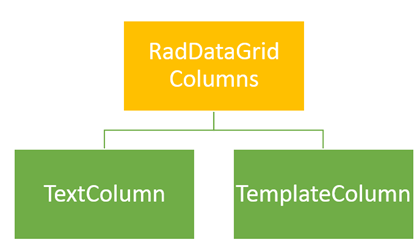
In this post we will take a look on working with Images as column value in RadDataGrid. As we discussed in this post that there are two types of columns in RadDataGrid.

image

To work with images we need to work with TemplateColumns. TemplateColumn uses DataTemplate to define content of column. To start with let us create business class Product. We will display collection of Products in RadDataGrid. Product class is defined as following. Along with other properties there is a property of Product Image. ProductImage property will hold URL of Image to be displayed for each Products.


public class Product
 {
 public string ProductName { get; set; }
 public double ProductPrice { get; set; }
 public string ProductType { get; set; }
 public BitmapImage ProuctImage { get; set; }
 }

Next let us create collection of Products locally. GetProducts function will return list of Products. We will bind this function as ItemSource of RadDataGrid.


private List<Product> GetProducts()
 {
 List<Product> lstProduct = new List<Product>()
 {
 new Product
 {
 ProductName = "Pen",
 ProductPrice = 100,
 ProductType = "Education",
 ProuctImage = new BitmapImage(new Uri("/ProductImages/Pen.jpg",UriKind.Relative))
 },
 new Product
 {
 ProductName ="Pencil",
 ProductPrice = 50,
 ProductType = "Education",
 ProuctImage = new BitmapImage(new Uri("/ProductImages/Pencil.jpg",UriKind.Relative))

 },
 new Product
 {
 ProductName ="Math Book",
 ProductPrice = 345,
 ProductType = "Education",
 ProuctImage = new BitmapImage(new Uri("/ProductImages/Mathbook.jpg",UriKind.Relative))

 },
 new Product
 {
 ProductName ="Ball",
 ProductPrice = 23,
 ProductType = "Sports",
 ProuctImage = new BitmapImage(new Uri("/ProductImages/Ball.jpg",UriKind.Relative))

 },
 new Product
 {
 ProductName ="Cricket Bat",
 ProductPrice = 560,
 ProductType = "Sports",
 ProuctImage = new BitmapImage(new Uri("/ProductImages/Cricketbat.jpg",UriKind.Relative))

 },
 new Product
 {
 ProductName ="Baseball Bat",
 ProductPrice = 550,
 ProductType = "Sports",
 ProuctImage = new BitmapImage(new Uri("/ProductImages/Baseballbat.jpg",UriKind.Relative))

 },
 };
 return lstProduct;
 }

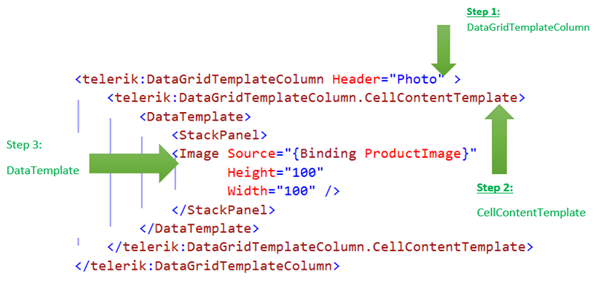
As of now we have data source in place. Next we need to create RadDataGrid. After creating RadDataGrid we will create DataGridTemplateColumn with DataTemplate. To create RadDataGrid with image as one of the column value we need to follow following steps inside RadDataGrid.

Step 1: Create DataGridTemplateColumn

Step 2: Create DataGridTemplateColumn.CellContentTemplate

Step 3: Create DataTemplate and put Image inside this

We can create RadDataGrid Column with Image in column value as following,

image

We can create columns for each properties in the same way we created for ProductImage property. Final RadDataGrid with columns can be created as following,


<Page
 x:Class="RadDataGridProductDemo.MainPage"
 xmlns="http://schemas.microsoft.com/winfx/2006/xaml/presentation"
 xmlns:x="http://schemas.microsoft.com/winfx/2006/xaml"
 xmlns:local="using:RadDataGridProductDemo"
 xmlns:d="http://schemas.microsoft.com/expression/blend/2008"
 xmlns:mc="http://schemas.openxmlformats.org/markup-compatibility/2006"
 xmlns:telerik="using:Telerik.UI.Xaml.Controls.Grid"
 mc:Ignorable="d">

<Grid Background="{StaticResource ApplicationPageBackgroundThemeBrush}">
 <telerik:RadDataGrid x:Name="ProductGrid" AutoGenerateColumns="False">
 <telerik:RadDataGrid.Columns>
 <telerik:DataGridTemplateColumn Header="Name" >
 <telerik:DataGridTemplateColumn.CellContentTemplate>
 <DataTemplate>
 <TextBlock Text="{Binding ProductName}"
 VerticalAlignment="Center"
 HorizontalAlignment="Center"/>
 </DataTemplate>
 </telerik:DataGridTemplateColumn.CellContentTemplate>
 </telerik:DataGridTemplateColumn>
 <telerik:DataGridTemplateColumn Header="Photo" >
 <telerik:DataGridTemplateColumn.CellContentTemplate>
 <DataTemplate>
 <StackPanel>
 <Image Source="{Binding ProductImage}"
 Height="100"
 Width="100" />
 </StackPanel>
 </DataTemplate>
 </telerik:DataGridTemplateColumn.CellContentTemplate>
 </telerik:DataGridTemplateColumn>
 <telerik:DataGridTemplateColumn Header="Price" >
 <telerik:DataGridTemplateColumn.CellContentTemplate>
 <DataTemplate>
 <TextBlock Text="{Binding ProductPrice}"
 VerticalAlignment="Center"
 HorizontalAlignment="Center"/>
 </DataTemplate>
 </telerik:DataGridTemplateColumn.CellContentTemplate>
 </telerik:DataGridTemplateColumn>
 <telerik:DataGridTemplateColumn Header="Type" >
 <telerik:DataGridTemplateColumn.CellContentTemplate>
 <DataTemplate>
 <TextBlock Text="{Binding ProductType}"
 VerticalAlignment="Center"
 HorizontalAlignment="Center"/>
 </DataTemplate>
 </telerik:DataGridTemplateColumn.CellContentTemplate>
 </telerik:DataGridTemplateColumn>

 </telerik:RadDataGrid.Columns>
 </telerik:RadDataGrid>
 </Grid>
</Page>

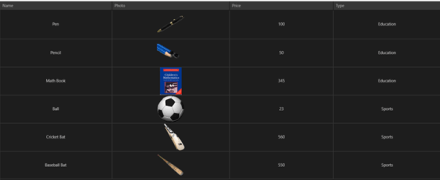
Now go ahead and run application. You will find Product Images as one of the column value.

image

In this way you can work with Images as column value in RadDataGrid. I hope you find this post useful. Thanks for reading.

Learn more about Rad Controls for Windows 8 here